7.10. Approve delete equipment request
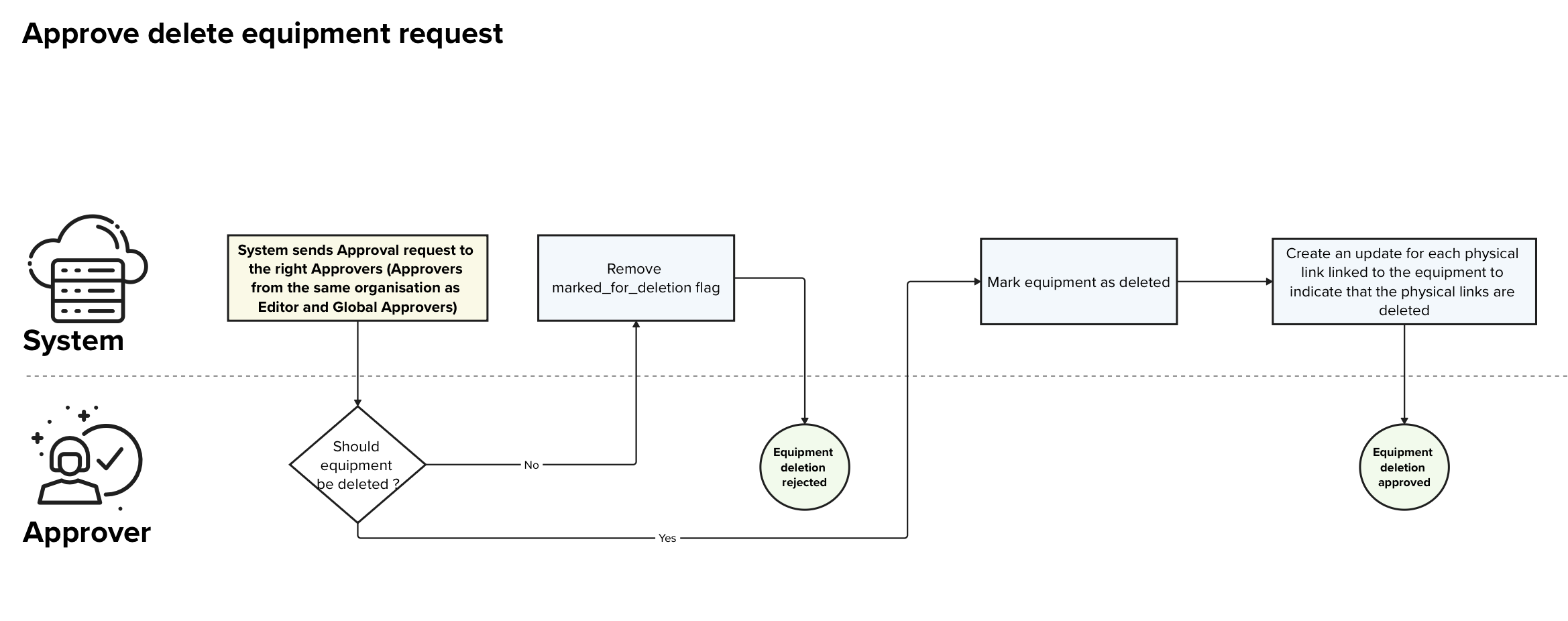
| Name | Approve delete equipment request |
|---|---|
| Purpose | Allow Approver to validate an equipment delete request |
| Linked user stories |
4.42. Editor - Delete an equipment 4.50. Approver - Approve deleted equipment request 4.55. Organisation Approver - Approve delete equipment request for organisation |
| APIs used | PUT /equipments/<equipment-id>/approve PUT /equipments/<equipment-id>/reject PUT or PATCH /equipments/<equipment-id> |
| Scope | This process only handles the validation of an already created equipment deletion request |
| Roles | System, Approver / Global Approver |
| Input | - id of the unit that is marked for deletion - optionally the information to amend |
| Output | - confirmation that the update request has been approved/rejected |
Detailed Process description
Main Process
| Step | Description | Actor(s) | Input(s) | Output(s) | Decision points |
|---|---|---|---|---|---|
| 1 | The System sends out notifications to the Global approvers and organisation approvers, indicating that an approval a pending. | System | - Outside trigger (e.g. Editor sent a delete request) | - notification to the Global and organisation Approvers | |
| 2 | The Approver verifies if the equipment can be deleted | Approver | - equipment deletion request | - yes / no | If the equipment can be deleted: Go to step 3 Else: Go to secondary process S.1 |
| 3 | The System marks the equipment with the flag “is_deleted = true” and adds the information on the date of validation and the user that validated the request | System | - equipment with flag “marked_for_deletion = true” | - equipment with flag “is_deleted = true” - approver set to the user that triggered the approval - approval date set to the current date |
|
| 4 | The System creates validated update requests with the flag “is_deleted = true” for each active physical link that are linked to the deleted equipments | System | - unit | - new validated physical links with the flag “is_deleted = true” for each active physical link that is linked to the deleted equipments | |
| 5 | The Approver gets a confirmation that the approval has been applied | Approver | - confirmation of the validation |
Secondary Processes
S.1. Delete equipment request rejected
| Step | Description | Actor(s) | Input(s) | Output(s) | Decision points |
|---|---|---|---|---|---|
| 1 | The System removes the mark_for_deletion tag from the equipment entry | System | - equipment marked for deletion | - equipment with the flag “mark_for_deletion = false” | |
| 2 | The Approver gets a confirmation that the deletion rejection has been applied | Approver | - deletion request rejection confirmation |
Exceptions
[400 Bad Request] Invalid input:
If mandatory fields are missing or invalid, the system returns an error message.
[404 Not Found] Equipment not found
Error returned by the system if the given equipment does not exist.
[500 Internal Server Error] System Error
If the system fails to save changes due to an internal error, it displays an appropriate message and logs the error for further investigation.