3. User management & user roles
3.1. User management
This section explains the general principles how user will be managed in the system. It explains the core concepts that need to be implemented.
IMPORTANT: Please note that when we talk about users, we mean API users. The system is designed around APIs which can then be used to implement user interfaces, or to be directly integrated into third-party systems.
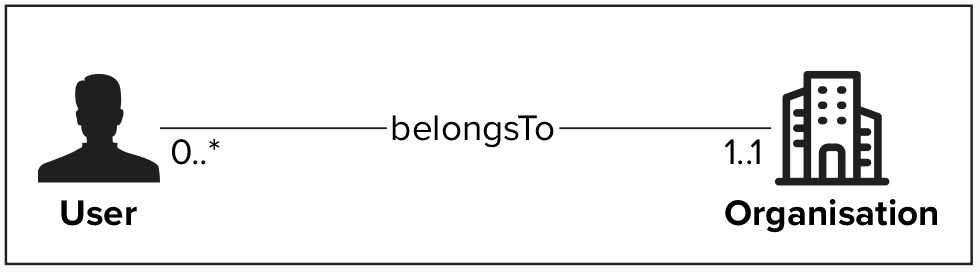
Organisation
An Organisation represents an entity to which users or datasets can be linked to. An organisation can be an operator, MyConnectivity, a Syndic ABC, …
When creating a user other than an Application Administrator, the Administrator has to assign that user to an organisation in order to signal that the user belongs to that specific entity. This is important for two reasons:
- We want to know which organisation performed which changes to the vertical cabling database.
- Some organisation might receive an account that will allow them to manage their own users. Exact requirements on how such an access can be granted need to be evaluated and decided. (delegated administration)
When a new vertical cabling dataset is produced, this dataset will be assigned to an Organisation. The exact assignment rules will be described in the user stories linked with data production.
User
A user with a role other than Application Administrator, will always belong to exactly one organisation. The organisation to which the user belongs has following implications:
- When a user performs an action, it performs the action on behalf of that organisation.
- The user is managed by the organisation’s administrators
The exact definition of a dataset and how a dataset is assigned to an organisation will be described in dedicated user stories
Examples
Organisation Administrator
An organisation administrator can only see/manage users that belong to his organisation:
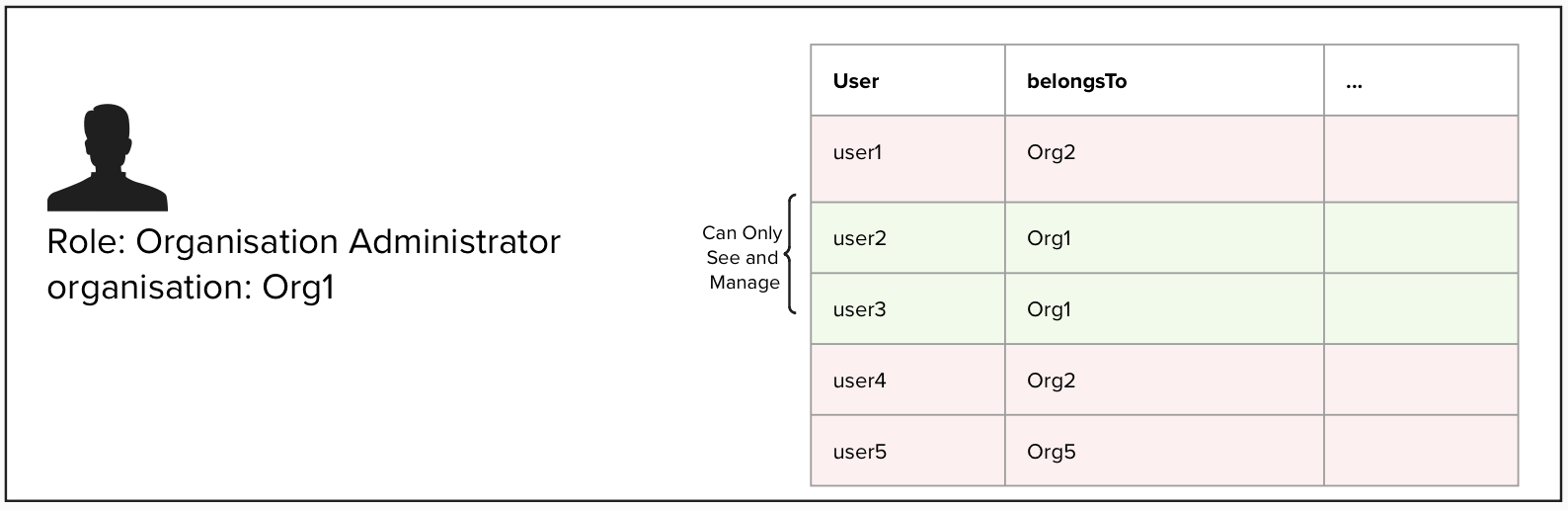
Processes Linked to User Management
Organisation Processes
The creation, modification or deletion of processes for organisations will be a manual one. The Organisations that want to be part of the system will send a request to MyConnectivity (e.g. per e-mail). MyConnectivity will analyse the request and if the request is accepted, MyConnectivity will create the organisation in the System
User Processes
Potential future use cases:
The cases described below, are cases that do not exist as of today but might become relevant in the future. These cases will not be implemented as part of a first version of the application.
Fine grade access control
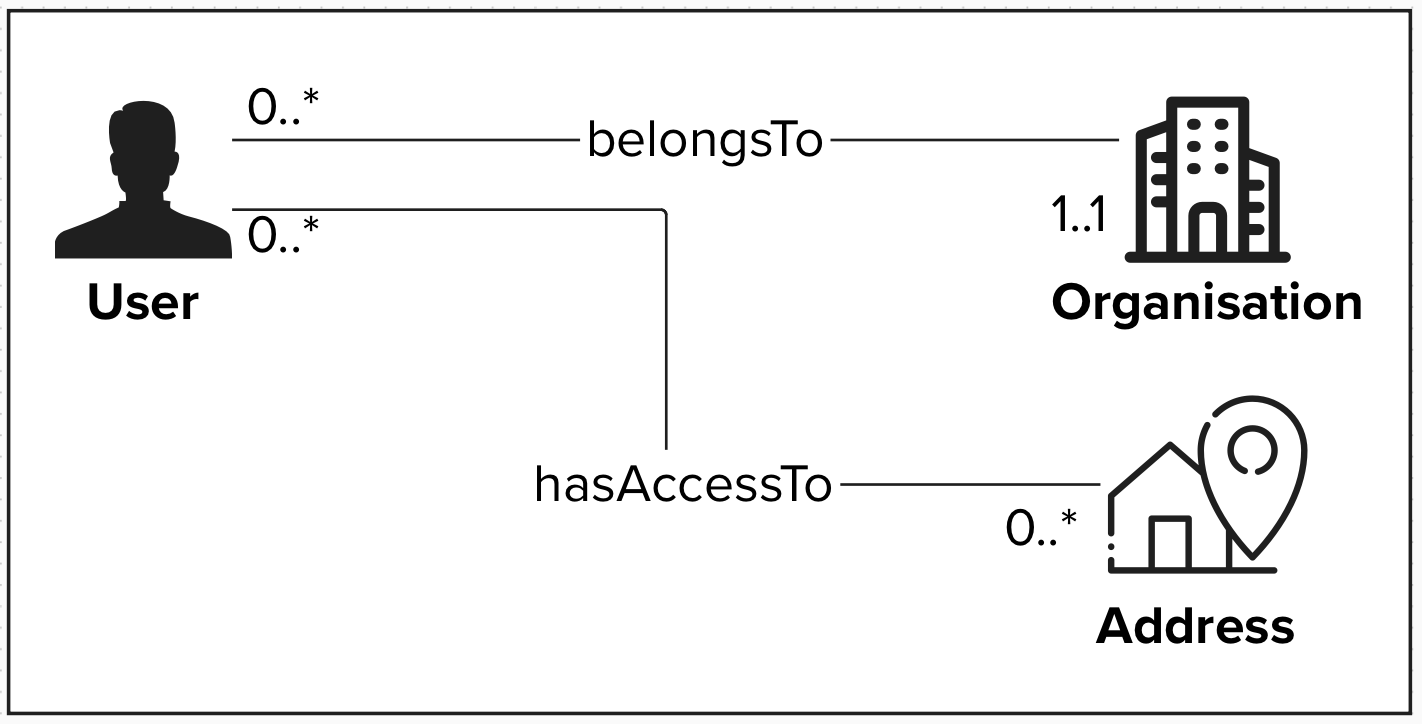
In the future building managers, building owners, and other stakeholders could receive access to the System. In these cases, the users should only be able to access resources they have been assigned to. Such a access limitation could be based on Addresses, but might also be necessary on a Site, Block or Unit level.
A possible implementation of such a restriction could be to create a link “hasAccessTo”, that would link the user to the resources it is allowed to access. If such a relation exists, the system should behave exactly as for any other user, except that it will only return datasets that have been assigned to the user.
3.2. Roles
3.2.1. User
Generic User (applies to all roles)
A Generic User is a base-level role assigned to every system user, regardless of their specific functional roles (e.g., Viewer, Analyst, Editor, Approver). This role encompasses fundamental use cases and permissions that are common across all users, such as accessing the application, managing personal profiles, and utilizing core system features.
- Authentication: Log in and log out of the application using valid credentials or authenticate with a valid authentication method (to be defined: api key, saml2, …).
- Profile Management: View and update personal information (e.g. password reset, manage secrets).
| ID | Name |
| 4.1 | Profile management [canceled] |
| 4.2 | Change password |
| 4.3 | Manage user secrets [canceled] |
3.2.2. Administrator
Application Administrator
An Application Administrator is a user with the highest privileges and responsibilities, allowing them to manage and oversee the application's functionality, settings, and user base holistically across all Organisations. The provisioning of the Application Administrator privileges should only be granted to the owners of the solution (application), e.g. MyConnectivity.
Administrators do not have privileges to write vertical cabling data. If the user needs EDITOR permission, a different non privileged account is needed to perform these operations.
Application Administrators typically have access to advanced features and tools that standard users as well as Organisation Administrators do not, such as:
- User Management: Adding, editing, or removing users, assigning roles, including Organisation Administrators, and managing permissions.
- Content Oversight: View the entire database, recover previous versions (see undo delete and undo approval processes)
- System Configuration: Customising application settings, workflows, and integrations to align with organisational needs.
- Monitoring and Reporting: Accessing logs, analytics, and reports to ensure proper usage and system health.
- Troubleshooting: Addressing technical issues, resetting passwords, or resolving other user concerns.
- Security Enforcement: Setting security policies, managing access controls, and responding to potential threats or breaches.
| ID | Name |
| 4.4 | Create users |
| 4.5 | Update users |
| 4.6 | Delete users |
| 4.7 | Recover users marked for deletion |
| 4.8 | Create access tokens [new] |
| 4.9 | Delete access tokens [new] |
| 4.10 | View audit logs |
| 4.11 | View all data on the platform |
| 4.12 | Restore deleted records |
| 4.13 | Un-reject/approve an approved/rejected record |
| 4.14 | Export all |
| 4.15 | Monitoring |
| 4.16 | Alerting |
| 4.17 | Lightweight administration panel |
| 4.18 | Define webhooks [new] |
Organisation Administrator
An Organisation Administrator can manage resources linked to a specific domain (e.g. operator). A domain administrator is responsible for managing all the aspects linked with the domain, for example their own user base:
- Domain user management: Adding, editing, or removing domain users, assigning roles, and managing permissions
- Content Oversight: Oversee all the operations done by the domain users
3.2.3. Editor
An Editor is a user role with permissions to request create, update, and delete operations on vertical cabling data. The update requests need to be validated by a user that has a Validator role for the given organisation.
| ID | Name |
| 4.28 | Create temporary address |
| 4.29 | Create an additional temporary address for an existing site |
| 4.30 | Create an additional temporary address for an existing block |
| 4.31 | Add a site |
| 4.32 | Update a site |
| 4.33 | Delete a site |
| 4.34 | Add a block |
| 4.35 | Update a block |
| 4.36 | Delete a block |
| 4.37 | Add a unit |
| 4.38 | Update a unit |
| 4.39 | Delete a unit |
| 4.40 | Add an equipment |
| 4.41 | Update an equipment |
| 4.42 | Delete an equipment |
| 4.43 | Attach pictures [postponed] |
| 4.44 | Delete Pictures [postponed] |
| 4.45 | Search a site by address |
| 4.46 | Send an update vertical cabling request |
3.2.4. Approver
Approver
An Approver is a user role with permissions to approve or reject Vertical Cabling update requests for all domains within the system. This role ensures consistency and compliance across domains by reviewing and validating requests for creating, updating, or deleting vertical cabling data. Approvers have a system-wide oversight responsibility and can act as the final authority in the approval process.
Organisation approver
An Organisation Approver is a user role with permissions to approve or reject Vertical Cabling update requests only for the organisation they are assigned to. This role ensures that changes assigned to a specific domain are accurate and compliant with the data quality standards. Organisation Approvers focus exclusively on requests assigned to their own domain and cannot approve requests for other domains.
3.2.5. Analyst
Analyst
An Analyst is a user responsible for examining, interpreting, and generating insights from the data within the application. They access and process data to identify trends, patterns, and actionable insights, supporting decision-making processes. Analysts are typically granted read access to most system data and are equipped with tools for querying, visualising, and exporting data.
| ID | Name |
| 4.57 | Access to all data |
| 4.58 | Querying data |
| 4.59 | Query historical data |
| 4.60 | Query audit logs |
| 4.61 | Export data [to be reviewed] |
| 4.62 | Integrate external applications [to be reviewed] |
| 4.63 | Un-reject/approve an approved/rejected record |
3.2.6. Viewer
Viewer
A Viewer is a user with strictly limited access to the system, allowing them only to search and view specific datasets using predefined search queries. They cannot perform analytics, export data, or modify the system in any way.
| ID | Name |
| 4.64 | Search sites/blocks/units/equipments by address |
| 4.65 | Read single entries by ID |
| 4.66 | Read different versions of connections |
3.2.7. ETL
ETL
An ETL user is a user that has access to the RNCV address database, the user can read as well as write address data. In particular the ETL user is the only one that can create address information without needing an external Approver to validate the data in question. Furthermore the ETL is also the main process responsible for Approving address entries.
| ID | Name |
| 4.67 | Retrieve addresses |
| 4.68 | Create and update addresses |