6. Organisational Cases
- 6.1. User management
- 6.2. Address ingestion
- 6.3. Versioning, approvals and audit logs
- 6.4. Data privacy
- 6.5. Data quality
- 6.6. Data governance
- 6.7. Fair usage (access limitations)
- 6.8. Automatic data approvals and deletion
- 6.9. Manual reviews and audits
- 6.10. Consistency checks
6.1. User management
All user management use cases are covered by the processes below.
Processes
6.2. Address ingestion
|
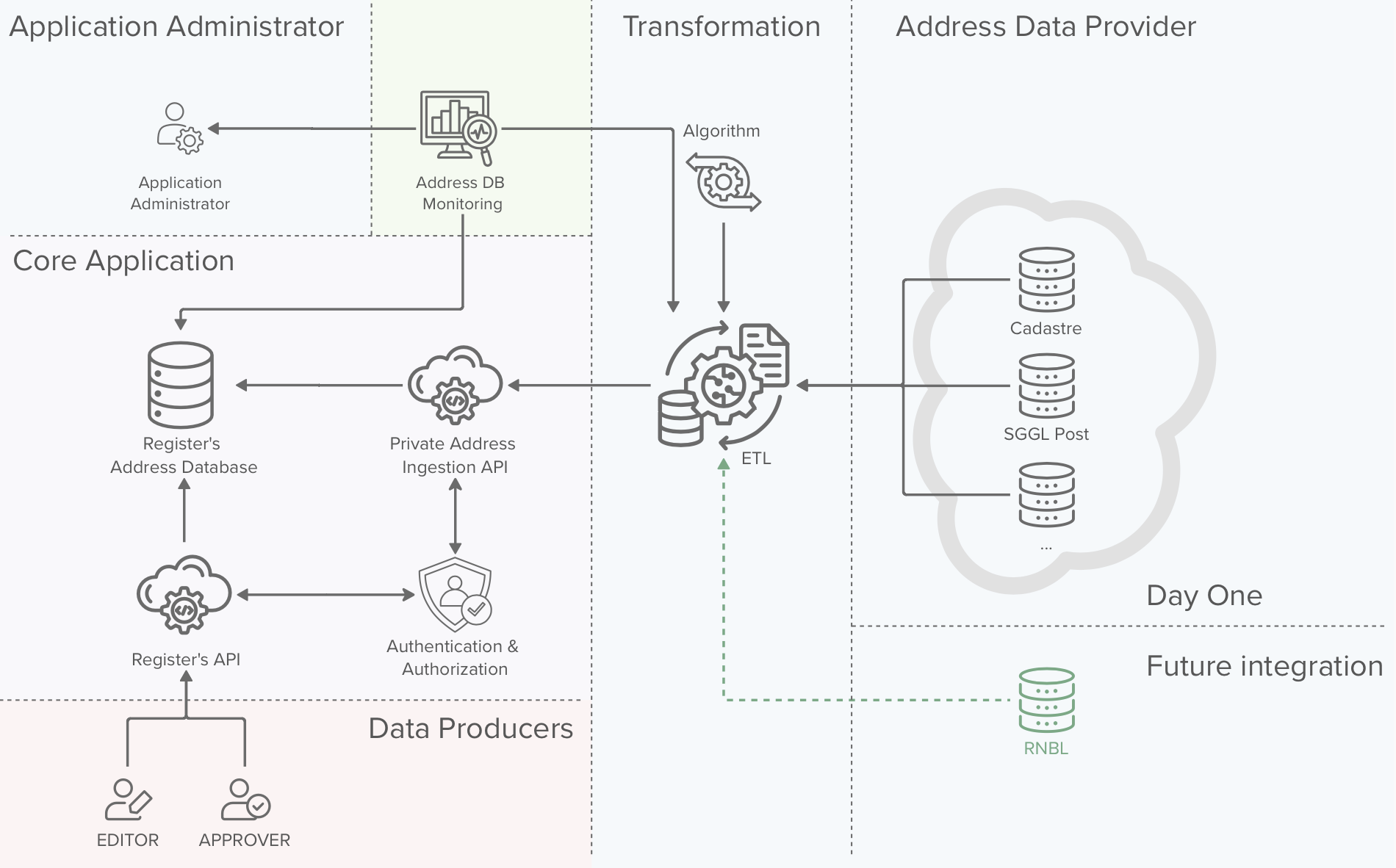
The background colors of the above image are to be interpreted as:
|
In this chapter we will have a look on how addresses are populated in the register. We will discuss about two scenarios:
- Addresses ingested via an ETL process
- Addresses ingested via the vertical cabling data producers
We will also discuss how the process will be monitored and the cases for which an alert will be sent to the application administrators.
Address ingestion via data producers
It is important that Data Producers, which are in most cases Technicians performing vertical cabling interventions, are not blocked in any way when trying to contribute to the RNCV. Therefore we need to consider the cases on which a data producer needs to insert a dataset for an address that does not yet exist on the system.
It is important to make a distinction between addresses ingested via the data producers and addresses inserted / validated by the ETL process.
An address ingested via the data producers is not considered as being a validated address until it has been validated by ETL process against the addresses of the Address Data Producers
The data producers can initiate two different address ingestion processes, The first consists in creating an address for a site that does not yet exist on the system and the second one consists in creating an address to be linked to an existing site or block. Both processes are described below.
Processes
7.2. Create missing address process
7.3. Create missing address for existing site or block process
Address ingestion via the ETL process
7.4. Address ingestion via the ETL process
Monitoring and alerting
The monitoring system will have two tasks:
- Monitor the health of the ETL process, making sure that the process runs with the right periodicity
- Monitor the data quality of the RNCV address database
If the system detects that an address in the RNCV address database has a flag “validated = false” and is older than a defined threshold (e.g. 1 month), the system will trigger an alert to the Application Administrators and / or Data Approvers.
The Application Administrators and / or Data Approvers are then responsible for validating the data and take corrective actions (delete or correct the data)
6.3. Versioning, approvals and audit logs
In order to fulfil the needs of the different parties, guarantee the data quality and accountability of each actor, three different mechanism are put in place:
| Mechanism | Purpose | Concerned data |
|---|---|---|
| Audit logs |
The purpose of audit logs is to keep track of who did what on the system. The audit logs contain the exact actions taken on the system and link them to the user / organisation that triggered the action.
The purpose is not to version data, but to keep track of changes and keep the users of the system accountable for their actions |
|
| Versioning |
The purpose of the versioning is to:
|
|
| Approvals |
Approval processes are put in place to guarantee data quality and to avoid unintentional destructive modifications. |
|
Versioning of physical links
|
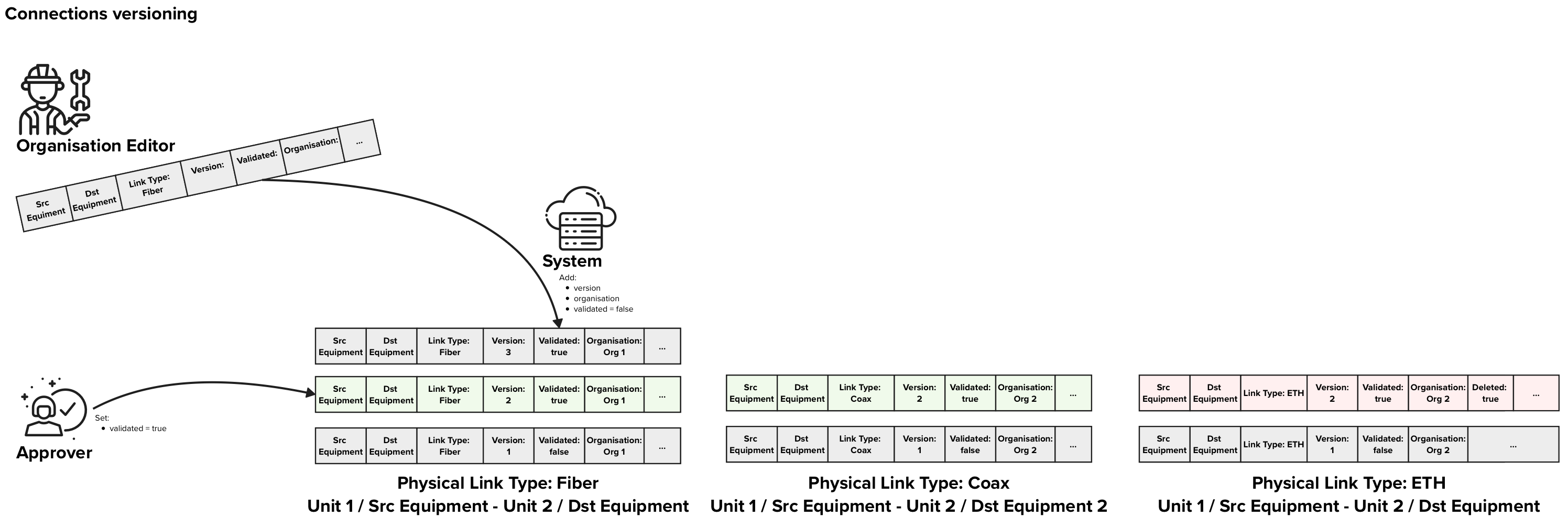
In the figure above each row of data represents on Physical Link data entry in the database. The background colors of the rows represent:
In this example, There are free approved Physical Links, two that indicate that Fiber and Coax are present between two units and one that indicates that ETH was removed. |
Description
Versioning of physical links between two equipments or an equipment and a unit in multi-dwelling units is a crucial part of the RNVC. In order to support the approval process, each version of a connection needs to have a flag “validated” that can be “true” or “false” to indicate if that specific version has been validated. Furthermore we also need a flag to explicitly indicate if a specific link type has been decommissioned.
When an Editor wants to send an update for a vertical cabling connection between an “Equipment 1” and an “Equipment / Unit 2”, the Editor creates a new connection with and POST it using the “physical links” endpoint. This POST contains following information:
- Source equipment
- Destination equipment or destination unit
- Link Type
- If all physical links of that specific link type were removed, a flag “deleted = true”
When receiving an update request, the system adds following information to it:
- timestamp of creation
- the editor that produced the data
- organisation to which the connection belongs is set to the Editor’s organisation
- version
- flag “validated = false”
The organisation approver always get the latest entry for a given connection that is not yet validated to validate. Once the validator has validated the entry following information is stored:
- flag “validated = true” or “rejected = true” depending on decision
- validation timestamp
- the approver
When retrieving data, the default version of the physical link returned are the latest validated once. The users can explicitly request the latest versions if needed or any other historical version.
Organisations with premium licenses
To be completed
Processes
7.5. Send update vertical cabling request process
7.6. Approve update vertical cabling request
Data deletion requests
The RNCV will contain some information that is very static by nature:
- addresses
- sites
- blocks
- units
- equipments
Due to the static nature of this data and to the fact that a history of the changes performed to this data is not relevant to the project, it has been decided not to keep any historical data on this data. Instead of versioning, audit logs will be used to keep track of who did what to the data.
One important principle is that once created these objects cannot and will not be deleted.
Instead if deleting the data a process is in place to mark data as deleted. This process involves an Editor marking the data as “to be deleted” and a Approver that will need to validate the deletion request. Furthermore Administrators and Organisation Administrators will have the power to recover deleted datasets.
Processes
7.7. Approve delete site request
7.8. Approve delete block request
7.9. Approve delete unit request
7.10. Approve delete equipment request
6.4. Data privacy
Data privacy has been one of the key considerations will design the data architecture of the RNCV. you will find below the key principle we followed during the development of the data architecture.
Principle 1: Data minimisation
Description
Only data that is strictly necessary to the RNCV will be collected. Each field collected is documented, justified and approved.
Implementation
Principle 2: Do not store private data if not absolutely needed
Description
Private data should not be stored except in very exceptional cases. Each field of data model where private data is stored or could be stored is documented, justified and approved by MyConnectivity.
Implementation
Principle 3: Fine-Grained Access Rights
Description
Each field stored in the RNCV will be limited in access (read and/or write) to the user roles that need it. Furthermore certain fields can only be modified/accessed from via specific APIs only exposed to a management and / or administration network.
E.g. Links between datasets and specific users that produced them are only visible by administrators, via the administration API that is only accessible via the Management access / network.
Implementation
3. User management & user roles
Principle 4: Purpose limitation
TODO with lawyers
The Organisations that receive access to the data should be contractually limited on what they can do with the accessed data.
6.5. Data quality
A lot of mechanisms are used to guarantee data quality. You will find below a brief explanation of all the mechanisms used and a link to the documentation where you can see them in action.
Data dictionary
Definition
The data dictionary contains all the terms, data objects and fields that are used in the context of the RNCV. The goal of the data dictionary is keep communication clear, consistent and meaningful for all involved parties.
Implementation
Inconsistent formats
Definition
Variability in formats, like dates or numbers, can lead to misinterpretation or processing errors. For instance, a date might be entered as "dd/mm/yyyy" in one place and "mm-dd-yyyy" elsewhere.
Implementation
Duplicate data
Definition
Duplicates often occur when data comes from multiple sources or overlapping imports. These duplicates can inflate datasets and introduce biases if not properly managed.
Implementation
6.3. Versioning, approvals and audit logs
6.9. Manual reviews and audits
Missing or incomplete data
Definition
Empty fields or missing essential information reduce the dataset’s completeness. This may result from data entry errors, system limitations, or gaps in data collection processes.
Implementation
Inaccurate or incorrect entries
Definition
Errors from manual entry or measurement inaccuracies can lead to faulty data. This includes misspelled names, transposed digits, or incorrect values.
Implementation
Inconsistent data standards
Definition
Lack of adherence to common standards (e.g., different units of measurement, terminology variations) makes it challenging to compare or aggregate data across sources.
Implementation
Poorly defined data
Definition
Ambiguous labels, unclear fields, or undefined variables can limit the data's usability by complicating its interpretation.
Implementation
Lack of data integrity
Definition
Missing links between related records or absence of primary keys in relational data can fragment datasets, making cohesive analysis difficult.
Implementation
Incorrectly classified data
Definition
Mislabelling categories or misclassifying items within datasets can skew analysis. For example, categorising a purchase as "corporate" instead of "personal" could mislead marketing analysis.
Implementation
Limited number of free text fields
Definition
It was decided to limit the number of free text fields to the minimum. Each free text field is defined in the data model alongside its justification and approval.
Implementation
Field validation rules
Definition
Every field has a well defined type and where possible an associated validation rule that limites the valid values that can be inputed. All mandatory fields are marked as such in the data model and the validation process will enforce these rules and return an error if any required fields are missing.
Implementation
Automatic validation processes
Definition
On top of the validation rules at the field level, where possible automated validation processes are put in place to detect and prevent invalid inputs.
E.g. If two equipments are too far away from each other to be connected by a cable, that physical link is not allowed by the system.
E.g.2: If an address is being created that already exists the system will return an error
E.g.3: If an address is created but similar addresses already exist (typo) the list of similar addresses is return for validation before proceeding with the creation of the new entry.
Implementation
6.3. Versioning, approvals and audit logs
6.8. Automatic data approvals and deletion
Manual Reviews
Definition
Even though automated processes are in place to ensure high quality standards, manual reviews of the data by experts can help identify and correct errors that automated systems might miss.
Implementation
6.3. Versioning, approvals and audit logs
6.9. Manual reviews and audits
Cross-referencing
Definition
Comparing data from multiple sources can help identify discrepancies and validate the accuracy of the data. Cross-referencing can be particularly useful for ensuring the consistency and reliability of data.
Implementation
Approval processes
Definition
Since the data ingestion process is 100% manual (usually performed by technicians on site) we need to consider the human error factor. From the discussions with the operators, the data produced by field technicians is considered as being highly qualitative and is fully trusted.
Nonetheless, human error can occur, therefore we created an approval process that redirects data ingested by field technicians to an Approver from his organisation that can perform sanity checks on the produced data records.
Implementation
6.3. Versioning, approvals and audit logs
Address database quality monitoring
Definition
Address ingestion into the RNCV database follows a process that is designed to keep the address database accurate and up to date. This process consolidates data from various datasources and approves addresses submitted by Editors.
Since the addresses submitted by the Editors are not considered as valid / approved but need to be validated by the ingestion process at a later stage, it could happen that some addresses are invalid and never get validated.
To cover such cases, a monitoring will be set up. This monitoring will configured to detect address entries that have not been validated within a reasonable amount of time. When such entries are detected, the Application Administrators and / or Approvers will receive an alert indicating that the entry needs to be manually validated.
Implementation
Versioning
Definition
Vertical cabling physical links between two equipments are crucial information whose quality needs to guaranteed. Once a physical link dataset is produced it cannot be deleted anymore, the produced data can then be validated or rejected.
If a problem is detected with a dataset, after it has been validated/rejected, this decision can be undone at a later stage by Administrators, effectively reverting the approved version to the previously approved version.
Implementation
6.3. Versioning, approvals and audit logs
Audit logs
Definition
Audit logs of every action performed on the system are kept. The audit logs are mainly kept for accountability, but can also be used to analyse drops in data quality. Furthermore since all actions performed are stored, the audit logs could be used as last resort to manually correct unintended or malicious actions.
Implementation
6.3. Versioning, approvals and audit logs
Systematic reviews
Definition
Audits involving systematic reviews ensure that datasets align with quality benchmarks and organizational standards. For example, checking for duplicates or data not conforming to predefined rules.
Implementation
Mark old data as deleted
Definition
Once data is inserted in the VC database it won’t be deleted anymore (sites, blocks, units, equipments, physical links) instead, it will be marked for deletion, and will go through a validation process. Once the data deletion is validated by the Approver or Organisation Approver, the data is marked as Deleted and the system will not allow new links to that data entry.
Note that user objects will also not be deleted from the system, but all personal data will be deleted (first name, last name, email, …)
Implementation
6.6. Data governance
To clearly identify the responsibilities of each user, you will find below a responsibility matrix (RACI - Responsible, Accountable, Consulted, Informed).
Definitions:
Responsible (R): The role that is responsible for executing the task / activity.
Accountable (A): The role that is accountable for the execution of the activity its correct execution and completeness. The person accountable for an activity is not necessarily the one responsible for executing it.
Consulted (C): A role whose opinion is sought for the given activity.
Informed (I): A role that is informed about the activity, but does not play an active part in it.
Matrix:
| MyConnectivity | MyConnectivity | Organisation User | Organisation User | Organisation User | Organisation User | |
|---|---|---|---|---|---|---|
| Activity / Role | Application Administration | Analyst | Organisation Administrator | Editor | Approver | Viewer |
| Produce Data | C | I | C | R | A | I |
| Data quality of data produced by the organisation (approve / reject) | R, A | I | R | R | A | I |
| Undo Approvals | R, A | I | R, A | I | C | I |
| General System reliability | R, A | C | I | I | I | I |
| Query Data Subsets | I | I | I | I | I | R, A |
| Analyse Data | I | R,A | I | I | I | I |
Additional clarifications concerning data quality
Editor
Editors are responsible for producing high quality VC data.
Approvers
Approvers are accountable for the quality of the VC data produced by their organisation’s Editors.
Organisation Administrators
Organisation administrators are responsible for undoing actions data approvals done by mistake by the Approver. This action is done upon request from the Approver.
Application Administrators / MyConnectivity
The application administrators / MyConnectivity are responsible for performing manual validation tasks to ensure the data quality. These can be tasks linked with automatic processes (e.g. address ingestion process, is not able to validate an existing address), or manual period data validations.
The application administrators / MyConnectivity are responsible for the overall data quality of the system, for the automatic data quality processes as well as for the periodic auditing of the overall data quality.
6.7. Fair usage (access limitations)
The goal of the RNCV is to created a shared, reliable and fair data source of vertical cabling data. Therefore it is important to guarantee that each user of the RNCV not only consumes the available data but also contributes to it. To promote a fair usage of the data a faire usage policy will be developed and implemented.
You will find below a few suggestions for such a policy which can be enforced by the system, but the exact policy and its implementation still need to be defined in collaboration with the stakeholders.
Faire usage policy
MyConnectivity will generate reports on the contributions and consumptions of each actor and regularly control that all actors are contributing fairly to the system. If an irregularity is detected, MyConnectivity would trigger discussions with the given actor to solve the issue.
Rate limits
Rate limits are also implemented to prevent one IP to flood the system with requests. This limit is set to 5 requests per second for IPs that are not whitelisted, and 100 requests per second for whitelisted IPs. The IPs of all the different partners will be whitelisted and the exact amount of allowed requests per second will be adapted if needed based on the real API usage.
6.8. Automatic data approvals and deletion
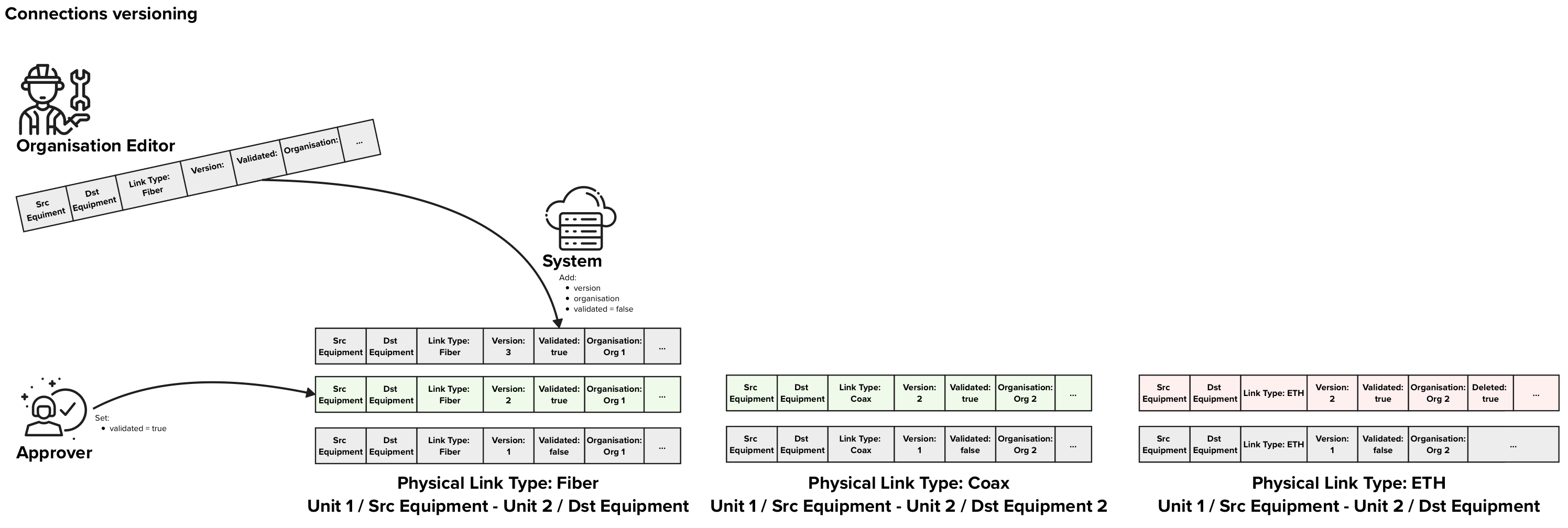
Keeping multiple versions of the system physical links information in the RNCV has some side effects that allow us to implement automated data approval and data deletion processes that we will describe below.
|
In the figure above each row of data represents on Physical Link data entry in the database. The background colors of the rows represent:
In this example, There are free approved Physical Links, two that indicate that Fiber and Coax are present between two units and one that indicates that ETH was removed. |
Automatic data approvals
Each time an Editor performs an intervention in a given unit / block / site, he should send an update for the concerned physical links, no matter if anything changed or not.
E.g. if three interventions take place for customer A that has a fiber installed in between a socket in his apartment and an NTP, each time the technicians would send an update to the RNCV with the information that fiber is present in between that socket and the given NTP.
If the system receives three consecutive updates for the same source equipment and destination equipment on different days or from different organisations, we can infer that the information is correct and should be automatically approved.
Furthermore if the system receives consecutive update requests that confirm a current state that is already approved, these updates can be automatically approved, and wont need any manual approval.
Soft delete and Automatic data deletion
Soft delete
In chapter 6.5. Data Quality we introduce the notion of “soft delete”. The “soft delete” consists in marking data as deleted which will have following effects:
- The system will consider the data as being deleted and will behave as if the records do not exist
- The data is still kept for auditing purposes and historical analysis
Soft deletes are triggered manually by the Editors and approved by the Approvers and do not involve any automatic process. These is useful to indicate that buildings, blocks, units or equipments have been demolished / decommissioned.
Special case: Physical Links versioning
Physical Links consist a special case since we might have multiple versions of the physical links that contain exactly the same information. Multiple technicians might go to the same sight over a period of a few years and insert the same information into the RNCV.
This is desirable as we want to make sure that the information in the RNCV is still accurate with the reality on site and we want to have these entries as often as possible, to keep the confidence on the data as high as possible.
This will result in scenarios where the same data is populated multiple times over the course of multiple years. The reason to keep these multiple entries for the same physical links are:
- Keep track of the contributions of each Organisation.
- Keep the data up to date and reliable by requiring the updates to be sent as often as possible
- Enable the automatic approval processes as described in this chapter
Automatic deletion of old redundant Physical Link versions

Example 1: Two recent entries and 4 old entries that are identical, are reduced to only one old entry and the two recent ones are left untouched.
After a period of X years, where X will be defined by MyConnectivity based on their needs, the information carried by the redundant records will not carry any added value anymore:
- There is no need to keep track of the number of contributions performed by each Organisation X years ago
- Data older than X years is not considered as reliable as recent data since the situation on site might have changed in the meantime
Therefore an automatic process will be implemented that will delete redundant records that do not carry addition relavant information. Only records the datasets that record a change in the vertical cabling are kept to keep track of dates when these changes occurred. All other records do not carry any additional relevant information and can be deleted.
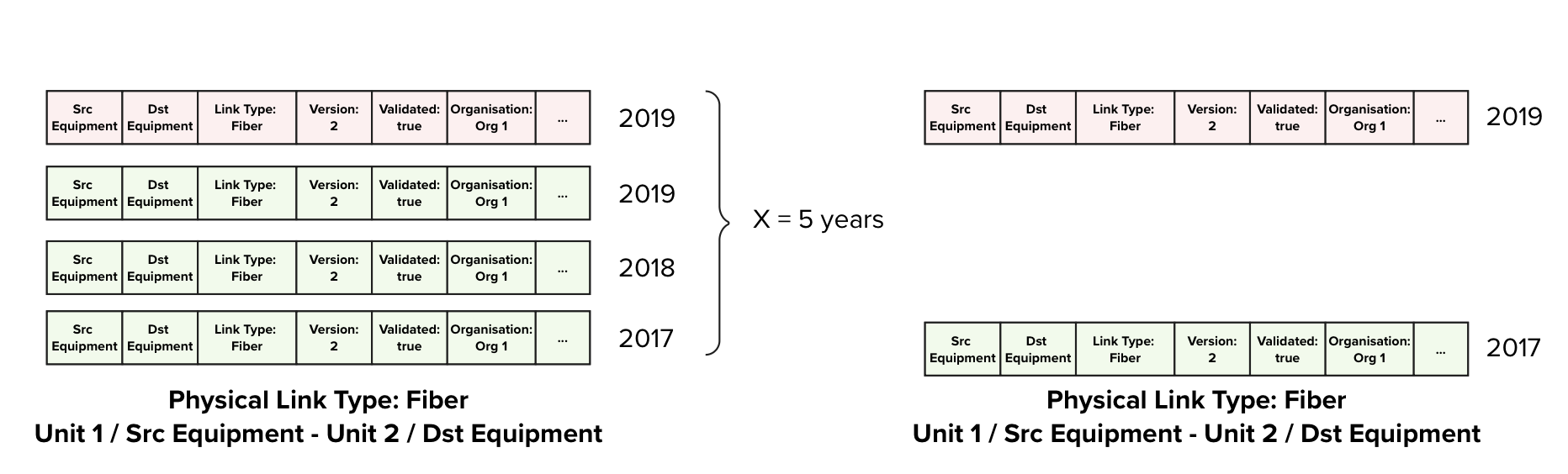
Example 2: Four old entries. The are identical and one denotes that Fibre has been decommissioned, only two records are kept, the earliest that recorded the presence of Fibre, and the record that marks the date when Fibre was decommissioned.
6.9. Manual reviews and audits
Once a year data will be manually reviewed and Audited. The review will be done by an internal Analyst that is a domain expert, whereas the Audit can be performed by either an internal or an external auditor.
Data Review
The purpose of the review is to perform a high-level assessment by a domain expert to identify:
- Duplicates in the dataset
- Inconsistent data
- Cross-references data with external data sources to make sure that the data is accurate
- Issues that the automated processes might have missed
Data Audit
The audit is a more in-depth and systematic examination, ensuring that datasets align with quality benchmarks and organisational standards. It will focus on:
- Checking for duplicates
- Verifying the accuracy and integrity of the data
- Ensuring compliance with the policies defined in the architecture
- Assessing the effectiveness of data management processes
Both the review and audit will help maintain data quality and ensure continuous improvement in data governance.
6.10. Consistency checks
This section is meant to be used and completed during the entire lifetime of the project. All consistency checks that are not part of the global architecture concepts will be listed here for completeness and documentation purposes.
These are the checks that will be performed by the Analyst and the analyst will decide on a case by case on how to handle the results (correct, delete, mark for review).
| Name | Check |
| FDB Links consistency checks | Check if the same unit is connected via a FDB and via a direct link at the same time |