Architecture documentation
The Architecture Documentation of the "National Registry of Vertical Cabling", in french "Registre National du Câblage Vertical" (RNCV), offers an overview of the current systems and expectations from the perspective of key stakeholders, including MyConnectivity. It outlines their expectations for the future, detailing essential processes, user stories, and architectural principles and best practices. This document serves as a valuable guide for understanding the system’s structure, functionality, and evolution.
- 1. Life-cycle of the document
- 2. Introduction
- 3. User management & user roles
- 4. User stories
- 4.1. User - Profile management [canceled]
- 4.2. User - Change password
- 4.3. User - Manage user secrets [canceled]
- 4.4. Application Administrator - Create users
- 4.5. Application Administrator - Update users
- 4.6. Application Administrator - Delete users
- 4.7. Application Administrator - Recover users marked for deletion
- 4.8. Application Administrator - Create access tokens [new]
- 4.9. Application Administrator - Delete access tokens [new]
- 4.10. Application Administrator - View audit logs
- 4.11. Application Administrator - View all data on the platform
- 4.12. Application Administrator - Restore deleted records
- 4.13. Application Administrator - Un-reject/approve an approved/rejected record
- 4.14. Application Administrator - Export all
- 4.15. Application Administrator - Monitoring
- 4.16. Application Administrator - Alerting
- 4.17. Application Administrator - Lightweight Administration Panel
- 4.18. Application Administrator - Define webhooks [new]
- 4.19. Organisation Administrator - Create organisation users
- 4.20. Organisation Administrator - Update organisation users
- 4.21. Organisation Administrator - Delete organisation users
- 4.22. Organisation Approver - Recover organisation users marked for deletion
- 4.23. Organisation Administrator - Create organisation access tokens [new]
- 4.24. Organisation Administrator - Delete organisation access tokens [new]
- 4.25. Organisation Administrator - View organisation audit logs
- 4.26. Organisation Administrator - Un-reject/approve an approved/rejected record lined to organisation
- 4.27. Organisation Administrator - Restore records deleted by the organisation
- 4.28. Editor - Create temporary address
- 4.29. Editor - Create an additional temporary address for an existing site [canceled]
- 4.30. Editor - Create an additional temporary address for an existing block
- 4.31. Editor - Add a site
- 4.32. Editor - Update a site
- 4.33. Editor - Delete a site
- 4.34. Editor - Add a block
- 4.35. Editor - Update a block
- 3.36. Editor - Delete a block
- 4.37. Editor - Add a unit
- 4.38. Editor - Update a unit
- 4.39. Editor - Delete a unit
- 4.40. Editor - Add an equipment
- 4.41. Editor - Update an equipment
- 4.42. Editor - Delete an equipment
- 4.43. Editor - Attach pictures [postponed]
- 4.44. Editor - Delete Pictures [postponed]
- 4.45. Editor - Search a site by address
- 4.46. Editor - Send an update vertical cabling request
- 4.47. Approver - Approve deleted site request
- 4.48. Approver - Approve deleted block request
- 4.49. Approver - Approve deleted unit request
- 4.50. Approver - Approve deleted equipment request
- 4.51. Approver - Approve or reject update vertical cabling request
- 4.52. Organisation Approver - Approve deleted site request for organisation
- 4.53. Organisation Approver - Approve deleted block request for organisation
- 4.54. Organisation Approver - Approve deleted unit request for organisation
- 4.55. Organisation Approver - Approve delete equipment request for organisation
- 4.56. Organisation Approver - Approve or reject update vertical cabling request for organisation
- 4.57. Analyst - Access to all data
- 4.58. Analyst - Querying data
- 4.59. Analyst - Query historical data
- 4.60. Analyst - Query audit logs
- 4.61. Analyst - Export data [to be reviewed]
- 4.62. Analyst - Integrate external applications
- 4.63. Analyst - Un-reject/approve an approved/rejected record
- 4.64. Viewer - Search sites/blocks/units/equipments by address
- 4.65. Viewer - Read single entries by ID
- 4.66. Viewer - Read different versions of connections - Required Premium License
- 4.67. ETL - Retrieve addresses
- 4.68. ETL - Create and update addresses
- 5. Functional requirements
- 6. Organisational Cases
- 6.1. User management
- 6.2. Address ingestion
- 6.3. Versioning, approvals and audit logs
- 6.4. Data privacy
- 6.5. Data quality
- 6.6. Data governance
- 6.7. Fair usage (access limitations)
- 6.8. Automatic data approvals and deletion
- 6.9. Manual reviews and audits
- 6.10. Consistency checks
- 7. Processes
- 7.1. User management processes
- 7.2. Create missing address process
- 7.3. Create missing address for existing site or block process
- 7.4. Address ingestion via the ETL process
- 7.5. Send update vertical cabling request process
- 7.6. Approve update vertical cabling request
- 7.7. Approve delete site request
- 7.8. Approve delete block request
- 7.9. Approve delete unit request
- 7.10. Approve delete equipment request
- 8. Data architecture
- 9. API Proposal
1. Life-cycle of the document
The objectif of this document is to provide a scope of work and to be used as work document. It means that it documents the whole work by design, with an initial version created now and evolving over time.
Software developers can challenge this document, but this needs to be justified, analysed and documented, as well as agreed with the operators.
1.1. Change log
| Ver. | Date | Author | Description | Justification |
|---|---|---|---|---|
| 0.1 | 30/12/2024 | Sergio Sousa | Initial version | |
| 0.2 | 07/02/2025 | Sergio Sousa | Modifications of the architecture to include Equipments | |
| 0.3 | 06/03/2025 | Sergio Sousa | Modifications based on LNDS input | |
| 0.4 | 08/04/2025 | Sergio Sousa | Analyst can now also un-approve / un-reject records. Added the possibility to link a phyiscal link to destination unit or destination equipment. Added a section consistency checks where all manual consistency checks performed by the Analyst will be defined Updated API documentation to allow the viewer to retrieve more data. |
Operators need to have access to the entire physical links to be able to compute the eligibility of the customers. |
| 1.0 | 07/04/2025 | Sergio Sousa | Version number changed to 1.0. | |
| 1.1 | 14/10/2025 | Sergio Sousa | Update according to backend implementation and migration to doc.rncv.lu | During the implementation some missing information was detected, the justification for each is documented in the data model chapter. |
2. Introduction
2.1. Context
As stated in “Luxembourg’s ultra-high-speed broadband strategy 2021-2025”, connectivity is no longer just a matter of technological advancement, it is a cornerstone of social and economic inclusion in a digitally driven society. While Luxembourg already enjoys extensive ultra-high-speed broadband coverage and a robust digital infrastructure, as highlighted in the state’s strategy, there remains a critical gap: a small yet significant percentage of the population still lacks access to these essential services. The strategy underlines the social urgency of closing the digital divide, which increasingly mirrors a broader societal divide.
As an economic interest group driving national connectivity goals, MyConnectivity plays a pivotal role in realising Luxembourg’s ultra-high-speed broadband strategy through its three core missions. First, it raises awareness and provides information about the challenges and potential of digital technology, ensuring full inclusion of all segments of society. Second, it actively promotes the deployment of and access to Ultra-High-Speed Broadband for everyone by fostering the development of reliable, high-performance, and sustainable technical infrastructures. Finally, it provides support, advice, and training to the public to overcome psychological and technical barriers that may hinder the adoption of new digital practices.
When looking at the mission of promoting the deployment and access to Ultra-High-Speed Broadband for everyone, the problem can be split in two. The first part of the problem is to bring ultra-high-speed connectivity to every building in Luxembourg. In this context, MyConnectivity already performed an analysis on the underserved areas of the country, and this problem is now well understood and under control.
The second part of the problem is that once a building has access to ultra-high-speed connectivity, each individual residential unit that is part of that building needs to be connected to the Network Termination Point (NTP). This is usually trivial for single familly homes but can be a challenge for multi-dwellling units, where the installation of vertical cabling can slow down the adoption of very high capacity networks (VHCN). These challenges can be due to technical reasons, such as the complexity of the installation (space constraints, building architecture, …), financial reasons (costs of the installation) or lack of awareness and consent of the multiple owners of the multi-dewlling units.
To tackle the challenge linked to the deployment of vertical cabling, the first step consists in documenting and quantifying the problem. In this context MyConnectivity launched a project that aims to bridge this knowledge gap by creating a “National registry of vertical cabling", in french "Registre National du Câblage Vertical (RNCV)”, which will be a centralised, neutral Database System that empowers telecom operators to efficiently populate and manage a comprehensive, centralised, nationwide inventory of vertical cabling infrastructure data, with a focus on multi-dwelling buildings.
The primary objectives of the RNCV are to identify buildings and building units lacking the necessary cabling standards to prioritise the necessary work to reach 100% VHCN connectivity within the multi-dwelling units. This approach is necessary to enable informed decision-making in prioritising infrastructure investments as well as to enable safe and fair vertical cabling inventory exchanges among telecom operators and other stakeholders. Additionally, it will create the ground for an ecosystem of services around this platform in the future.
2.2. Document purpose and scope
The present document describes the data architecture of the RNCV that has been designed to respond to the requirements expressed by the different stakeholders.
The document contains:
- the requirements that were gathered as well as the methodology used to gather them.
- The proposed data architecture based on these requirements
- The processes used to ingest and validate data
- Data privacy, quality, security and governance considerations
- System requirements and guidelines
Following aspects are out of scope of this document:
- System architecture
- Address reconciliation algorithm
- Definition of the different releases of the software
- All legal aspects of the projects (including GDPR) are out of scope of this document and are handled in parallel in a separated work package.
It is important to note that this is a living document. The stakeholders can make suggestions or request changes, these changes will then be validated. If the changes are approved, they are then integrated into the data architecture documentation before being implemented.
This document should drive the direction, but any specific aspect can be challenged/adapted, but any change must become part of the document again
2.3. Targeted audience
2.3.1. Confidentiality
This document is an internal and confidential document and restricted access to selected audience is provisioned.
2.3.2. MyConnectivity and their shareholders
MyConnectivity and their shareholders are responsible and accountable for the the RNCV project. They are the owner of the solution and are the final approvers of the present document, making sure that the targeted data architecture fulfils the initial scope of the project and aligns with their long term strategy.
2.3.3. Operators
In a first phase, the operators are the main contributors and consumers of the RNCV, this document will help them understand the target data architecture.
The operator’s role is to make sure that the resulting data architecture can be used in practice and comply with their requirements. Operators may also suggest improvements when needed.
2.3.4. LNDS
LNDS is MyConnecitivity’s partner of choice regarding data privacy, data security, data quality and data governance. LNDS will qualify the data quality, security and privacy measures and provide valuable insights and suggest improvements to the data architecture.
2.3.5. Software developers of the RNCV
The software developers that will implement the RNCV, will use the document as requirement document for the data architecture. The document will also provide valuable suggestions for the system architecture.
The developers are 100% responsible for the system and its development, therefore they can challenge any part of the document and suggest modifications. These modifications requests will be taking into consideration, validated and if accepted, they will be integrated into the documentation.
2.3.6. MyConnectivity legal support
The legal support team will use the present document to understand the solution that will be developed and to analyse the legal basis for the execution of the project.
2.3.7. Data Architect
The data architect is responsible for the document’s content. The architect will be in charge of gathering and centralising the requirements and change requests to the data architecture.
The data architect will keep this document alive and up to date and will use it as a reference to support the software development.
3. User management & user roles
3.1. User management
This section explains the general principles how user will be managed in the system. It explains the core concepts that need to be implemented.
IMPORTANT: Please note that when we talk about users, we mean API users. The system is designed around APIs which can then be used to implement user interfaces, or to be directly integrated into third-party systems.
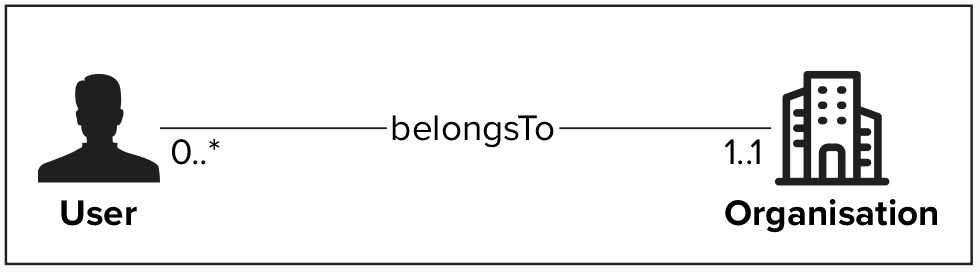
Organisation
An Organisation represents an entity to which users or datasets can be linked to. An organisation can be an operator, MyConnectivity, a Syndic ABC, …
When creating a user other than an Application Administrator, the Administrator has to assign that user to an organisation in order to signal that the user belongs to that specific entity. This is important for two reasons:
- We want to know which organisation performed which changes to the vertical cabling database.
- Some organisation might receive an account that will allow them to manage their own users. Exact requirements on how such an access can be granted need to be evaluated and decided. (delegated administration)
When a new vertical cabling dataset is produced, this dataset will be assigned to an Organisation. The exact assignment rules will be described in the user stories linked with data production.
User
A user with a role other than Application Administrator, will always belong to exactly one organisation. The organisation to which the user belongs has following implications:
- When a user performs an action, it performs the action on behalf of that organisation.
- The user is managed by the organisation’s administrators
The exact definition of a dataset and how a dataset is assigned to an organisation will be described in dedicated user stories
Examples
Organisation Administrator
An organisation administrator can only see/manage users that belong to his organisation:
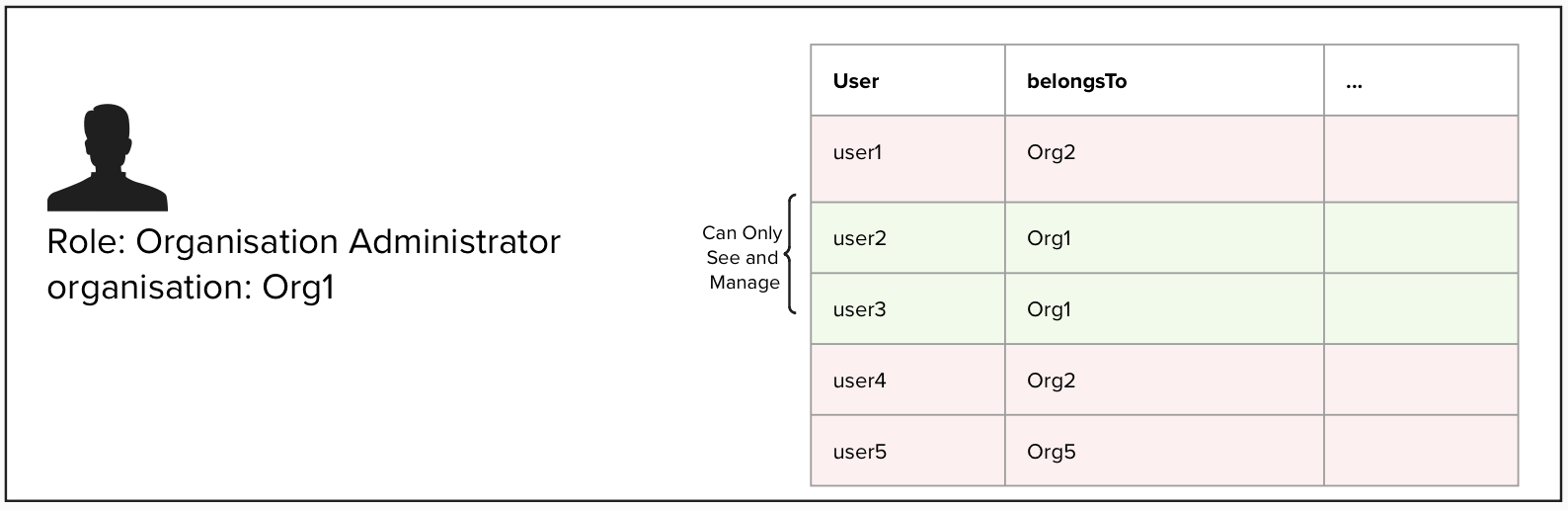
Processes Linked to User Management
Organisation Processes
The creation, modification or deletion of processes for organisations will be a manual one. The Organisations that want to be part of the system will send a request to MyConnectivity (e.g. per e-mail). MyConnectivity will analyse the request and if the request is accepted, MyConnectivity will create the organisation in the System
User Processes
Potential future use cases:
The cases described below, are cases that do not exist as of today but might become relevant in the future. These cases will not be implemented as part of a first version of the application.
Fine grade access control
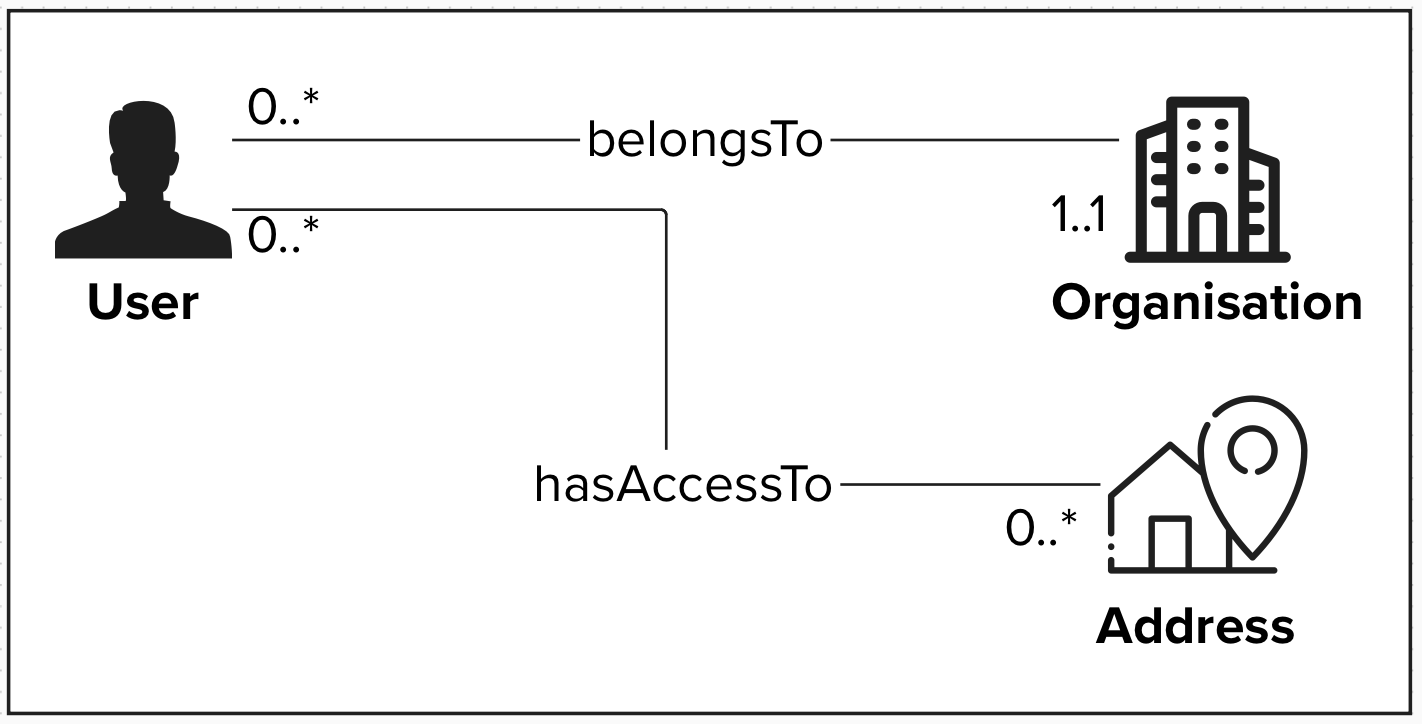
In the future building managers, building owners, and other stakeholders could receive access to the System. In these cases, the users should only be able to access resources they have been assigned to. Such a access limitation could be based on Addresses, but might also be necessary on a Site, Block or Unit level.
A possible implementation of such a restriction could be to create a link “hasAccessTo”, that would link the user to the resources it is allowed to access. If such a relation exists, the system should behave exactly as for any other user, except that it will only return datasets that have been assigned to the user.
3.2. Roles
3.2.1. User
Generic User (applies to all roles)
A Generic User is a base-level role assigned to every system user, regardless of their specific functional roles (e.g., Viewer, Analyst, Editor, Approver). This role encompasses fundamental use cases and permissions that are common across all users, such as accessing the application, managing personal profiles, and utilizing core system features.
- Authentication: Log in and log out of the application using valid credentials or authenticate with a valid authentication method (to be defined: api key, saml2, …).
- Profile Management: View and update personal information (e.g. password reset, manage secrets).
| ID | Name |
| 4.1 | Profile management [canceled] |
| 4.2 | Change password |
| 4.3 | Manage user secrets [canceled] |
3.2.2. Administrator
Application Administrator
An Application Administrator is a user with the highest privileges and responsibilities, allowing them to manage and oversee the application's functionality, settings, and user base holistically across all Organisations. The provisioning of the Application Administrator privileges should only be granted to the owners of the solution (application), e.g. MyConnectivity.
Administrators do not have privileges to write vertical cabling data. If the user needs EDITOR permission, a different non privileged account is needed to perform these operations.
Application Administrators typically have access to advanced features and tools that standard users as well as Organisation Administrators do not, such as:
- User Management: Adding, editing, or removing users, assigning roles, including Organisation Administrators, and managing permissions.
- Content Oversight: View the entire database, recover previous versions (see undo delete and undo approval processes)
- System Configuration: Customising application settings, workflows, and integrations to align with organisational needs.
- Monitoring and Reporting: Accessing logs, analytics, and reports to ensure proper usage and system health.
- Troubleshooting: Addressing technical issues, resetting passwords, or resolving other user concerns.
- Security Enforcement: Setting security policies, managing access controls, and responding to potential threats or breaches.
| ID | Name |
| 4.4 | Create users |
| 4.5 | Update users |
| 4.6 | Delete users |
| 4.7 | Recover users marked for deletion |
| 4.8 | Create access tokens [new] |
| 4.9 | Delete access tokens [new] |
| 4.10 | View audit logs |
| 4.11 | View all data on the platform |
| 4.12 | Restore deleted records |
| 4.13 | Un-reject/approve an approved/rejected record |
| 4.14 | Export all |
| 4.15 | Monitoring |
| 4.16 | Alerting |
| 4.17 | Lightweight administration panel |
| 4.18 | Define webhooks [new] |
Organisation Administrator
An Organisation Administrator can manage resources linked to a specific domain (e.g. operator). A domain administrator is responsible for managing all the aspects linked with the domain, for example their own user base:
- Domain user management: Adding, editing, or removing domain users, assigning roles, and managing permissions
- Content Oversight: Oversee all the operations done by the domain users
3.2.3. Editor
An Editor is a user role with permissions to request create, update, and delete operations on vertical cabling data. The update requests need to be validated by a user that has a Validator role for the given organisation.
| ID | Name |
| 4.28 | Create temporary address |
| 4.29 | Create an additional temporary address for an existing site |
| 4.30 | Create an additional temporary address for an existing block |
| 4.31 | Add a site |
| 4.32 | Update a site |
| 4.33 | Delete a site |
| 4.34 | Add a block |
| 4.35 | Update a block |
| 4.36 | Delete a block |
| 4.37 | Add a unit |
| 4.38 | Update a unit |
| 4.39 | Delete a unit |
| 4.40 | Add an equipment |
| 4.41 | Update an equipment |
| 4.42 | Delete an equipment |
| 4.43 | Attach pictures [postponed] |
| 4.44 | Delete Pictures [postponed] |
| 4.45 | Search a site by address |
| 4.46 | Send an update vertical cabling request |
3.2.4. Approver
Approver
An Approver is a user role with permissions to approve or reject Vertical Cabling update requests for all domains within the system. This role ensures consistency and compliance across domains by reviewing and validating requests for creating, updating, or deleting vertical cabling data. Approvers have a system-wide oversight responsibility and can act as the final authority in the approval process.
Organisation approver
An Organisation Approver is a user role with permissions to approve or reject Vertical Cabling update requests only for the organisation they are assigned to. This role ensures that changes assigned to a specific domain are accurate and compliant with the data quality standards. Organisation Approvers focus exclusively on requests assigned to their own domain and cannot approve requests for other domains.
3.2.5. Analyst
Analyst
An Analyst is a user responsible for examining, interpreting, and generating insights from the data within the application. They access and process data to identify trends, patterns, and actionable insights, supporting decision-making processes. Analysts are typically granted read access to most system data and are equipped with tools for querying, visualising, and exporting data.
| ID | Name |
| 4.57 | Access to all data |
| 4.58 | Querying data |
| 4.59 | Query historical data |
| 4.60 | Query audit logs |
| 4.61 | Export data [to be reviewed] |
| 4.62 | Integrate external applications [to be reviewed] |
| 4.63 | Un-reject/approve an approved/rejected record |
3.2.6. Viewer
Viewer
A Viewer is a user with strictly limited access to the system, allowing them only to search and view specific datasets using predefined search queries. They cannot perform analytics, export data, or modify the system in any way.
| ID | Name |
| 4.64 | Search sites/blocks/units/equipments by address |
| 4.65 | Read single entries by ID |
| 4.66 | Read different versions of connections |
3.2.7. ETL
ETL
An ETL user is a user that has access to the RNCV address database, the user can read as well as write address data. In particular the ETL user is the only one that can create address information without needing an external Approver to validate the data in question. Furthermore the ETL is also the main process responsible for Approving address entries.
| ID | Name |
| 4.67 | Retrieve addresses |
| 4.68 | Create and update addresses |
4. User stories
4.1. User - Profile management [canceled]
| Id | 4.1. |
| Description | As a Generic User I need to be able to update my personal information So that my information stays accurate and up to date |
| Priority | High |
| Actors | User |
| API Calls | N/A |
| Linked Processes | |
| Status | Canceled - We don't keep personal information that would need to be updated |
Preconditions
- The User must be authenticated.
Postconditions
- The System returns the updated user information.
Main flow
- The User triggers an update of his profile user the APIs (PUT/PATCH).
- The system returns the update user information.
Exceptions
[400 Bad Request] Invalid input:
If mandatory fields are missing or invalid, the system returns an error message.
[500 Internal Server Error] System Error
If the system fails to save changes due to an internal error, it displays an appropriate message and logs the error for further investigation.
4.2. User - Change password
| Id | 4.2. |
| Description |
As a Generic User
So that I can keep my account secure |
| Priority | High |
| Actors | User |
| API Calls | N/A |
| Linked Processes | |
| Status | Implemented - Only user with access to django-admin use password authentication, and therefore only these users can perform a password change via UI. API users, use API keys and don't have passwords to manage. |
Preconditions
- The User must be authenticated.
- The User must known his old password
Postconditions
- The System returns a confirmation that the password has been reset.
Main flow
- The User triggers a credential change via the django-admin UI.
- The system returns a confirmation indicating the the password has been updated.
Exceptions
[400 Bad Request] Invalid input:
If mandatory fields are missing or invalid, the system returns an error message.
[500 Internal Server Error] System Error
If the system fails to save changes due to an internal error, it displays an appropriate message and logs the error for further investigation.
4.3. User - Manage user secrets [canceled]
| Id | 4.3. |
| Description | As a Generic User I want to be able to manage my secrets linked to the chosen authentication mechanism and to revoke consents given to external applications, So that I can grant and revoke access given to external applications to my account |
| Priority | High |
| Actors | User |
| API Calls | N/A |
| Linked Processes | |
| Status | Canceled - Each application will receive a dedicated user with the appropriate role and a dedicated access token |
Preconditions
- The User must be authenticated.
Postconditions
- The System returns a list of external application to which the user has granted access.
- The system updates the external application secrets / information as requested by the user.
- If the user choses to revoke the external application’s permissions, the system deletes that external application’s credentials and the application can no longer access the system on behalf of the user.
Main flow
- The User retrieves the list of external applications to which he has granted access (GET).
- The user performs the updates needed to the external applications grants (e.g. update secrets, change name, …) (PUT)
- If needed the user can revoke the access granted to an external application (DELETE)
- The system applies the instructions given by the user.
Exceptions
[400 Bad Request] Invalid input:
If mandatory fields are missing or invalid, the system returns an error message.
[500 Internal Server Error] System Error
If the system fails to save changes due to an internal error, it displays an appropriate message and logs the error for further investigation.
4.4. Application Administrator - Create users
| Id | 4.4. |
| Description | As a Application Administrator, I must be able to create user accounts and assigning them the appropriate roles, So that I can control access to the system and ensure that each user has the correct permissions based on their responsibilities. |
| Priority | High |
| Actors | Application Administrator |
| API Calls | GET /admin/api-users POST /admin/api-users |
| Linked Processes | |
| Status | Implemented |
Preconditions
- The User must be authenticated and have the Application Administrator role.
- The system must have a list of predefined roles available for assignment.
Postconditions
- The user list is updated with the new accounts.
- All assigned roles are correctly enforced by the system
Main flow
- The Application Administrator retrieves a list of existing users with their details and roles (GET).
- The Application Administrator uses an API to add a new user by entering required details (e.g., name, email) and assigning roles (POST).
- The system validates the input data.
- The system saves the changes and updates the user list.
Exceptions
[400 Bad Request] Invalid input:
If mandatory fields are missing or invalid, the system returns an error message.
[409 Already Exists] Duplicate User
If the Application Administrator attempts to add a user with an email already registered, the system returns an error and prevents duplicate creation.
[500 Internal Server Error] System Error
If the system fails to save changes due to an internal error, it displays an appropriate message and logs the error for further investigation.
4.5. Application Administrator - Update users
| Id | 4.5. |
| Description | As a Application Administrator, I must be able to update user accounts and re-assign them appropriate roles, So that I can control access to the system and ensure that each user has the correct permissions based on their responsibilities. |
| Priority | High |
| Actors | User |
| API Calls | GET /admin/api-users/<user-id> PUT /admin/api-users/<user-id> PATCH /admin/api-users/<user-id> |
| Linked Processes | |
| Status | Implemented |
Preconditions
- The User must be authenticated and have the Application Administrator role.
- The system must have a list of predefined roles available for assignment.
- The user to be modified must exist on the platform
Postconditions
- The user list is updated with the modified accounts.
- All assigned roles are correctly enforced by the system.
Main flow
- The Application Administrator retrieves a list of existing users with their details and roles (GET).
- The Application Administrator uses an API to modify an existing user by modifying the required details (e.g., name, email) and assigning roles (PUT/PATCH).
- The system validates the input data.
- The system saves the changes and updates the user list.
Exceptions
[400 Bad Request] Invalid input:
If mandatory fields are missing or invalid, the system returns an error message.
[404 Not found] User not found
If the Application Administrator attempts to modify a user that does not exist, the system returns an error and prevents the action.
[500 Internal Server Error] System Error
If the system fails to save changes due to an internal error, it displays an appropriate message and logs the error for further investigation.
4.6. Application Administrator - Delete users
| Id | 4.6. |
| Description | As a Application Administrator, I must be able to mark a user for deletion, So that I can remove the access for users that no longer require it, and to ensure that personal data linked to old users are properly removed from the system without impacting existing data. |
| Priority | High |
| Actors | Application Administrator |
| API Calls | PUT /admin/api-users/<user-id>
PATCH /admin/api-users/<user-id> |
| Linked Processes | |
| Status | Implemented |
Preconditions
- The User must be authenticated and have the Application Administrator role.
- The user to be deleted must exist on the platform
Postconditions
- The user is marked as “inactive”.
- The user is disabled and can no longer login or use the system in any way.
- After a period of X days (X being configurable by the Application Administrator), all personal data of that user is deleted (name, lastname, email) and replaced by generic data.
- IMPORTANT: No data entries linked to the vertical cabling datasets that are linked to that user are deleted! The organisation information, to which that user was linked is kept.
Main flow
- The Application Administrator retrieves a list of existing users with their details and roles (GET).
- The Application Administrator uses an API to modify the existing user and the flag “is_active=false” (PUT/PATCH/DELETE).
- The system validates the input data.
- The system saves the changes and updates the user list.
- After the pre-defined period the system deletes all personal data linked to the inactive user.
Exceptions
[400 Bad Request] Invalid input:
If mandatory fields are missing or invalid, the system returns an error message.
[403 Forbidden] User cannot delete himself
If the Application Administrator attempts to delete his own user, an error will be returned.
[404 Not found] User not found
If the Application Administrator attempts to modify a user that does not exist, the system returns an error and prevents the action.
[500 Internal Server Error] System Error
If the system fails to save changes due to an internal error, it displays an appropriate message and logs the error for further investigation.
4.7. Application Administrator - Recover users marked for deletion
| Id | 4.7. |
| Description | As a Application Administrator, I must be able to recover a user marked for deletion, So that I can recover the access of a user that was deleted by mistake. |
| Priority | High |
| Actors | Application Administrator |
| API Calls | GET /admin/api-users/<user-id> PUT /admin/api-users/<user-id> PATCH /admin/api-users/<user-id> |
| Linked Processes | |
| Status | Implemented |
Preconditions
- The User must be authenticated and have the Application Administrator role.
- The system must have a list of predefined roles available for assignment.
- The user to be recovered must be inactive and not yet be deleted.
Postconditions
- The user is active.
- The user can again login and use the system in accordance with the assigned roles.
Main flow
- The Application Administrator retrieves the user that is marked for deletion (GET).
- The Application Administrator uses an API to recover the user removing the flag “marked for deletion” (PUT/PATCH).
- The system validates the input data.
- The system saves the changes and updates the user list.
Exceptions
[400 Bad Request] Invalid input:
If mandatory fields are missing or invalid, the system returns an error message.
[404 Not found] User not found
If the Application Administrator attempts to recover a user that does not exist, the system returns an error and prevents the action.
[409 Not marked for deletion] User not marked for deletion
If the Applicaiton Administrator attempts to recover a user that is not marked for deleting, the system returns an error and prevents the action.
[500 Internal Server Error] System Error
If the system fails to save changes due to an internal error, it displays an appropriate message and logs the error for further investigation.
4.8. Application Administrator - Create access tokens [new]
| Id | 4.8. |
| Description | As an Application Administrator I need to be able to create access tokens linked to existing users So that I can grant access to the APIs to the different users |
| Priority | High |
| Actors | Application Administrator |
| API Calls | POST /admin/tokens |
| Linked Processes | N/A |
| Status | Implemented |
Preconditions
- The User must be authenticated and have the Application Administrator role.
- The User for which the Application Administrator wants to create a token must exist on the platform.
Postconditions
- The User token is generated
Main flow
- The Application Administrator retrieves the users.
- The Application Administrator uses the API to generate a token for the selected user.
- The system returns the generated token
Exceptions
[400 Bad Request] Invalid input:
If mandatory fields are missing or invalid, the system returns an error message.
[409 Already exists] Token already exists
A token already exists for the given user.
[500 Internal Server Error] System Error
If the system fails to save changes due to an internal error, it displays an appropriate message and logs the error for further investigation.
4.9. Application Administrator - Delete access tokens [new]
| Id | 4.9. |
| Description | As an Application Administrator I need to be able to delete access tokens So that I can revoke access to the APIs for the different users |
| Priority | High |
| Actors | Application Administrator |
| API Calls | DELETE /admin/tokens |
| Linked Processes | |
| Status | Implemented |
Preconditions
- The User must be authenticated and have the Application Administrator role.
- The Token that the Application Administrator wants to delete a token must exist on the platform.
Postconditions
- The User token is deleted
Main flow
- The Application Administrator retrieves the existing tokens.
- The Application Administrator uses the API to delete a selected token.
- The system confirms that the token was deleted.
Exceptions
[400 Bad Request] Invalid input:
If mandatory fields are missing or invalid, the system returns an error message.
[404 Not Found] Token not found
The token, that the Application Administrator tried to delete does not exist.
[500 Internal Server Error] System Error
If the system fails to save changes due to an internal error, it displays an appropriate message and logs the error for further investigation.
4.10. Application Administrator - View audit logs
| Id | 4.10. |
| Description | As an Application Administrator I want to have access to audit logs So that I can find out what actions have been performed in the system and by whom |
| Priority | High |
| Actors | User |
| API Calls | GET /audit-logs GET /audit-logs/<audit_log_id> |
| Linked Processes | |
| Status | Implemented |
Preconditions
- The User must be authenticated and have the Application Administrator role.
Postconditions
- The System returns the list of audit logs.
Main flow
-
The Application Administrator retrieves the audit logs using the API (GET). Optionally the Application Administrator can filter logs linked to to a specific:
- user
- site
- block
- unit
The user can also specify a time range of interest.
-
The system validates the request parameters.
-
The system returns the list of audit logs that match the query.
Exceptions
[400 Bad Request] Invalid input:
If mandatory fields are missing or invalid, the system returns an error message.
[404 Not found] Data not found
If the Application Administrator attempts to retrieve audit logs using filters for resources that do not exist, the system will return an error.
[500 Internal Server Error] System Error
If the system fails to save changes due to an internal error, it displays an appropriate message and logs the error for further investigation.
4.11. Application Administrator - View all data on the platform
| Id | 4.11. |
| Description | As an Application Administrator I need to see everything that happens in the system including the data itself So that I can analyse any potential issues in the system |
| Priority | Low |
| Actors | Application Administrator |
| API Calls | GET /admin/addresses GET /admin/sites GET /admin/blocks GET /admin/units GET /admin/equipments GET /admin/physical-links |
| Linked Processes | |
| Status | Implemented |
Preconditions
- The User must be authenticated and have the Application Administrator role.
Postconditions
- The System returns the requested data.
Main flow
- The Application Administrator retrieves any information related to vertical cabling :
- audit logs
- sites
- blocks
- units
- equipments
- physical links
- …
- The system validates the request parameters.
- The system returns the list of requested data.
Exceptions
[400 Bad Request] Invalid input:
If mandatory fields are missing or invalid, the system returns an error message.
[404 Not found] Data not found
If the Application Administrator attempts to retrieve a resources that does not exist, the system will return an error.
[500 Internal Server Error] System Error
If the system fails to save changes due to an internal error, it displays an appropriate message and logs the error for further investigation.
4.12. Application Administrator - Restore deleted records
| Id | 4.12. |
| Description | As an Application Administrator I need to be able to recover records marked as deleted So that I can rollback invalid changes |
| Priority | High |
| Actors | Application Administrator |
| API Calls |
POST /sites/<site_id>/restore POST /blocks/<block_id>/restore POST /units/<unit_id>/restore POST /equipments/<equipment_id>/restore |
| Linked Processes | |
| Status | Implemented |
Preconditions
- The User must be authenticated and have the Application Administrator role.
- The User must have a deleted record that he wants to recover
Postconditions
- The System recovers the selected record.
Main flow
- The Application Administrator retrieves a record marked as deleted.
- The Application Administrator recovers the record.
- The system validates the request parameters.
- The system recovers the deleted record.
Exceptions
[400 Bad Request] Invalid input:
If mandatory fields are missing or invalid, the system returns an error message.
[404 Not found] Data not found
If the Application Administrator attempts to recover a resources that does not exist, the system will return an error.
[409 Not deleted] Data not marked as deleted
If the Application Administrator attempts to recover a resources that is not marked as deleted, the system will return an error.
[500 Internal Server Error] System Error
If the system fails to save changes due to an internal error, it displays an appropriate message and logs the error for further investigation.
4.13. Application Administrator - Un-reject/approve an approved/rejected record
| Id | 4.13. |
| Description |
As an Application Administrator
So that I can rollback invalid changes and allow the approvers to correct their mistakes. |
| Priority | Low |
| Actors | User |
| API Calls | POST /phyiscal-links/<physical_link_id>/reset-approval/ |
| Linked Processes | |
| Status | Implemented |
Preconditions
- The User must be authenticated and have the Application Administrator role.
- The User must have an approved/rejected record that he wants to un-approve/reject
Postconditions
- The System rolls back the approval/rejection.
Main flow
- The Application Administrator retrieves a record marked as approved/rejected.
- The Application Administrator un-approves/rejects the record.
- The system validates the request parameters.
- The system rolls back the approval/rejection.
Exceptions
[400 Bad Request] Invalid input:
If mandatory fields are missing or invalid, the system returns an error message.
[404 Not found] Data not found
If the Application Administrator attempts to un-approve/reject a resources that does not exist, the system will return an error.
[409 Not approved/reject] Data not marked as approved or rejected
If the Application Administrator attempts to rollback a resources that is not marked as approved or rejected, the system will return an error.
[500 Internal Server Error] System Error
If the system fails to save changes due to an internal error, it displays an appropriate message and logs the error for further investigation.
4.14. Application Administrator - Export all
| Id | 4.14. |
| Description | As an Application Administrator I want to be able to export the entire database in a format that is supported by external analytics platforms (JSON, CSV) such as Tableau So that I can perform analytics no top of my data |
| Priority | High |
| Actors | Application Administrator |
| API Calls | N/A |
| Linked Processes | |
| Status | Not started |
Preconditions
- The User must be authenticated and have the Application Administrator role.
Postconditions
- The System returns a file containing the exported data (Json, CSV, …).
Main flow
- The Application Administrator triggers the export of the entire vertical cabling data and specifies the format of the export (Json, CSV,…)
- The system returns a file containing the requested data (Json, CSV, …).
Exceptions
[400 Bad Request] Invalid input:
If mandatory fields are missing or invalid, the system returns an error message.
[500 Internal Server Error] System Error
If the system fails to save changes due to an internal error, it displays an appropriate message and logs the error for further investigation.
4.15. Application Administrator - Monitoring
| Id | 4.15. |
| Description |
As an Application Administrator
I want to have access to the health status of each component of the system
So that I can quickly identify issues and resolve them. |
| Priority | High |
| Actors | Application Administrator |
| API Calls | N/A |
| Linked Processes | |
| Status | Implemented |
Preconditions
- The User must be authenticated and have the Application Administrator role.
Postconditions
- The System returns returns all necessary health metrics and visualisations needed to identify if the system is running as intended.
Main flow
- The Application Administrator logs into the monitoring interface
- The System returns the necessary views / information relevant to the health of the system
4.16. Application Administrator - Alerting
| Id | 4.16. |
| Description |
As an Application Administrator
I want to be notified if the monitoring detects any issues with the components of the system
So that I can take corrective actions and inform the customers in case of issues. |
| Priority | High |
| Actors | User |
| API Calls | N/A |
| Linked Processes | |
| Status | Not started |
Preconditions
- The System identifies an incident that requires immediate attention
Postconditions
- The System notifies the Application Administrators and any other contacts as specified by MyConnectivity that an incident has been detected. (e-mail / sms / other ? )
Main flow
- The System detects an incident
- The System notifies the Application Administrators as well as the other contacts as specified by MyConnectivity that an incident has been detected. (e-mail / sms / other ? )
4.17. Application Administrator - Lightweight Administration Panel
| Id | 4.17. |
| Description |
As an Application Administrator
I need a lightweight administration panel where I can perform all the above mentioned actions. The panel should usable on Desktop/Tablet/Mobile (PWA).
So that I can perform my duties as Application Administrator. |
| Priority | High |
| Actors | Application Administrator |
| API Calls | N/A |
| Linked Processes | |
| Status | Implemented |
Preconditions
- The User must be authenticated and have the Application Administrator role.
Postconditions
- The User has access to a lightweight administration panel
Main flow
- The User logs into the administration panel
- The User can perform all the actions linked to the Application Administrator role
4.18. Application Administrator - Define webhooks [new]
| Id | 4.18. |
| Description | As an Application Administrator I need to be able to configure webhooks So that the platform notifies external systems of events |
| Priority | High |
| Actors | Application Administrator |
| API Calls | Not done via API calls. Webhooks are configured in the Django Administration panel |
| Linked Processes | |
| Status | Not started |
Preconditions
- The User must be authenticated and have the Application Administrator role.
- The User has an external application that he wants to integrate.
Postconditions
- The Webhook is configured and the selected events trigger the external application.
Main flow
- The Application Administrator navigates to django admin and configures a new Webhook.
- The Application Administrator selects the URL of the external application to which the system will send notifications.
- The Application Administrator selects the type of events that should be sent to the external application.
- The Application Administrator configures the authentication method and saves.
4.19. Organisation Administrator - Create organisation users
| Id | 4.19. |
| Description |
As an Organisation Administrator,
I want to create user accounts belonging to my organisation by adding users and assigning them appropriate roles,
So that I can control access to the system for my organisation and ensure that each user has the correct permissions based on their responsibilities. |
| Priority | Medium |
| Actors | Organisation Administrator |
| API Calls | GET /admin/api-users POST /admin/api-users |
| Linked Processes | |
| Status | Implemented |
Preconditions
- The User must be authenticated and have the Organisation Administrator role.
- The system must have a list of predefined roles available for assignment.
Postconditions
- The user list is updated with the new user account.
- The new user belongs to the same organisation as the Organisation Administrator and can only be assigned with roles of type Editor, Organisation Approver, Organisation Administrator or Viewer.
- All assigned roles are correctly enforced by the system
Main flow
- The Organisation Administrator retrieves the list of existing users for his organisation with their details and roles (GET).
- The Application Administrator uses the APIs to add a new user by entering required details (e.g., name, email) and assigning valid roles (Editor, Validator, Organisation Administrator or Viewer) (POST).
- The system validates the input data and adds the right organisation to the newly created user.
- The system saves the changes and updates the user list.
Exceptions
[400 Bad Request] Invalid input:
If mandatory fields are missing or invalid, the system returns an error message.
[404 Already Exists] Duplicate User
If the Organisation Administrator attempts to add a user with an email already registered, the system returns an error message and prevents duplicate creation.
[500 Internal Server Error] System Error
If the system fails to save changes due to an internal error, it displays an appropriate message and logs the error for further investigation.
4.20. Organisation Administrator - Update organisation users
| Id | 4.20. |
| Description | As an Organisation Administrator, I want to update user accounts belonging to my organisation and assigning them appropriate roles, So that I can control access to the system for my organisation and ensure that each user has the correct permissions based on their responsibilities. |
| Priority | Medium |
| Actors | Organisation Administrator |
| API Calls | GET /admin/api-users/<user-id> PUT /admin/api-users/<user-id> PATCH /admin/api-users/<user-id> |
| Linked Processes | |
| Status | Implemented |
Preconditions
- The User must be authenticated and have the Organisation Administrator role.
- The system must have a list of predefined roles that organisation administrators can assign to their users. This is not the full list of roles available (only will include Editor, Organisation Approver, Viewer and Organisation Administrator).
- The user to be modified must exist on the platform and belong to the organisation of the Organisation Administrator
Postconditions
- The user list is updated with the modified account.
- The modified user belongs to the Organisation Administrator’s organisation
- The modified user only has roles that can be assigned by the Organisation Administrator.
- All assigned roles are correctly enforced by the system
Main flow
- The Organisation Administrator retrieves a list of existing users that belong to his organisation with their details and roles (GET).
- The Organisation Administrator uses an API to modify an existing user by modifying the required details (e.g., name, email) and assigning roles (PUT/PATCH).
- The system validates the input data.
- The system saves the changes and updates the user list.
Exceptions
[400 Bad Request] Invalid input:
If mandatory fields are missing or invalid, the system returns an error message.
[404 Not found] User not found
If the Organisation Administrator attempts to modify a user that does not exist or does not belong to his organisation, the system returns an error and prevents the action.
[500 Internal Server Error] System Error
If the system fails to save changes due to an internal error, it displays an appropriate message and logs the error for further investigation.
4.21. Organisation Administrator - Delete organisation users
| Id | 4.21. |
| Description | As an Organisation Administrator, I want to be able to mark users of my organisation for deletion, So that I can ensure that users that do no longer require access to the System have their access revoked. |
| Priority | Medium |
| Actors | Organisation Administrator |
| API Calls |
PUT /admin/api-users/<user-id> DELETE /admin/api-users/<user-id> |
| Linked Processes | |
| Status | Implemented |
Preconditions
- The User must be authenticated and have the Organisation Administrator role.
- The user to be deleted must exist on the platform and belong to the Organisation Administrator’s organisation
Postconditions
- The user is marked as “inactive”.
- The user is disabled and can no longer login or use the system in any way.
- After a period of X days (configurable by the Application Administrator), all personal data of that user is deleted (name, lastname, email) and replaced by generic data.
- IMPORTANT: No data entries linked to the vertical cabling datasets that are linked to that user are deleted! The organisation information, to which that user was linked is kept.
Main flow
- The Organisation Administrator retrieves a list of existing users that belong to his organisation with their details and roles (GET).
- The Organisation Administrator uses an API to modify the existing user and the flag “active=false” (PUT/PATCH).
- The system validates the input data.
- The system saves the changes and updates the user list.
- After the pre-defined period the system deletes all personal data linked to the inactive user.
Exceptions
[400 Bad Request] Invalid input:
If mandatory fields are missing or invalid, the system returns an error message.
[403 Forbidden] User cannot delete himself
If the Organisation Administrator attempts to delete his own user, an error will be returned.
[404 Not found] User not found
If the Organisation Administrator attempts to modify a user that does not exist or does not belong to his organisation, the system returns an error and prevents the action.
[500 Internal Server Error] System Error
If the system fails to save changes due to an internal error, it displays an appropriate message and logs the error for further investigation.
4.22. Organisation Approver - Recover organisation users marked for deletion
| Id | 4.22. |
| Description |
As an Organisation Administrator,
I want to be able to recover a user marked for deletion that belongs to my organisation,
So that I can recover the access of a user that was deleted by mistake. |
| Priority | Low |
| Actors | Organisation Administrator |
| API Calls | GET /admin/api-users/<user-id> PUT /admin/api-users/<user-id> PATCH /admin/api-users/<user-id> |
| Linked Processes | |
| Status | Implemented |
Preconditions
- The User must be authenticated and have the Organisation Administrator role.
- The system must have a list of predefined roles available for assignment.
- The user to be recovered must belong to the Organisation Administrator’s organisation, be marked for deletion and not yet be deleted.
Postconditions
- The user is not marked as inactive any more.
- The user is enabled and can again login and use the system in accordance with the assigned roles.
Main flow
- The Organisation Administrator retrieves the user that belongs to his organisation and is marked for deletion (GET).
- The Organisation Administrator uses an API to recover the user removing the flag “marked for deletion” (PUT/PATCH).
- The system validates the input data.
- The system saves the changes and updates the user list.
Exceptions
[400 Bad Request] Invalid input:
If mandatory fields are missing or invalid, the system returns an error message.
[404 Not found] User not found
If the Organisation Administrator attempts to recover a user that does not exist or does not belong to his organisation, the system returns an error and prevents the action.
[409 Not marked for deletion] User not marked for deletion
If the Organisation Administrator attempts to recover a user that is not marked for deleting, the system returns an error and prevents the action.
[500 Internal Server Error] System Error
If the system fails to save changes due to an internal error, it displays an appropriate message and logs the error for further investigation.
4.23. Organisation Administrator - Create organisation access tokens [new]
| Id | 4.23. |
| Description | As an Organisation Administrator I need to be able to create access tokens linked to existing users of my organisation So that I can grant access to the APIs to the different users |
| Priority | Medium |
| Actors | Organisation Administrator |
| API Calls | POST /admin/tokens |
| Linked Processes | N/A |
| Status | Implemented |
Preconditions
- The User must be authenticated and have the Organisation Administrator role.
- The User for which the Organisation Administrator wants to create a token must exist on the platform.
Postconditions
- The User token is generated
Main flow
- The Organisation Administrator retrieves the users.
- The Organisation Administrator uses the API to generate a token for the selected user.
- The system returns the generated token
Exceptions
[400 Bad Request] Invalid input:
If mandatory fields are missing or invalid, the system returns an error message.
[409 Already exists] Token already exists
A token already exists for the given user.
[500 Internal Server Error] System Error
If the system fails to save changes due to an internal error, it displays an appropriate message and logs the error for further investigation.
4.24. Organisation Administrator - Delete organisation access tokens [new]
| Id | 4.24. |
| Description | As an Organisation Administrator I need to be able to delete access tokens for users belonging to my organisation So that I can revoke access to the APIs for the different users |
| Priority | Medium |
| Actors | Application Administrator |
| API Calls | DELETE /admin/tokens |
| Linked Processes | |
| Status | Implemented |
Preconditions
- The User must be authenticated and have the Organisation Administrator role.
- The Token that the Organisation Administrator wants to delete a token must exist on the platform.
Postconditions
- The User token is deleted
Main flow
- The Organisation Administrator retrieves the existing tokens.
- The Organisation Administrator uses the API to delete a selected token.
- The system confirms that the token was deleted.
Exceptions
[400 Bad Request] Invalid input:
If mandatory fields are missing or invalid, the system returns an error message.
[404 Not Found] Token not found
The token, that the Organisation Administrator tried to delete does not exist.
[500 Internal Server Error] System Error
If the system fails to save changes due to an internal error, it displays an appropriate message and logs the error for further investigation.
4.25. Organisation Administrator - View organisation audit logs
| Id | 4.25. |
| Description |
As an Organisation Administrator,
I want to have access to audit logs of all the actions perform by the users assigned to my organisation
So that I can find out what actions have been performed in the system and by whom |
| Priority | Low |
| Actors | Organisation Administrator |
| API Calls |
GET /audit-logs GET /audit-logs/<audit_log_id> |
| Linked Processes | |
| Status | Implemented |
Preconditions
- The User must be authenticated and have the Organisation Administrator role.
Postconditions
- The System returns the list of audit logs that are linked to users that belong to the Organisation Administrator’s organisation.
Main flow
-
The Organisation Administrator retrieves the audit logs using the API (GET). Optionally the Organisation Administrator can filter logs linked to to a specific:
- user of the Organisation Administrator’s organisation
- site
- block
- unit
The user can also specify a time range of interest.
-
The system validates the request parameters.
-
The system returns the list of audit logs that match the query and are linked to the Organisation Administrator’s organisation.
Exceptions
[400 Bad Request] Invalid input:
If mandatory fields are missing or invalid, the system returns an error message.
[404 Not found] Data not found
If the Organisation Administrator attempts to retrieve audit logs using filters for resources that do not exist or belong to another organisation, the system will return an error.
[500 Internal Server Error] System Error
If the system fails to save changes due to an internal error, it displays an appropriate message and logs the error for further investigation.
4.26. Organisation Administrator - Un-reject/approve an approved/rejected record lined to organisation
| Id | 4.26. |
| Description |
As an Organisation Administrator
I need to be able to un-approve/reject a record belonging to my organisation that was unintentionally rejected/approved.
So that I can rollback invalid changes and allow the approvers to correct their mistakes. |
| Priority | Medium |
| Actors | Organisation Administrator |
| API Calls | POST /phyiscal-links/<physical_link_id>/reset-approval/ |
| Linked Processes | |
| Status | Implemented |
Preconditions
- The User must be authenticated and have the Organisation Administrator role.
- The User must have an approved/rejected record that belongs to his organisation and that he wants to un-approve/reject
Postconditions
- The System rolls back the approval/rejection.
Main flow
- The Organisation Administrator retrieves a record marked as approved/rejected that belongs to his organisation.
- The Organisation Administrator un-approves/rejects the record.
- The system validates the request parameters.
- The system rolls back the approval/rejection.
Exceptions
[400 Bad Request] Invalid input:
If mandatory fields are missing or invalid, the system returns an error message.
[400 Bad Request] Record already approved / un-approved:
If the user tries to approve a record that is already approved an error is returned.
[404 Not found] Data not found
If the Organisation Administrator attempts to un-approve/reject a resources that does not exist or does not belong to his organisation, the system will return an error.
[409 Not approved/reject] Data not marked as approved or rejected
If the Organisation Administrator attempts to rollback a resources that is not marked as approved or rejected, the system will return an error.
[500 Internal Server Error] System Error
If the system fails to save changes due to an internal error, it displays an appropriate message and logs the error for further investigation.
4.27. Organisation Administrator - Restore records deleted by the organisation
| Id | 4.27. |
| Description | As an Organisation Administrator I need to be able to recover records marked as deleted by my organisation. So that I can rollback invalid changes |
| Priority | High |
| Actors | Organisation Administrator |
| API Calls | POST /sites/<site_id>/restore POST /blocks/<block_id>/restore POST /units/<unit_id>/restore POST /equipments/<equipment_id>/restore |
| Linked Processes | |
| Status | Implemented |
Preconditions
- The User must be authenticated and have the Organisation Administrator role.
- The User must have a deleted record that he wants to recover
- The record must have been deleted by a user in his organisation
Postconditions
- The System recovers the selected record.
Main flow
- The Organisation Administrator retrieves a record marked as deleted.
- The Organisation Administrator recovers the record.
- The system validates the request parameters.
- The system recovers the deleted record.
Exceptions
[400 Bad Request] Invalid input:
If mandatory fields are missing or invalid, the system returns an error message.
[404 Not found] Data not found
If the Organisation Administrator attempts to recover a resources that does not exist, the system will return an error.
[409 Not deleted] Data not marked as deleted
If the Organisation Administrator attempts to recover a resources that is not marked as deleted, the system will return an error.
[500 Internal Server Error] System Error
If the system fails to save changes due to an internal error, it displays an appropriate message and logs the error for further investigation.
4.28. Editor - Create temporary address
| Id | 4.28. |
| Description |
As an Editor,
I want to be able to add a missing address to the System,
So that I am not blocked by missing information and can perform my contribution. |
| Priority | High |
| Actors | Editor |
| API Calls | POST /addresses |
| Linked Processes | |
| Status | Implemented |
Preconditions
- The User must be authenticated and have the Editor role.
- The User has all the required address information
Postconditions
- The requested address is created with a flag (validated = false) indicating that the address is not validated and is temporary.
- If a site structure is provided, the site structure is persisted and linked to the created address.
- If no site structure is provided, a default site structure is persisted and linked to the created address.
- The requested address is returned to the user.
Main flow
- See linked process
Exceptions
See linked process
4.29. Editor - Create an additional temporary address for an existing site [canceled]
This call has been removed. Addresses now need to be configured on the blocks exclusively and are back populated to the sites.
| Id | 4.29. |
| Description |
As an Editor,
I want to be able to add a missing address to an existing site,
So that I can find the site independently of the address used to search it. |
| Priority | Medium |
| Actors | Editor |
| API Calls | POST /sites/<site-id>/addresses |
| Linked Processes | 7.3. Create missing address for existing site or block process |
| Status | Implemented |
Preconditions
- The User must be authenticated and have the Editor role.
- The User has the site id to which he wants to add an address
- The User has all the required address information
Postconditions
- The requested address is created with a flag (validated = false) indicating that the address is not validated and is temporary.
- The created address is linked to the given site
- The requested address is returned to the user.
Main flow
Exceptions
4.30. Editor - Create an additional temporary address for an existing block
| Id | 4.30. |
| Description |
As an Editor,
I want to be able to add a missing address to an existing block,
So that I can find the block or site independently of the address used to search it. |
| Priority | Medium |
| Actors | Editor |
| API Calls | POST /blocks/<block-id>/addresses |
| Linked Processes |
7.3. Create missing address for existing site or block process |
| Status | Implemented |
Preconditions
- The User must be authenticated and have the Editor role.
- The User has the block id to which he wants to add an address
- The User has all the required address information
Postconditions
- The requested address is created with a flag (validated = false) indicating that the address is not validated and is temporary.
- The created address is linked to the given block
- The requested address is returned to the user.
Main flow
See linked process
Exceptions
See linked process
4.31. Editor - Add a site
| Id | 4.31. |
| Description |
As an Editor,
I want to be able to create a site for an address that already exists in the register,
So that I am not blocked by missing information and can perform my contribution. |
| Priority | High |
| Actors | User |
| API Calls | POST /sites |
| Linked Processes | |
| Status | Implemented |
Preconditions
- The User must be authenticated and have the Editor role.
- The User has on or more addresses to which the new site needs to be assigned to.
- The User has the mandatory site information
Postconditions
- The system returns the created site
Main flow
- The Editor uses an API call to create a new site for a given list of addresses.
- The system validates the input parameters.
- The system returns the created site
Exceptions
[400 Bad Request] Invalid input:
If mandatory fields are missing or invalid, the system returns an error message.
[409 Conflict] Addresses already used
Error returned by the system if the all or some of the given address are already linked to another site or block.
[500 Internal Server Error] System Error
If the system fails to save changes due to an internal error, it displays an appropriate message and logs the error for further investigation.
4.32. Editor - Update a site
| Id | 4.32. |
| Description |
As an Editor,
I want to be able to update the site information,
So that I can correct the site’s name and/or contact if it is missing or wrong. |
| Priority | High |
| Actors | Editor |
| API Calls |
PATCH /sites/<site-id> PUT /sites/<site-id> |
| Linked Processes | |
| Status | Implemented |
Preconditions
- The User must be authenticated and have the Editor role.
- The User has a valid site ID to update
- The User has new name or contact information to assign to the site
Postconditions
- The system returns the updated site
Main flow
- The Organisation Editor uses an API call to update a specific site by ID (PUT / PATCH).
- The system validates the search parameters.
- The system returns the list of sites that match the searched address.
Exceptions
[400 Bad Request] Invalid input:
If mandatory fields are missing or invalid, the system returns an error message.
[404 Not Found] Site not found
Error returned by the system if the site is not found.
[409 Conflict] Addresses already used
Error returned by the system if the all or some of the given address are already linked to another site or block.
[500 Internal Server Error] System Error
If the system fails to save changes due to an internal error, it displays an appropriate message and logs the error for further investigation.
4.33. Editor - Delete a site
| Id | 4.33. |
| Description |
As an Editor,
I want to be able to delete a site that has been demolished or entered multiple times with different addresses,
So that I can correct the registry, avoid confusion and improve reliability on the data. |
| Priority | Medium |
| Actors | Editor |
| API Calls | DELETE /sites/<site-id> |
| Linked Processes | |
| Status | Implemented |
Preconditions
- The User must be authenticated and have the Editor role.
- The User has a valid site ID to delete
- The User has selected a reason for deleting the site
Postconditions
- The system returns a confirmation that the site has been marked as “to be deleted”.
Main flow
- The Organisation Editor uses an API call to delete a specific site by ID (DELETE).
- The system validates the input parameters.
- The system marks the site, its blocks and its units as well as their connections as “to be deleted”. WARNING: If the site is already used somewhere in the system, the site gets marked as deleted but is kept in the database.
- The system returns a confirmation that the site has been marked as “to be deleted”
Exceptions
[400 Bad Request] Invalid input:
If mandatory fields are missing or invalid, the system returns an error message.
[404 Not Found] Site not found
Error returned by the system if the site is not found.
[500 Internal Server Error] System Error
If the system fails to save changes due to an internal error, it displays an appropriate message and logs the error for further investigation.
4.34. Editor - Add a block
| Id | 4.34. |
| Description |
As an Editor,
I want to be able to create a missing block for a given site,
So that I can attach at a later stage the units for which I need to create vertical cabling entries. |
| Priority | High |
| Actors | User |
| API Calls | POST /blocks |
| Linked Processes | |
| Status | Implemented |
Preconditions
- The User must be authenticated and have the Editor role.
- The User has a site id for which he wants to create a block
- The User has the name of the block and list of zero or more addresses to be linked to that specific block
Postconditions
- The system returns the created block
Main flow
- The Editor uses an API call to create a new block for a given site.
- The system validates the input parameters.
- The system returns the created block
Exceptions
[400 Bad Request] Invalid input:
If mandatory fields are missing or invalid, the system returns an error message.
[409 Conflict] Addresses already used
Error returned by the system if the all or some of the given address are already linked to another site.
[500 Internal Server Error] System Error
If the system fails to save changes due to an internal error, it displays an appropriate message and logs the error for further investigation.
4.35. Editor - Update a block
| Id | 4.35. |
| Description |
As an Editor,
I want to be able to update wrong or missing block information,
So that I can improve the quality and reliability of the register. |
| Priority | High |
| Actors | Editor |
| API Calls |
PUT /blocks/<block-id> PATCH /blocks/<block-id> |
| Linked Processes | |
| Status | Implemented |
Preconditions
- The User must be authenticated and have the Editor role.
- The User has a block id for which he wants to send an update
- The User has the name of the block and list of zero or more addresses to be linked to that specific block
Postconditions
- The system returns the updated block
Main flow
- The Editor uses an API call to update a specific block by ID (PUT / PATCH).
- The system validates the input parameters.
- The system returns the updated block
Exceptions
[400 Bad Request] Invalid input:
If mandatory fields are missing or invalid, the system returns an error message.
[404 Not Found] Block not found
Error returned by the system if the given block does not exist.
[409 Conflict] Addresses already used
Error returned by the system if the all or some of the given address are already linked to another site or block.
[500 Internal Server Error] System Error
If the system fails to save changes due to an internal error, it displays an appropriate message and logs the error for further investigation.
3.36. Editor - Delete a block
| Id | 4.36. |
| Description |
As an Editor,
I want to be able to delete a block that was created by mistake,
So that I can improve the quality and reliability of the register. |
| Priority | Medium |
| Actors | Editor |
| API Calls | DELETE /blocks/<block-id> |
| Linked Processes | |
| Status | Implemented |
Preconditions
- The User must be authenticated and have the Editor role.
- The User has a block id that he wants to delete
- The site for which the block is being deleted has more than one block.
- The User has a valid reason to delete the block
Postconditions
- The system returns a confirmation that the block has been marked as “to be deleted”.
Main flow
- The Organisation Editor uses an API call to delete a specific block by ID (DELETE).
- The system validates the input parameters.
- The system marks the block, its units as well as their connections as “to be deleted”. WARNING: If the block is already used somewhere in the system, the block gets marked as deleted but is kept in the database.
- The system returns a confirmation that the block has been marked as “to be deleted”.
Exceptions
[400 Bad Request] Invalid input:
If mandatory fields are missing or invalid, the system returns an error message.
[404 Not Found] Block not found
Error returned by the system if the given block does not exist.
[409 Conflict] Site must have at least one block
Error returned by the system if the given block is the only block of a site. A site must always have at least one block attached to.
[500 Internal Server Error] System Error
If the system fails to save changes due to an internal error, it displays an appropriate message and logs the error for further investigation.
4.37. Editor - Add a unit
| Id | 4.37. |
| Description |
As an Editor,
I want to be able to create a missing unit for a given block,
So that I can attach at a later stage the vertical cabling entries for that unit. |
| Priority | High |
| Actors | Editor |
| API Calls | POST /units |
| Linked Processes | |
| Status | Implemented |
Preconditions
- The User must be authenticated and have the Editor role.
- The User has a block id for which he wants to create a block
- The User has the mandatory unit information
Postconditions
- The system returns the created unit
Main flow
- The Editor uses an API call to create a new unit for a given block.
- The system validates the input parameters.
- The system returns the created unit
Exceptions
[400 Bad Request] Invalid input:
If mandatory fields are missing or invalid, the system returns an error message.
[500 Internal Server Error] System Error
If the system fails to save changes due to an internal error, it displays an appropriate message and logs the error for further investigation.
4.38. Editor - Update a unit
| Id | 4.38. |
| Description |
As an Editor,
I want to be able to update wrong or missing unit information,
So that I can improve the quality and reliability of the register. |
| Priority | High |
| Actors | Editor |
| API Calls |
PUT /units/<unit-id> PATCH /units/<unit-id> |
| Linked Processes | |
| Status | Implemented |
Preconditions
- The User must be authenticated and have the Editor role.
- The User has a unit id for which he wants to send an update
- The User has the mandatory unit information
Postconditions
- The system returns the updated unit
Main flow
- The Editor uses an API call to update a specific unit by ID (PUT / PATCH).
- The system validates the input parameters.
- The system returns the updated unit
Exceptions
[400 Bad Request] Invalid input:
If mandatory fields are missing or invalid, the system returns an error message.
[404 Not Found] Unit not found
Error returned by the system if the given unit does not exist.
[500 Internal Server Error] System Error
If the system fails to save changes due to an internal error, it displays an appropriate message and logs the error for further investigation.
4.39. Editor - Delete a unit
| Id | 4.39. |
| Description |
As an Editor,
I want to be able to delete a unit that was created by mistake,
So that I can improve the quality and reliability of the register. |
| Priority | Medium |
| Actors | Editor |
| API Calls | DELETE /units/<unit-id> |
| Linked Processes | |
| Status | Implemented |
Preconditions
- The User must be authenticated and have the Editor role.
- The User has a unit id that he wants to delete
- The User has a valid reason to delete the unit
Postconditions
- The system returns a confirmation that the unit has been marked as “to be deleted”.
Main flow
- The Editor uses an API call to delete a specific unit by ID (DELETE).
- The system validates the input parameters.
- The system marks the unit as well as its connections as “to be deleted”. WARNING: If the unit is used anywhere else in the system, the unit is marked as deleted but kept in the database.
- The system returns a confirmation that the unit has been marked as “to be deleted”.
Exceptions
[400 Bad Request] Invalid input:
If mandatory fields are missing or invalid, the system returns an error message.
[404 Not Found] Unit not found
Error returned by the system if the given unit does not exist.
[500 Internal Server Error] System Error
If the system fails to save changes due to an internal error, it displays an appropriate message and logs the error for further investigation.
4.40. Editor - Add an equipment
| Id | 4.40. |
| Description |
As an Editor,
I want to be able to create a missing equipment for a given unit,
So that I can determine at a later stage if the vertical cabling connects a given unit has a connected equipment to the NTP/BAP. |
| Priority | High |
| Actors | Editor |
| API Calls | POST /equipments |
| Linked Processes | |
| Status | Implemented |
Preconditions
- The User must be authenticated and have the Editor role.
- The User has a unit id for which he wants to create an equipment
- The User has the mandatory equipment information
Postconditions
- The system returns the created equipment
Main flow
- The Editor uses an API call to create a new equipment for a given unit.
- The system validates the input parameters.
- The system returns the created equipment
Exceptions
[400 Bad Request] Invalid input:
If mandatory fields are missing or invalid, the system returns an error message.
[500 Internal Server Error] System Error
If the system fails to save changes due to an internal error, it displays an appropriate message and logs the error for further investigation.
4.41. Editor - Update an equipment
| Id | 4.41. |
| Description |
As an Editor,
I want to be able to update wrong or missing equipment information,
So that I can improve the quality and reliability of the register. |
| Priority | High |
| Actors | Editor |
| API Calls |
PUT /equipments/<equipment-id> PATCH /equipments/<equipment-id> |
| Linked Processes | |
| Status | Implemented |
Preconditions
- The User must be authenticated and have the Editor role.
- The User has an equipment id for which he wants to send an update
- The User has the mandatory equipment information
Postconditions
- The system returns the updated unit
Main flow
- The Editor uses an API call to update a specific equipment by ID (PUT / PATCH).
- The system validates the input parameters.
- The system returns the updated equipment
Exceptions
[400 Bad Request] Invalid input:
If mandatory fields are missing or invalid, the system returns an error message.
[404 Not Found] Equipment not found
Error returned by the system if the given equipment does not exist.
[500 Internal Server Error] System Error
If the system fails to save changes due to an internal error, it displays an appropriate message and logs the error for further investigation.
4.42. Editor - Delete an equipment
| Id | 4.42. |
| Description |
As an Editor,
I want to be able to delete an equipment that was created by mistake or has been decommissioned,
So that I can improve the quality and reliability of the register. |
| Priority | High |
| Actors | Editor |
| API Calls | DELETE /equipments/<equipment-id> |
| Linked Processes | |
| Status | Implemented |
Preconditions
- The User must be authenticated and have the Editor role.
- The User has a equipment id that he wants to delete
- The User has a valid reason to delete the equipment
Postconditions
- The system returns a confirmation that the equipment has been marked as “to be deleted”.
Main flow
- The Editor uses an API call to delete a specific equipment by ID (DELETE).
- The system validates the input parameters.
- The system marks the equipment as “to be deleted”. WARNING: If the equipment is already used somewhere else in the system, the equipment is marked as deleted but is kept in the database.
- The system returns a confirmation that the equipment has been marked as “to be deleted”.
Exceptions
[400 Bad Request] Invalid input:
If mandatory fields are missing or invalid, the system returns an error message.
[404 Not Found] Equipment not found
Error returned by the system if the given equipment does not exist.
[500 Internal Server Error] System Error
If the system fails to save changes due to an internal error, it displays an appropriate message and logs the error for further investigation.
4.43. Editor - Attach pictures [postponed]
| Id | 4.43. |
| Description |
As an Editor,
I want to be able to add pictures to a specific site, bloc or unit,
So that I can document my register entries and complex on premise situations. |
| Priority | Medium |
| Actors | Editor |
| API Calls | POST /pictures |
| Linked Processes | |
| Status | Postponed |
Preconditions
- The User must be authenticated and have the Editor role.
- The User has a site id / block id / unit id to which he wants to attach an image
- The User has the has the image to be uploaded
Postconditions
- The system returns the URL and meta data of the created picture
Main flow
- The Editor uses an API call to upload a new picture for a given site/block/unit.
- The system validates the input parameters.
- The system returns the created picture url and metadata
Exceptions
[400 Bad Request] Invalid input:
If mandatory fields are missing or invalid, the system returns an error message.
[500 Internal Server Error] System Error
If the system fails to save changes due to an internal error, it displays an appropriate message and logs the error for further investigation.
4.44. Editor - Delete Pictures [postponed]
| Id | 4.44. |
| Description |
As an Editor,
I want to be able to delete a picture that is not up to date anymore,
So that I can improve the quality and reliability of the register. |
| Priority | High |
| Actors | Editor |
| API Calls | DELETE /pictures/<picture-id> |
| Linked Processes | |
| Status | Postponed |
Preconditions
- The User must be authenticated and have the Editor role.
- The User has a picture id that he wants to delete
- The User has a valid reason to delete the picture
Postconditions
- The system returns a confirmation that the picture has been marked as “to be deleted”.
Main flow
- The Editor uses an API call to delete a specific picture by ID (DELETE).
- The system validates the input parameters.
- The system marks the picture as “to be deleted”. WARNING: The picture is marked as deleted but kept in the database.
- The system returns a confirmation that the picture has been marked as “to be deleted”.
Exceptions
[400 Bad Request] Invalid input:
If mandatory fields are missing or invalid, the system returns an error message.
[404 Not Found] picture not found
Error returned by the system if the given picture does not exist.
[500 Internal Server Error] System Error
If the system fails to save changes due to an internal error, it displays an appropriate message and logs the error for further investigation.
4.45. Editor - Search a site by address
| Id | 4.45. |
| Description |
As an Editor,
I want to be able to search for an address and retrieve the linked site information,
So that I can get an understanding of the vertical cabling situation on site. |
| Priority | High |
| Actors | Editor |
| API Calls | GET /sites |
| Linked Processes | |
| Status | Implemented |
Preconditions
- The User must be authenticated and have the Editor role.
- The User inputs a full or partial address
Postconditions
- The system returns the list of sites that match the searched address
Main flow
- The Editor uses an API call to query the sites by using either a full address or partial address information (GET).
- The system validates the search parameters.
- The system returns the list of sites that match the searched address
Exceptions
[400 Bad Request] Invalid input:
If mandatory fields are missing or invalid, the system returns an error message.
[500 Internal Server Error] System Error
If the system fails to save changes due to an internal error, it displays an appropriate message and logs the error for further investigation.
4.46. Editor - Send an update vertical cabling request
| Id | 4.46. |
| Description |
As an Editor,
I want to be able to send an update for a vertical cable entry,
So that I can add information on my interventions on vertical cabling as well as to improve the quality and reliability of the register. |
| Priority | High |
| Actors | Editor |
| API Calls | POST /physical-links |
| Linked Processes | |
| Status | Implemented |
Preconditions
- The User must be authenticated and have the Editor role.
- The User has the equipment ids of the two equipment for which he wants to send an update request or the equipment id of the source equipment and the unit id of the destination.
- The User has all the mandatory information (physical link type, physical link added / deleted)
Postconditions
- The system returns a confirmation that the update request was successfully transmitted
Main flow
- The Editor uses an API call to send an update for a connection in between two units.
- The system validates the input parameters.
- The system returns the confirmation that the update was successfully transmitted including the complete object that was stored.
Exceptions
[400 Bad Request] Invalid input:
If mandatory fields are missing or invalid, the system returns an error message.
[500 Internal Server Error] System Error
If the system fails to save changes due to an internal error, it displays an appropriate message and logs the error for further investigation.
4.47. Approver - Approve deleted site request
| Id | 4.47. |
| Description |
As an Approver,
I need to be able to approve site deletion requests,
So that I can guarantee that no site is deleted by mistake and to preserve the quality and reliability of the register |
| Priority | Medium |
| Actors | Approver |
| API Calls |
POST /sites/<site-id>/approve POST /sites/<site-id>/reject PUT /sites/<site-id> |
| Linked Processes | |
| Status | Implemented |
Preconditions
- The User must be authenticated and have the Approver role.
- The User has a valid site ID that is marked as “to be deleted”
Postconditions
- The system returns a confirmation that the decision (validation/rejection) has successfully been applied
Main flow
- The Approver uses an API call to approve/reject the site deletion by ID (POST).
- The system validates the deletion request.
- The system returns the confirmation that the request has been approved/rejected
Exceptions
[400 Bad Request] Invalid input:
If mandatory fields are missing or invalid, the system returns an error message.
[404 Not Found] Site not found
Error returned by the system if the site is not found.
[500 Internal Server Error] System Error
If the system fails to save changes due to an internal error, it displays an appropriate message and logs the error for further investigation.
4.48. Approver - Approve deleted block request
| Id | 4.48. |
| Description |
As an Approver,
I need to be able to approve block deletion requests,
So that I can guarantee that no block is deleted by mistake and to preserve the quality and reliability of the register |
| Priority | Medium |
| Actors | Approver |
| API Calls | POST /blocks/<block-id>/approve POST /blocks/<block-id>/reject PUT /blocks/<block-id> PATCH /blocks/<block-id> |
| Linked Processes | |
| Status | Implemented |
Preconditions
- The User must be authenticated and have the Approver role.
- The User has a valid block ID that is marked as “to be deleted”
Postconditions
- The system returns a confirmation that the decision (validation/rejection) has successfully been applied
Main flow
- The Approver uses an API call to approve/reject the block deletion by ID (POST).
- The system validates the deletion request.
- The system returns the confirmation that the request has been approved/rejected
Exceptions
[400 Bad Request] Invalid input:
If mandatory fields are missing or invalid, the system returns an error message.
[404 Not Found] Block not found
Error returned by the system if the block is not found.
[500 Internal Server Error] System Error
If the system fails to save changes due to an internal error, it displays an appropriate message and logs the error for further investigation.
4.49. Approver - Approve deleted unit request
| Id | 4.49. |
| Description |
As an Approver,
I need to be able to approve unit deletion requests,
So that I can guarantee that no unit is deleted by mistake and to preserve the quality and reliability of the register |
| Priority | Medium |
| Actors | Approver |
| API Calls |
POST /units/<unit-id>/approve POST /units/<unit-id>/reject PUT /units/<unit-id> PATCH /units/<unit-id> |
| Linked Processes | |
| Status | Implemented |
Preconditions
- The User must be authenticated and have the Approver role.
- The User has a valid unit ID that is marked as “to be deleted”
Postconditions
- The system returns a confirmation that the decision (validation/rejection) has successfully been applied
Main flow
- The Approver uses an API call to approve/reject the unit deletion by ID (POST).
- The system validates the deletion request.
- The system returns the confirmation that the request has been approved/rejected
Exceptions
[400 Bad Request] Invalid input:
If mandatory fields are missing or invalid, the system returns an error message.
[404 Not Found] Unit not found
Error returned by the system if the unit is not found.
[500 Internal Server Error] System Error
If the system fails to save changes due to an internal error, it displays an appropriate message and logs the error for further investigation.
4.50. Approver - Approve deleted equipment request
| Id | 4.50. |
| Description |
As an Approver,
I need to be able to approve equipment deletion requests,
So that I can guarantee that no equipment is deleted by mistake and to preserve the quality and reliability of the register |
| Priority | Medium |
| Actors | Approver |
| API Calls |
POST /equipments/<equipment-id>/approve POST /equipments/<equipment-id>/reject PUT /equipments/<equipment-id> PATCH /equipments/<equipment-id> |
| Linked Processes | |
| Status | Implemented |
Preconditions
- The User must be authenticated and have the Approver role.
- The User has a valid equipment id that is marked as “to be deleted”
Postconditions
- The system returns a confirmation that the decision (validation/rejection) has successfully been applied
Main flow
- The Approver uses an API call to approve/reject the equipment deletion by id (POST).
- The system validates the deletion request.
- The system returns the confirmation that the request has been approved/rejected
Exceptions
[400 Bad Request] Invalid input:
If mandatory fields are missing or invalid, the system returns an error message.
[404 Not Found] Equipment not found
Error returned by the system if the NTP is not found.
[500 Internal Server Error] System Error
If the system fails to save changes due to an internal error, it displays an appropriate message and logs the error for further investigation.
4.51. Approver - Approve or reject update vertical cabling request
| Id | 4.51. |
| Description |
As an Approver,
I need to be able to approve an update vertical cabling request
So that I can guarantee that the data updates performed on the registry are accurate and meet the needed data quality standards. |
| Priority | High |
| Actors | Approver |
| API Calls |
GET /physical-links POST /physical-links/<physical-link-id>/approve POST /physical-links/<physical-link-id>/reject PUT /physical-links/<physical-link-id> PATCH /physical-links/<physical-link-id> |
| Linked Processes | |
| Status | Implemented |
Preconditions
- The User must be authenticated and have the Approver role.
- The User has a valid Physical Link ID that has to be validated
Postconditions
- The system returns a confirmation that the decision (validation/rejection) has successfully been applied
Main flow
- The Approver retrieves the list of physical links to be approved (GET)
- The Approver can perform amendments if needed prior to the approval
- The Approver uses an API call to approve/reject the physical link by ID (POST).
- The System validates the approval request.
- The System returns the confirmation that the request has been approved/rejected
Exceptions
[400 Bad Request] Invalid input:
If mandatory fields are missing or invalid, the system returns an error message.
[404 Not Found] Physical link not found
Error returned by the system if the physical link is not found.
[500 Internal Server Error] System Error
If the system fails to save changes due to an internal error, it displays an appropriate message and logs the error for further investigation.
4.52. Organisation Approver - Approve deleted site request for organisation
| Id | 4.52. |
| Description |
As an Organisation Approver,
I need to be able to approve site deletion requests from Editors linked to my Organisation,
So that I can guarantee that no site is deleted by mistake and to preserve the quality and reliability of the register |
| Priority | Medium |
| Actors | Organisation Approver |
| API Calls |
POST /sites/<site-id>/approve POST /sites/<site-id>/reject PUT /sites/<site-id> PATCH /sites/<site-id> |
| Linked Processes | 7.7. Approve delete site request |
| Status | Implemented |
Preconditions
- The User must be authenticated and have the Organisation Approver role.
- The User has a valid site ID that is marked as “to be deleted”
- The delete request has been performed by a user from the Approver’s organisation.
Postconditions
- The system returns a confirmation that the decision (validation/rejection) has successfully been applied
Main flow
- The Organisation Approver uses an API call to approve/reject the site deletion by ID (POST).
- The system validates the deletion request.
- The system returns the confirmation that the request has been approved/rejected
Exceptions
[400 Bad Request] Invalid input:
If mandatory fields are missing or invalid, the system returns an error message.
[404 Not Found] Site not found
Error returned by the system if the site is not found.
[500 Internal Server Error] System Error
If the system fails to save changes due to an internal error, it displays an appropriate message and logs the error for further investigation.
4.53. Organisation Approver - Approve deleted block request for organisation
| Id | 4.53. |
| Description |
As an Organisation Approver,
I need to be able to approve block deletion requests from Editors linked to my Organisation,
So that I can guarantee that no block is deleted by mistake and to preserve the quality and reliability of the register |
| Priority | Medium |
| Actors | Organisation Approver |
| API Calls |
POST /blocks/<block-id>/approve POST /blocks/<block-id>/reject PUT /blocks/<block-id> PATCH /blocks/<block-id> |
| Linked Processes | |
| Status | Implemented |
Preconditions
- The User must be authenticated and have the Organisation Approver role.
- The User has a valid block ID that is marked as “to be deleted”
- The delete request has been performed by a user from the Approver’s organisation.
Postconditions
- The system returns a confirmation that the decision (validation/rejection) has successfully been applied
Main flow
- The Organisation Approver uses an API call to approve/reject the block deletion by ID (POST).
- The system validates the deletion request.
- The system returns the confirmation that the request has been approved/rejected
Exceptions
[400 Bad Request] Invalid input:
If mandatory fields are missing or invalid, the system returns an error message.
[404 Not Found] Block not found
Error returned by the system if the block is not found.
[500 Internal Server Error] System Error
If the system fails to save changes due to an internal error, it displays an appropriate message and logs the error for further investigation.
4.54. Organisation Approver - Approve deleted unit request for organisation
| Id | 4.54. |
| Description |
As an Organisation Approver,
I need to be able to approve unit deletion requests from Editors linked to my Organisation,
So that I can guarantee that no unit is deleted by mistake and to preserve the quality and reliability of the register |
| Priority | Medium |
| Actors | Organisation Approver |
| API Calls |
POST /units/<unit-id>/approve POST /units/<unit-id>/reject PUT /units/<unit-id> PATCH /units/<unit-id> |
| Linked Processes | |
| Status | Implemented |
Preconditions
- The User must be authenticated and have the Organisation Approver role.
- The User has a valid unit ID that is marked as “to be deleted”
- The delete request has been performed by a user from the Approver’s organisation.
Postconditions
- The system returns a confirmation that the decision (validation/rejection) has successfully been applied
Main flow
- The Organisation Approver uses an API call to approve/reject the unit deletion by ID (PUT).
- The system validates the deletion request.
- The system returns the confirmation that the request has been approved/rejected
Exceptions
[400 Bad Request] Invalid input:
If mandatory fields are missing or invalid, the system returns an error message.
[404 Not Found] Unit not found
Error returned by the system if the unit is not found.
[500 Internal Server Error] System Error
If the system fails to save changes due to an internal error, it displays an appropriate message and logs the error for further investigation.
4.55. Organisation Approver - Approve delete equipment request for organisation
| Id | 4.55. |
| Description |
As an Organisation Approver,
I need to be able to approve equipment deletion requests from Editors linked to my Organisation,
So that I can guarantee that no equipment is deleted by mistake and to preserve the quality and reliability of the register |
| Priority | Medium |
| Actors | Organisation Approver |
| API Calls |
POST /equipments/<equipment-id>/approve POST /equipments/<equipment-id>/reject PUT /equipments/<equipment-id> PATCH /equipments/<equipment-id> |
| Linked Processes | |
| Status | Implemented |
Preconditions
- The User must be authenticated and have the Organisation Approver role.
- The User has a valid equipment id that is marked as “to be deleted”
- The delete request has been performed by a user from the Approver’s organisation.
Postconditions
- The system returns a confirmation that the decision (validation/rejection) has successfully been applied
Main flow
- The Organisation Approver uses an API call to approve/reject the equipment deletion by id (POST).
- The system validates the deletion request.
- The system returns the confirmation that the request has been approved/rejected
Exceptions
[400 Bad Request] Invalid input:
If mandatory fields are missing or invalid, the system returns an error message.
[404 Not Found] Equipment not found
Error returned by the system if the equipment is not found.
[500 Internal Server Error] System Error
If the system fails to save changes due to an internal error, it displays an appropriate message and logs the error for further investigation.
4.56. Organisation Approver - Approve or reject update vertical cabling request for organisation
| Id | 4.56. |
| Description |
As an Organisation Approver,
I need to be able to approve an update vertical cabling request from Editors linked to my Organisation,
So that I can guarantee that the data updates performed on the registry are accurate and meet the needed data quality standards. |
| Priority | High |
| Actors | Organisation Approver |
| API Calls |
GET /physical-links POST /physical-links/<physical-link-id>/approve POST /physical-links/<physical-link-id>/reject PUT /physical-links/<physical-link-id> PATCH /physical-links/<physical-link-id> |
| Linked Processes | |
| Status | Implemented |
Preconditions
- The User must be authenticated and have the Organisation Approver role.
- The User has a valid Phyiscal Link ID that has to be validated
- The delete request has been performed by a user from the Approver’s organisation.
Postconditions
- The system returns a confirmation that the decision (validation/rejection) has successfully been applied
Main flow
- The Organisation Approver retrieves the list of physical links to be approved (GET)
- The Organisation Approver can perform amendments if needed prior to the approval
- The Organisation Approver uses an API call to approve/reject the physical link by ID (POST).
- The System validates the approval request.
- The System returns the confirmation that the request has been approved/rejected
Exceptions
[400 Bad Request] Invalid input:
If mandatory fields are missing or invalid, the system returns an error message.
[404 Not Found] Physical link not found
Error returned by the system if the physical-link is not found.
[500 Internal Server Error] System Error
If the system fails to save changes due to an internal error, it displays an appropriate message and logs the error for further investigation.
4.57. Analyst - Access to all data
| Id | 4.57. |
| Description |
As an Analyst,
I need access to all the data in the System,
So that I can apply visualisations and perform advanced analytics on the available data and extract valuable insight. |
| Priority | High |
| Actors | Analyst |
| API Calls |
GET /analyst/access-control-procedure-types GET /analyst/organisation-types GET /analyst/organisations GET /analyst/addresses GET /analyst/site-types GET /analyst/block-types GET /analyst/blocks GET /analyst/unit-types GET /analyst/units GET /analyst/equipment-types GET /analyst/equipments GET /analyst/physical-link-types GET /analyst/physical-links |
| Linked Processes | |
| Status | Implemented |
Preconditions
- The User must be authenticated and have the Analyst role.
Postconditions
- The System returns the request data.
Main flow
- The User triggers the retrieval of vertical cabling data via the APIs (GET).
- The system returns the requested data.
Exceptions
[400 Bad Request] Invalid input:
If mandatory fields are missing or invalid, the system returns an error message.
[500 Internal Server Error] System Error
If the system fails to save changes due to an internal error, it displays an appropriate message and logs the error for further investigation.
4.58. Analyst - Querying data
| Id | 4.58. |
| Description |
As an Analyst,
I need perform advanced queries on the available data,
So that I can extract specific datasets for further analysis. |
| Priority | High |
| Actors | Analyst |
| API Calls |
GET /analyst/access-control-procedure-types GET /analyst/organisation-types GET /analyst/organisations GET /analyst/addresses GET /analyst/site-types GET /analyst/block-types GET /analyst/blocks GET /analyst/unit-types GET /analyst/units GET /analyst/equipment-types GET /analyst/equipments GET /analyst/physical-link-types GET /analyst/physical-links |
| Linked Processes | |
| Status | Implemented |
Preconditions
- The User must be authenticated and have the Analyst role.
Postconditions
- The System returns the request data.
Main flow
- The User triggers the retrieval of vertical cabling data via the APIs (GET) and adds the needed filters or search queries to the request.
- The system returns the data that corresponds to given search/filters.
Exceptions
[400 Bad Request] Invalid input:
If mandatory fields are missing or invalid, the system returns an error message.
[500 Internal Server Error] System Error
If the system fails to save changes due to an internal error, it displays an appropriate message and logs the error for further investigation.
4.59. Analyst - Query historical data
| Id | 4.59. |
| Description |
As an Analyst,
I need to be able to analyse trends in the vertical cabling infrastructure and historical evolutions,
So that I determine the progress and trends of vertical cabling adoption over the years. |
| Priority | High |
| Actors | Analyst |
| API Calls |
GET /analyst/sites GET /analyst/blocks GET /analyst/units GET /analyst/equipments GET /analyst/physical-links |
| Linked Processes | |
| Status | Implemented |
Preconditions
- The User must be authenticated and have the Analyst role.
Postconditions
- The System returns the requested data including all versions of the connections stored in the system.
Main flow
- The User triggers the retrieval of vertical cabling data via the APIs (GET).
- The system returns the data including all the connection versions linked to the retrieved data.
Exceptions
[400 Bad Request] Invalid input:
If mandatory fields are missing or invalid, the system returns an error message.
[500 Internal Server Error] System Error
If the system fails to save changes due to an internal error, it displays an appropriate message and logs the error for further investigation.
4.60. Analyst - Query audit logs
| Id | 4.60. |
| Description |
As an Analyst,
I need to be able to analyse the audit logs,
So that I perform advanced analytics on changes performed on the system. |
| Priority | Medium |
| Actors | Analyst |
| API Calls | GET /analyst/audit-logs |
| Linked Processes | |
| Status | Implemented |
Preconditions
- The User must be authenticated and have the Analyst role.
Postconditions
- The System returns the requested audit logs.
Main flow
- The User triggers the retrieval of audit logs via the APIs (GET).
- The system returns the requested audit logs.
Exceptions
[400 Bad Request] Invalid input:
If mandatory fields are missing or invalid, the system returns an error message.
[500 Internal Server Error] System Error
If the system fails to save changes due to an internal error, it displays an appropriate message and logs the error for further investigation.
4.61. Analyst - Export data [to be reviewed]
| Id | 4.61. |
| Description |
As an Analyst,
I must be able to export all or part of the data,
So that I can analyse the data in external analytics tools or import it into other systems. |
| Priority | High |
| Actors | Analyst |
| API Calls | N/A |
| Linked Processes | |
| Status |
Preconditions
- The User must be authenticated and have the Analyst role.
Postconditions
- The System returns the requested data export.
Main flow
- The User triggers the export of all available vertical cabling data via the APIs (GET) and specifies the exact format expected (e.g. CSV, Json)
- The system returns the requested export.
Exceptions
[400 Bad Request] Invalid input:
If mandatory fields are missing or invalid, the system returns an error message.
[500 Internal Server Error] System Error
If the system fails to save changes due to an internal error, it displays an appropriate message and logs the error for further investigation.
4.62. Analyst - Integrate external applications
| Id | 4.62. |
| Description |
As an Analyst,
I must be able to integrate external application with the register,
So that I can access the data from within these applications in order to perform advance analytics (e.g. Tableau). |
| Priority | High |
| Actors | Analyst |
| API Calls | Not done via API. Webhooks are configured via the Django Administration panel. |
| Linked Processes | |
| Status | Implemented |
Preconditions
- The User must be authenticated and have the Analyst role.
- The User has an external application that he wants to integrate.
Postconditions
- The Webhook is configured and the selected events trigger the external application.
Main flow
- The Analyst navigates to django admin and configures a new Webhook.
- The Analyst selects the URL of the external application to which the system will send notifications.
- The Analyst selects the type of events that should be sent to the external application.
- The Analyst configures the authentication method and saves.
Exceptions
[400 Bad Request] Invalid input:
If mandatory fields are missing or invalid, the system returns an error message.
[500 Internal Server Error] System Error
If the system fails to save changes due to an internal error, it displays an appropriate message and logs the error for further investigation.
4.63. Analyst - Un-reject/approve an approved/rejected record
| Id | 4.63. |
| Description |
As an Analyst
I need to be able to un-approve/reject that do not comply with the quality standards defined.
So that I can rollback invalid changes and allow the approvers to correct their mistakes. |
| Priority | Low |
| Actors | Analyst |
| API Calls |
GET /analyst/phyiscal-links/<physical_link_id>/ POST /analyst/phyiscal-links/<physical_link_id>/reset-approval/ |
| Linked Processes | |
| Status | Implemented |
Preconditions
- The User must be authenticated and have the Analyst role.
- The User must have an approved/rejected record that he wants to un-approve/reject
Postconditions
- The System rolls back the approval/rejection.
Main flow
- The Analyst retrieves a record marked as approved/rejected.
- The Analyst un-approves/rejects the record.
- The system validates the request parameters.
- The system rolls back the approval/rejection.
Exceptions
[400 Bad Request] Invalid input:
If mandatory fields are missing or invalid, the system returns an error message.
[404 Not found] Data not found
If the Analyst attempts to un-approve/reject a resources that does not exist, the system will return an error.
[500 Internal Server Error] System Error
If the system fails to save changes due to an internal error, it displays an appropriate message and logs the error for further investigation.
4.64. Viewer - Search sites/blocks/units/equipments by address
| Id | 4.64. |
| Description |
As a Viewer,
I must be able to search for sites, blocks, units or NTPs by address,
So that I can determine the vertical cabling status of a given site, block, unit or NTP. |
| Priority | High |
| Actors | Viewer |
| API Calls |
GET /sites GET /blocks GET /units GET /equipments GET /physical-links |
| Linked Processes | |
| Status | Implemented |
Preconditions
- The User must be authenticated and have the Viewer role.
- The user must have an address to be looked up on the system.
Postconditions
- The System returns the data that matches the request.
Main flow
- The User triggers a search by address.
- The system returns the resources that match the query.
Exceptions
[400 Bad Request] Invalid input:
If mandatory fields are missing or invalid, the system returns an error message.
[404 Not Found] Resource not found:
Error returned if the Server could not find any resource for the given search criteria.
[500 Internal Server Error] System Error
If the system fails to save changes due to an internal error, it displays an appropriate message and logs the error for further investigation.
4.65. Viewer - Read single entries by ID
| Id | 4.65. |
| Description |
As a Viewer,
I must be able to access any site / block / unit / connection / ntp by ID,
So that I can retrieve detailed information on a given database entry. |
| Priority | High |
| Actors | Viewer |
| API Calls |
GET /sites/<site-id> GET /blocks/<block-id> GET /units/<unit-id> GET /equipments/<equipment-id> GET /physical-links/<physical-link-id> |
| Linked Processes | |
| Status | Implemented |
Preconditions
- The User must be authenticated and have the Viewer role.
- The user must have the id of a resource on the system.
Postconditions
- The System returns the data that matches the request.
Main flow
- The User requests a resource by id.
- The system returns the requested resource.
Exceptions
[400 Bad Request] Invalid input:
If mandatory fields are missing or invalid, the system returns an error message.
[404 Not Found] Resource not found:
Error returned if the Server could not find any resource with the given id.
[500 Internal Server Error] System Error
If the system fails to save changes due to an internal error, it displays an appropriate message and logs the error for further investigation.
4.66. Viewer - Read different versions of connections - Required Premium License
| Id | 4.66. |
| Description |
As a Viewer,
I must be able to access a specific physical link version,
So that I can compare previous and new versions of a physical link and understand the works that have been performed on site. |
| Priority | High |
| Actors | Viewer |
| API Calls |
GET /physical-links GET /physical-links/<physical-link-id> |
| Linked Processes | |
| Status | Implemented |
Preconditions
-
- The User must be authenticated and have the Viewer role.
- The user must have the source, destination and Physical Link Type of a physical link for which he wants a specific version.
Postconditions
- The System returns the given version of the physical link.
Main flow
- The User requests a specific version of a physical link.
- The system returns the requested version.
Exceptions
[400 Bad Request] Invalid input:
If mandatory fields are missing or invalid, the system returns an error message.
[500 Internal Server Error] System Error
If the system fails to save changes due to an internal error, it displays an appropriate message and logs the error for further investigation.
4.67. ETL - Retrieve addresses
| Id | 4.67. |
| Description |
As an ETL user,
I must be able to read all address information present in the RNCV address database,
So that I can determine the changes that need to be performed on the address database to synchronise it with the external Address Data Providers |
| Priority | High |
| Actors | ETL |
| API Calls |
GET /addresses GET /addresses/<address-id> |
| Linked Processes | |
| Status | Implemented |
Preconditions
- The User must be authenticated and have the ETL role.
- The user must have an address to be looked up on the system (id or filter / search criteria)
Postconditions
- The System returns the data that matches the request.
Main flow
- The ETL user triggers an address request (GET) by id or using search/filter criteria.
- The system returns the addresses that match the query.
Exceptions
[400 Bad Request] Invalid input:
If mandatory fields are missing or invalid, the system returns an error message.
[404 Not Found] Address not found:
Error returned if the Server could not find any address for the given search criteria.
[500 Internal Server Error] System Error
If the system fails to save changes due to an internal error, it displays an appropriate message and logs the error for further investigation.
4.68. ETL - Create and update addresses
| Id | 4.68. |
| Description |
As an ETL user,
I must be able to create and update address on the RNCV address database,
So that I can populate new addresses or correct / approve existing ones. |
| Priority | High |
| Actors | ETL |
| API Calls |
POST /addresses PUT /addresses/<address-id> PATCH /addresses/<address-id> |
| Linked Processes | |
| Status | Implemented |
Preconditions
- The User must be authenticated and have the ETL role.
- The user must have an address to create or update
Postconditions
- The System returns the updated address instance.
Main flow
- The ETL user triggers a creation (POST) or update of an address (PUT / PATCH).
- The system returns the added / updated address.
Exceptions
[400 Bad Request] Invalid input:
If mandatory fields are missing or invalid, the system returns an error message.
[404 Not Found] Address not found:
Error returned if the Server could not find any address for a given address id (update use case).
[500 Internal Server Error] System Error
If the system fails to save changes due to an internal error, it displays an appropriate message and logs the error for further investigation.
5. Functional requirements
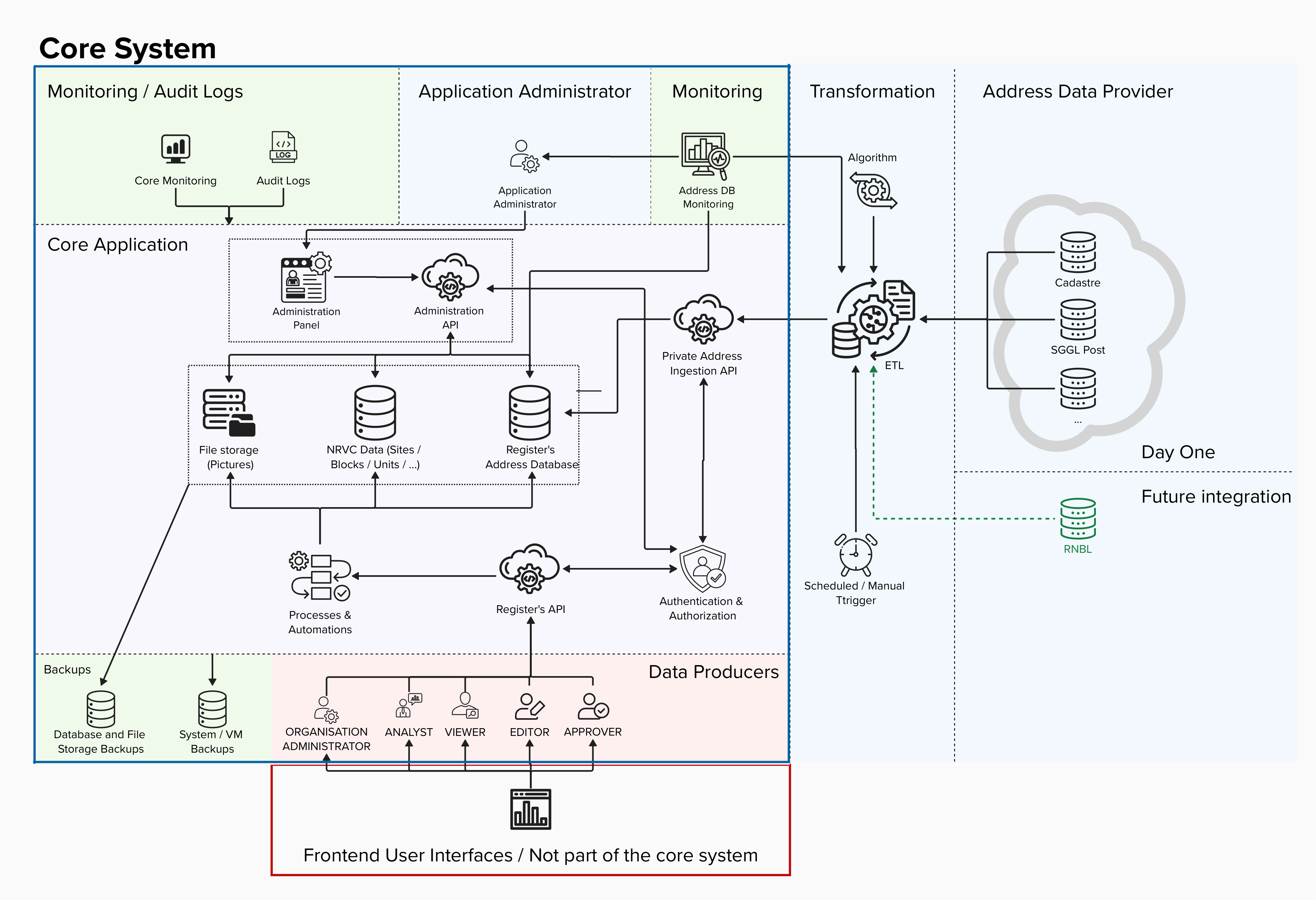
|
The background colors of the above image are to be interpreted as:
|
5.1. Core system
The core system comprises all parts of the application that are part of the scope of the RNCV project. This includes
- The register’s address database - this database is mainly used as cache and will be a consolidation of external address databases that are considered as being the source of truth. The register’s database will contain links to these external database in form of external IDs that will be stored to be able to reconcile / override the existing data with fresh data from the Address Data Providers.
- The RNCV data - this is the database that will contain the core data of the system (sites, blocks, units, equipments, …)
- File storage - will be used to store pictures
- Administration API - the endpoints that are meant for the Application Administrator roles
- Administration Panel - the panel that are meant for the Application Administrators. This panel will consume the Administration API
- Private Address Ingestion API - the endpoint used to populate the register’s address database with validated data from the external Address Data Providers
- Authentication & Authorisation - will be the service used to authenticate and authorise access to the users of the core system
- Register’s API - Is the main API used by all different Organisations that will produce and consume data from the RNCV
- Processes & Automations - represents the automations and validation processes that will be implemented by the backend
5.2. Supporting systems
- Backups - External backup systems
- Monitoring and Audit logs - External monitoring and audit log tools
5.3. Trusted parties
- Application Administrator - Represents the application administrator (MyConnectivity)
- ETL - The ETL process that will consolidate addresses from the Address Data Providers and ingest it into the core system
- Address Data Providers - Partners that have reliable address databases
5.4. External users
- Data Producers - the operators or other contributors / consumers of the RNCV data, that will access the system using the pre-defined user roles
- Frontend user interfaces - The data producers can implement their own user interfaces or integrate the APIs directly in their systems. These frontends or other integrations are out of scope of this project.
6. Organisational Cases
6.1. User management
All user management use cases are covered by the processes below.
Processes
6.2. Address ingestion
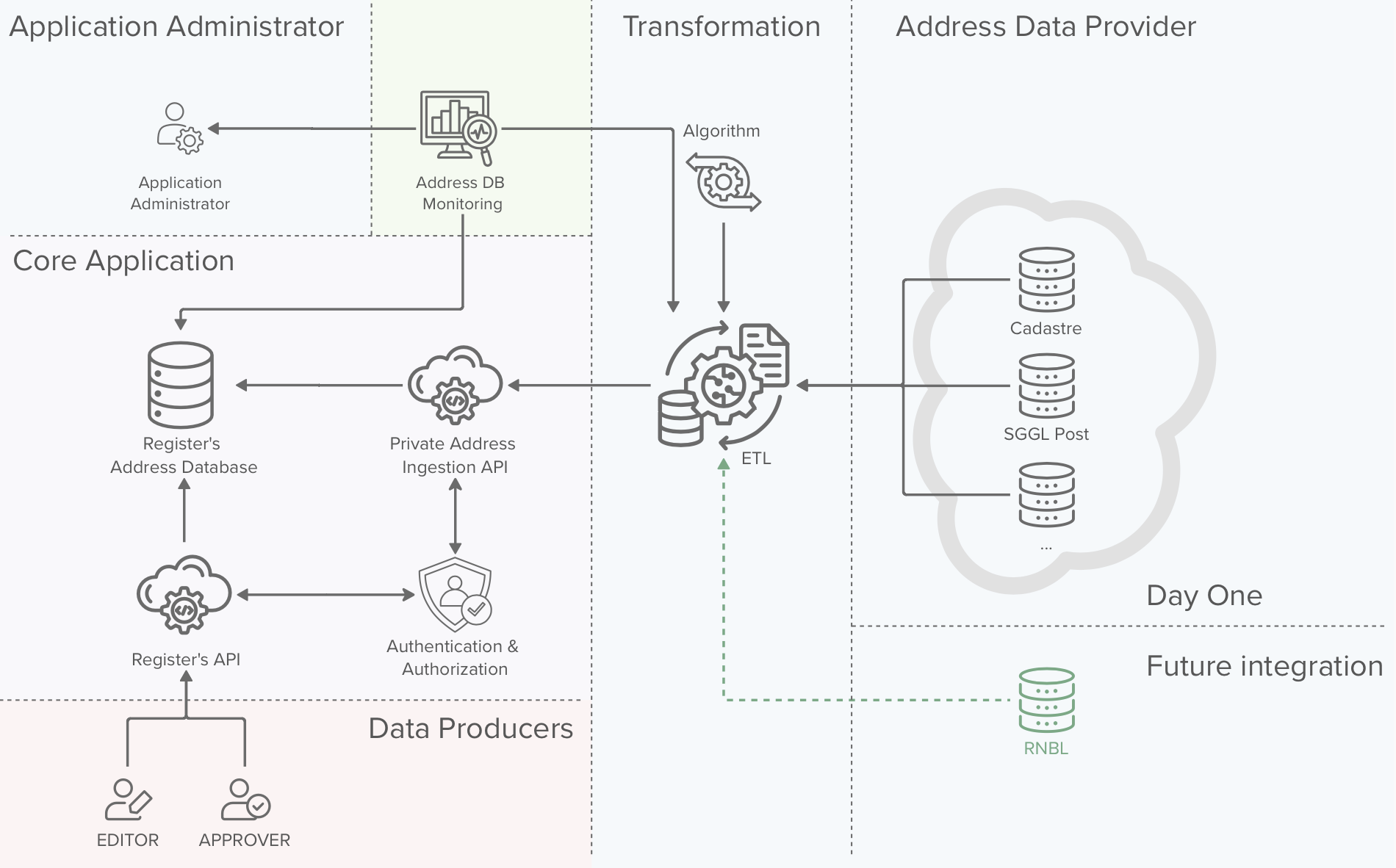
|
The background colors of the above image are to be interpreted as:
|
In this chapter we will have a look on how addresses are populated in the register. We will discuss about two scenarios:
- Addresses ingested via an ETL process
- Addresses ingested via the vertical cabling data producers
We will also discuss how the process will be monitored and the cases for which an alert will be sent to the application administrators.
Address ingestion via data producers
It is important that Data Producers, which are in most cases Technicians performing vertical cabling interventions, are not blocked in any way when trying to contribute to the RNCV. Therefore we need to consider the cases on which a data producer needs to insert a dataset for an address that does not yet exist on the system.
It is important to make a distinction between addresses ingested via the data producers and addresses inserted / validated by the ETL process.
An address ingested via the data producers is not considered as being a validated address until it has been validated by ETL process against the addresses of the Address Data Producers
The data producers can initiate two different address ingestion processes, The first consists in creating an address for a site that does not yet exist on the system and the second one consists in creating an address to be linked to an existing site or block. Both processes are described below.
Processes
7.2. Create missing address process
7.3. Create missing address for existing site or block process
Address ingestion via the ETL process
7.4. Address ingestion via the ETL process
Monitoring and alerting
The monitoring system will have two tasks:
- Monitor the health of the ETL process, making sure that the process runs with the right periodicity
- Monitor the data quality of the RNCV address database
If the system detects that an address in the RNCV address database has a flag “validated = false” and is older than a defined threshold (e.g. 1 month), the system will trigger an alert to the Application Administrators and / or Data Approvers.
The Application Administrators and / or Data Approvers are then responsible for validating the data and take corrective actions (delete or correct the data)
6.3. Versioning, approvals and audit logs
In order to fulfil the needs of the different parties, guarantee the data quality and accountability of each actor, three different mechanism are put in place:
| Mechanism | Purpose | Concerned data |
|---|---|---|
| Audit logs |
The purpose of audit logs is to keep track of who did what on the system. The audit logs contain the exact actions taken on the system and link them to the user / organisation that triggered the action.
The purpose is not to version data, but to keep track of changes and keep the users of the system accountable for their actions |
|
| Versioning |
The purpose of the versioning is to:
|
|
| Approvals |
Approval processes are put in place to guarantee data quality and to avoid unintentional destructive modifications. |
|
Versioning of physical links
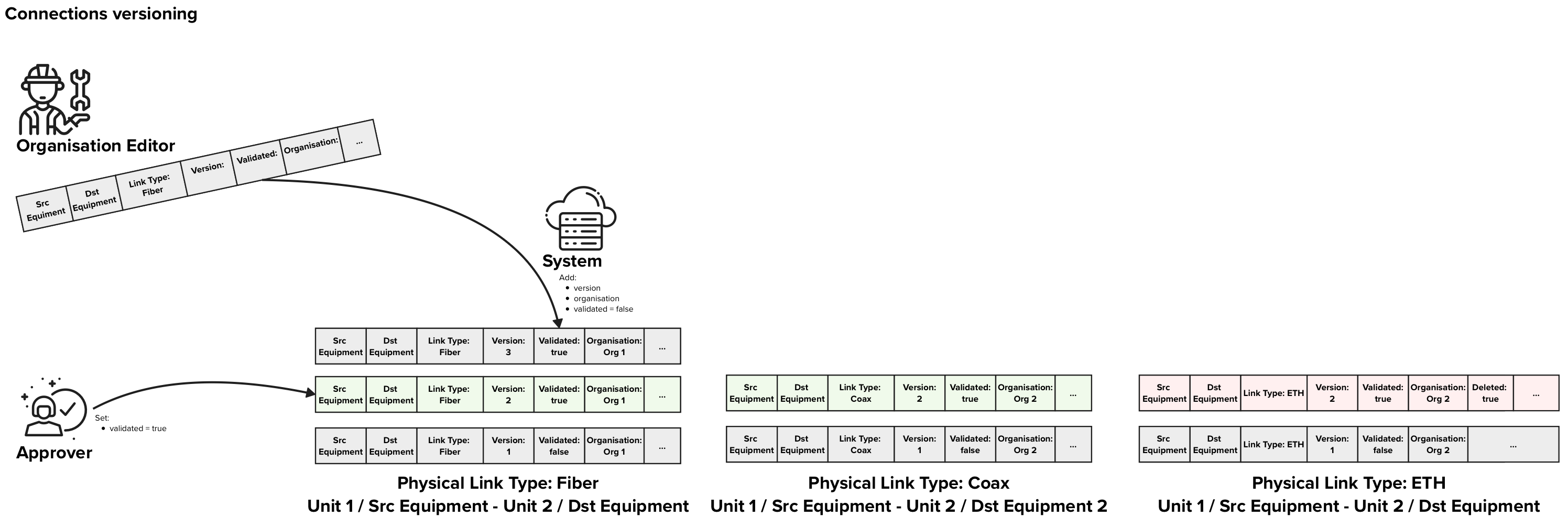
|
In the figure above each row of data represents on Physical Link data entry in the database. The background colors of the rows represent:
In this example, There are free approved Physical Links, two that indicate that Fiber and Coax are present between two units and one that indicates that ETH was removed. |
Description
Versioning of physical links between two equipments or an equipment and a unit in multi-dwelling units is a crucial part of the RNVC. In order to support the approval process, each version of a connection needs to have a flag “validated” that can be “true” or “false” to indicate if that specific version has been validated. Furthermore we also need a flag to explicitly indicate if a specific link type has been decommissioned.
When an Editor wants to send an update for a vertical cabling connection between an “Equipment 1” and an “Equipment / Unit 2”, the Editor creates a new connection with and POST it using the “physical links” endpoint. This POST contains following information:
- Source equipment
- Destination equipment or destination unit
- Link Type
- If all physical links of that specific link type were removed, a flag “deleted = true”
When receiving an update request, the system adds following information to it:
- timestamp of creation
- the editor that produced the data
- organisation to which the connection belongs is set to the Editor’s organisation
- version
- flag “validated = false”
The organisation approver always get the latest entry for a given connection that is not yet validated to validate. Once the validator has validated the entry following information is stored:
- flag “validated = true” or “rejected = true” depending on decision
- validation timestamp
- the approver
When retrieving data, the default version of the physical link returned are the latest validated once. The users can explicitly request the latest versions if needed or any other historical version.
Organisations with premium licenses
To be completed
Processes
7.5. Send update vertical cabling request process
7.6. Approve update vertical cabling request
Data deletion requests
The RNCV will contain some information that is very static by nature:
- addresses
- sites
- blocks
- units
- equipments
Due to the static nature of this data and to the fact that a history of the changes performed to this data is not relevant to the project, it has been decided not to keep any historical data on this data. Instead of versioning, audit logs will be used to keep track of who did what to the data.
One important principle is that once created these objects cannot and will not be deleted.
Instead if deleting the data a process is in place to mark data as deleted. This process involves an Editor marking the data as “to be deleted” and a Approver that will need to validate the deletion request. Furthermore Administrators and Organisation Administrators will have the power to recover deleted datasets.
Processes
7.7. Approve delete site request
7.8. Approve delete block request
7.9. Approve delete unit request
7.10. Approve delete equipment request
6.4. Data privacy
Data privacy has been one of the key considerations will design the data architecture of the RNCV. you will find below the key principle we followed during the development of the data architecture.
Principle 1: Data minimisation
Description
Only data that is strictly necessary to the RNCV will be collected. Each field collected is documented, justified and approved.
Implementation
Principle 2: Do not store private data if not absolutely needed
Description
Private data should not be stored except in very exceptional cases. Each field of data model where private data is stored or could be stored is documented, justified and approved by MyConnectivity.
Implementation
Principle 3: Fine-Grained Access Rights
Description
Each field stored in the RNCV will be limited in access (read and/or write) to the user roles that need it. Furthermore certain fields can only be modified/accessed from via specific APIs only exposed to a management and / or administration network.
E.g. Links between datasets and specific users that produced them are only visible by administrators, via the administration API that is only accessible via the Management access / network.
Implementation
3. User management & user roles
Principle 4: Purpose limitation
TODO with lawyers
The Organisations that receive access to the data should be contractually limited on what they can do with the accessed data.
6.5. Data quality
A lot of mechanisms are used to guarantee data quality. You will find below a brief explanation of all the mechanisms used and a link to the documentation where you can see them in action.
Data dictionary
Definition
The data dictionary contains all the terms, data objects and fields that are used in the context of the RNCV. The goal of the data dictionary is keep communication clear, consistent and meaningful for all involved parties.
Implementation
Inconsistent formats
Definition
Variability in formats, like dates or numbers, can lead to misinterpretation or processing errors. For instance, a date might be entered as "dd/mm/yyyy" in one place and "mm-dd-yyyy" elsewhere.
Implementation
Duplicate data
Definition
Duplicates often occur when data comes from multiple sources or overlapping imports. These duplicates can inflate datasets and introduce biases if not properly managed.
Implementation
6.3. Versioning, approvals and audit logs
6.9. Manual reviews and audits
Missing or incomplete data
Definition
Empty fields or missing essential information reduce the dataset’s completeness. This may result from data entry errors, system limitations, or gaps in data collection processes.
Implementation
Inaccurate or incorrect entries
Definition
Errors from manual entry or measurement inaccuracies can lead to faulty data. This includes misspelled names, transposed digits, or incorrect values.
Implementation
Inconsistent data standards
Definition
Lack of adherence to common standards (e.g., different units of measurement, terminology variations) makes it challenging to compare or aggregate data across sources.
Implementation
Poorly defined data
Definition
Ambiguous labels, unclear fields, or undefined variables can limit the data's usability by complicating its interpretation.
Implementation
Lack of data integrity
Definition
Missing links between related records or absence of primary keys in relational data can fragment datasets, making cohesive analysis difficult.
Implementation
Incorrectly classified data
Definition
Mislabelling categories or misclassifying items within datasets can skew analysis. For example, categorising a purchase as "corporate" instead of "personal" could mislead marketing analysis.
Implementation
Limited number of free text fields
Definition
It was decided to limit the number of free text fields to the minimum. Each free text field is defined in the data model alongside its justification and approval.
Implementation
Field validation rules
Definition
Every field has a well defined type and where possible an associated validation rule that limites the valid values that can be inputed. All mandatory fields are marked as such in the data model and the validation process will enforce these rules and return an error if any required fields are missing.
Implementation
Automatic validation processes
Definition
On top of the validation rules at the field level, where possible automated validation processes are put in place to detect and prevent invalid inputs.
E.g. If two equipments are too far away from each other to be connected by a cable, that physical link is not allowed by the system.
E.g.2: If an address is being created that already exists the system will return an error
E.g.3: If an address is created but similar addresses already exist (typo) the list of similar addresses is return for validation before proceeding with the creation of the new entry.
Implementation
6.3. Versioning, approvals and audit logs
6.8. Automatic data approvals and deletion
Manual Reviews
Definition
Even though automated processes are in place to ensure high quality standards, manual reviews of the data by experts can help identify and correct errors that automated systems might miss.
Implementation
6.3. Versioning, approvals and audit logs
6.9. Manual reviews and audits
Cross-referencing
Definition
Comparing data from multiple sources can help identify discrepancies and validate the accuracy of the data. Cross-referencing can be particularly useful for ensuring the consistency and reliability of data.
Implementation
Approval processes
Definition
Since the data ingestion process is 100% manual (usually performed by technicians on site) we need to consider the human error factor. From the discussions with the operators, the data produced by field technicians is considered as being highly qualitative and is fully trusted.
Nonetheless, human error can occur, therefore we created an approval process that redirects data ingested by field technicians to an Approver from his organisation that can perform sanity checks on the produced data records.
Implementation
6.3. Versioning, approvals and audit logs
Address database quality monitoring
Definition
Address ingestion into the RNCV database follows a process that is designed to keep the address database accurate and up to date. This process consolidates data from various datasources and approves addresses submitted by Editors.
Since the addresses submitted by the Editors are not considered as valid / approved but need to be validated by the ingestion process at a later stage, it could happen that some addresses are invalid and never get validated.
To cover such cases, a monitoring will be set up. This monitoring will configured to detect address entries that have not been validated within a reasonable amount of time. When such entries are detected, the Application Administrators and / or Approvers will receive an alert indicating that the entry needs to be manually validated.
Implementation
Versioning
Definition
Vertical cabling physical links between two equipments are crucial information whose quality needs to guaranteed. Once a physical link dataset is produced it cannot be deleted anymore, the produced data can then be validated or rejected.
If a problem is detected with a dataset, after it has been validated/rejected, this decision can be undone at a later stage by Administrators, effectively reverting the approved version to the previously approved version.
Implementation
6.3. Versioning, approvals and audit logs
Audit logs
Definition
Audit logs of every action performed on the system are kept. The audit logs are mainly kept for accountability, but can also be used to analyse drops in data quality. Furthermore since all actions performed are stored, the audit logs could be used as last resort to manually correct unintended or malicious actions.
Implementation
6.3. Versioning, approvals and audit logs
Systematic reviews
Definition
Audits involving systematic reviews ensure that datasets align with quality benchmarks and organizational standards. For example, checking for duplicates or data not conforming to predefined rules.
Implementation
Mark old data as deleted
Definition
Once data is inserted in the VC database it won’t be deleted anymore (sites, blocks, units, equipments, physical links) instead, it will be marked for deletion, and will go through a validation process. Once the data deletion is validated by the Approver or Organisation Approver, the data is marked as Deleted and the system will not allow new links to that data entry.
Note that user objects will also not be deleted from the system, but all personal data will be deleted (first name, last name, email, …)
Implementation
6.6. Data governance
To clearly identify the responsibilities of each user, you will find below a responsibility matrix (RACI - Responsible, Accountable, Consulted, Informed).
Definitions:
Responsible (R): The role that is responsible for executing the task / activity.
Accountable (A): The role that is accountable for the execution of the activity its correct execution and completeness. The person accountable for an activity is not necessarily the one responsible for executing it.
Consulted (C): A role whose opinion is sought for the given activity.
Informed (I): A role that is informed about the activity, but does not play an active part in it.
Matrix:
| MyConnectivity | MyConnectivity | Organisation User | Organisation User | Organisation User | Organisation User | |
|---|---|---|---|---|---|---|
| Activity / Role | Application Administration | Analyst | Organisation Administrator | Editor | Approver | Viewer |
| Produce Data | C | I | C | R | A | I |
| Data quality of data produced by the organisation (approve / reject) | R, A | I | R | R | A | I |
| Undo Approvals | R, A | I | R, A | I | C | I |
| General System reliability | R, A | C | I | I | I | I |
| Query Data Subsets | I | I | I | I | I | R, A |
| Analyse Data | I | R,A | I | I | I | I |
Additional clarifications concerning data quality
Editor
Editors are responsible for producing high quality VC data.
Approvers
Approvers are accountable for the quality of the VC data produced by their organisation’s Editors.
Organisation Administrators
Organisation administrators are responsible for undoing actions data approvals done by mistake by the Approver. This action is done upon request from the Approver.
Application Administrators / MyConnectivity
The application administrators / MyConnectivity are responsible for performing manual validation tasks to ensure the data quality. These can be tasks linked with automatic processes (e.g. address ingestion process, is not able to validate an existing address), or manual period data validations.
The application administrators / MyConnectivity are responsible for the overall data quality of the system, for the automatic data quality processes as well as for the periodic auditing of the overall data quality.
6.7. Fair usage (access limitations)
The goal of the RNCV is to created a shared, reliable and fair data source of vertical cabling data. Therefore it is important to guarantee that each user of the RNCV not only consumes the available data but also contributes to it. To promote a fair usage of the data a faire usage policy will be developed and implemented.
You will find below a few suggestions for such a policy which can be enforced by the system, but the exact policy and its implementation still need to be defined in collaboration with the stakeholders.
Faire usage policy
MyConnectivity will generate reports on the contributions and consumptions of each actor and regularly control that all actors are contributing fairly to the system. If an irregularity is detected, MyConnectivity would trigger discussions with the given actor to solve the issue.
Rate limits
Rate limits are also implemented to prevent one IP to flood the system with requests. This limit is set to 5 requests per second for IPs that are not whitelisted, and 100 requests per second for whitelisted IPs. The IPs of all the different partners will be whitelisted and the exact amount of allowed requests per second will be adapted if needed based on the real API usage.
6.8. Automatic data approvals and deletion
Keeping multiple versions of the system physical links information in the RNCV has some side effects that allow us to implement automated data approval and data deletion processes that we will describe below.
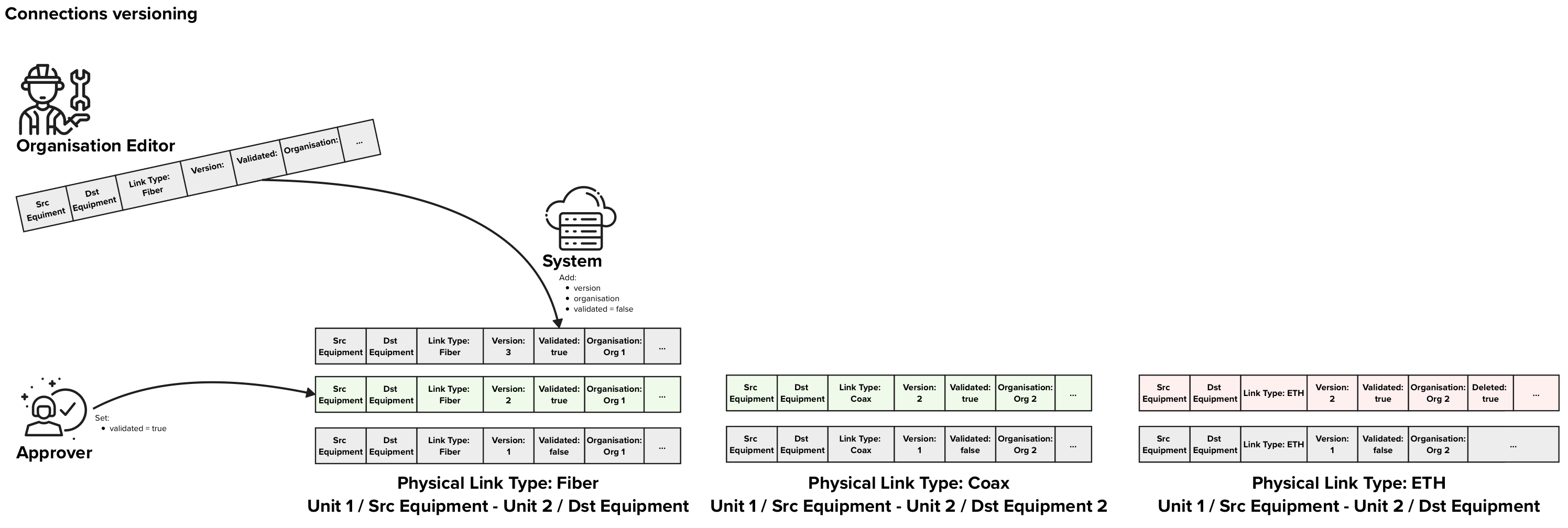
|
In the figure above each row of data represents on Physical Link data entry in the database. The background colors of the rows represent:
In this example, There are free approved Physical Links, two that indicate that Fiber and Coax are present between two units and one that indicates that ETH was removed. |
Automatic data approvals
Each time an Editor performs an intervention in a given unit / block / site, he should send an update for the concerned physical links, no matter if anything changed or not.
E.g. if three interventions take place for customer A that has a fiber installed in between a socket in his apartment and an NTP, each time the technicians would send an update to the RNCV with the information that fiber is present in between that socket and the given NTP.
If the system receives three consecutive updates for the same source equipment and destination equipment on different days or from different organisations, we can infer that the information is correct and should be automatically approved.
Furthermore if the system receives consecutive update requests that confirm a current state that is already approved, these updates can be automatically approved, and wont need any manual approval.
Soft delete and Automatic data deletion
Soft delete
In chapter 6.5. Data Quality we introduce the notion of “soft delete”. The “soft delete” consists in marking data as deleted which will have following effects:
- The system will consider the data as being deleted and will behave as if the records do not exist
- The data is still kept for auditing purposes and historical analysis
Soft deletes are triggered manually by the Editors and approved by the Approvers and do not involve any automatic process. These is useful to indicate that buildings, blocks, units or equipments have been demolished / decommissioned.
Special case: Physical Links versioning
Physical Links consist a special case since we might have multiple versions of the physical links that contain exactly the same information. Multiple technicians might go to the same sight over a period of a few years and insert the same information into the RNCV.
This is desirable as we want to make sure that the information in the RNCV is still accurate with the reality on site and we want to have these entries as often as possible, to keep the confidence on the data as high as possible.
This will result in scenarios where the same data is populated multiple times over the course of multiple years. The reason to keep these multiple entries for the same physical links are:
- Keep track of the contributions of each Organisation.
- Keep the data up to date and reliable by requiring the updates to be sent as often as possible
- Enable the automatic approval processes as described in this chapter
Automatic deletion of old redundant Physical Link versions

Example 1: Two recent entries and 4 old entries that are identical, are reduced to only one old entry and the two recent ones are left untouched.
After a period of X years, where X will be defined by MyConnectivity based on their needs, the information carried by the redundant records will not carry any added value anymore:
- There is no need to keep track of the number of contributions performed by each Organisation X years ago
- Data older than X years is not considered as reliable as recent data since the situation on site might have changed in the meantime
Therefore an automatic process will be implemented that will delete redundant records that do not carry addition relavant information. Only records the datasets that record a change in the vertical cabling are kept to keep track of dates when these changes occurred. All other records do not carry any additional relevant information and can be deleted.
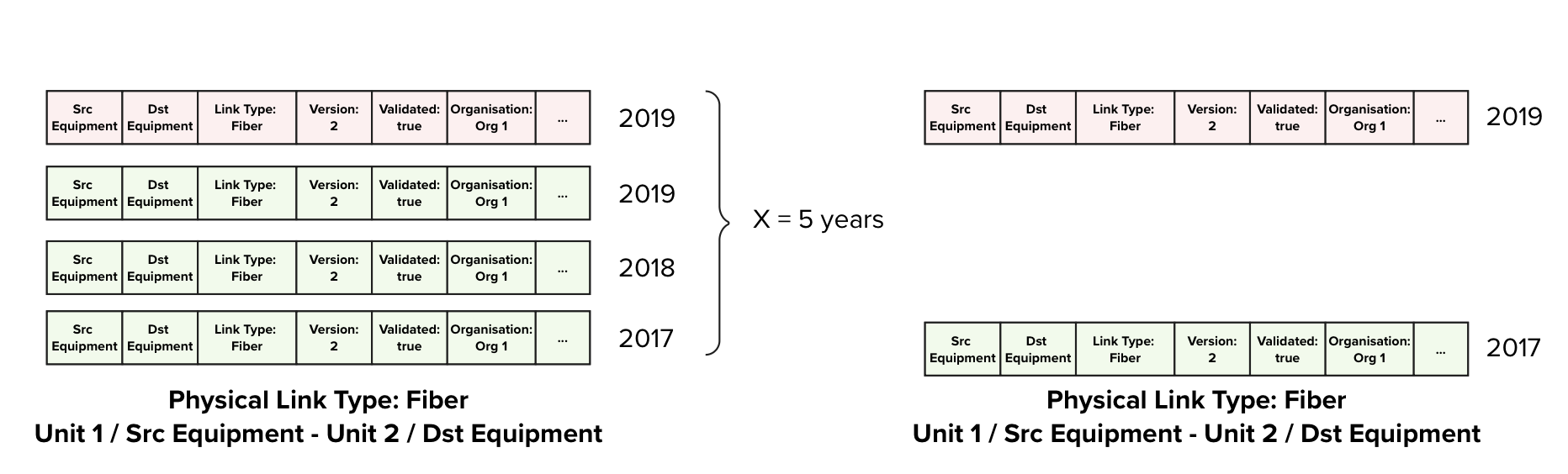
Example 2: Four old entries. The are identical and one denotes that Fibre has been decommissioned, only two records are kept, the earliest that recorded the presence of Fibre, and the record that marks the date when Fibre was decommissioned.
6.9. Manual reviews and audits
Once a year data will be manually reviewed and Audited. The review will be done by an internal Analyst that is a domain expert, whereas the Audit can be performed by either an internal or an external auditor.
Data Review
The purpose of the review is to perform a high-level assessment by a domain expert to identify:
- Duplicates in the dataset
- Inconsistent data
- Cross-references data with external data sources to make sure that the data is accurate
- Issues that the automated processes might have missed
Data Audit
The audit is a more in-depth and systematic examination, ensuring that datasets align with quality benchmarks and organisational standards. It will focus on:
- Checking for duplicates
- Verifying the accuracy and integrity of the data
- Ensuring compliance with the policies defined in the architecture
- Assessing the effectiveness of data management processes
Both the review and audit will help maintain data quality and ensure continuous improvement in data governance.
6.10. Consistency checks
This section is meant to be used and completed during the entire lifetime of the project. All consistency checks that are not part of the global architecture concepts will be listed here for completeness and documentation purposes.
These are the checks that will be performed by the Analyst and the analyst will decide on a case by case on how to handle the results (correct, delete, mark for review).
| Name | Check |
| FDB Links consistency checks | Check if the same unit is connected via a FDB and via a direct link at the same time |
7. Processes
7.1. User management processes
User creation process
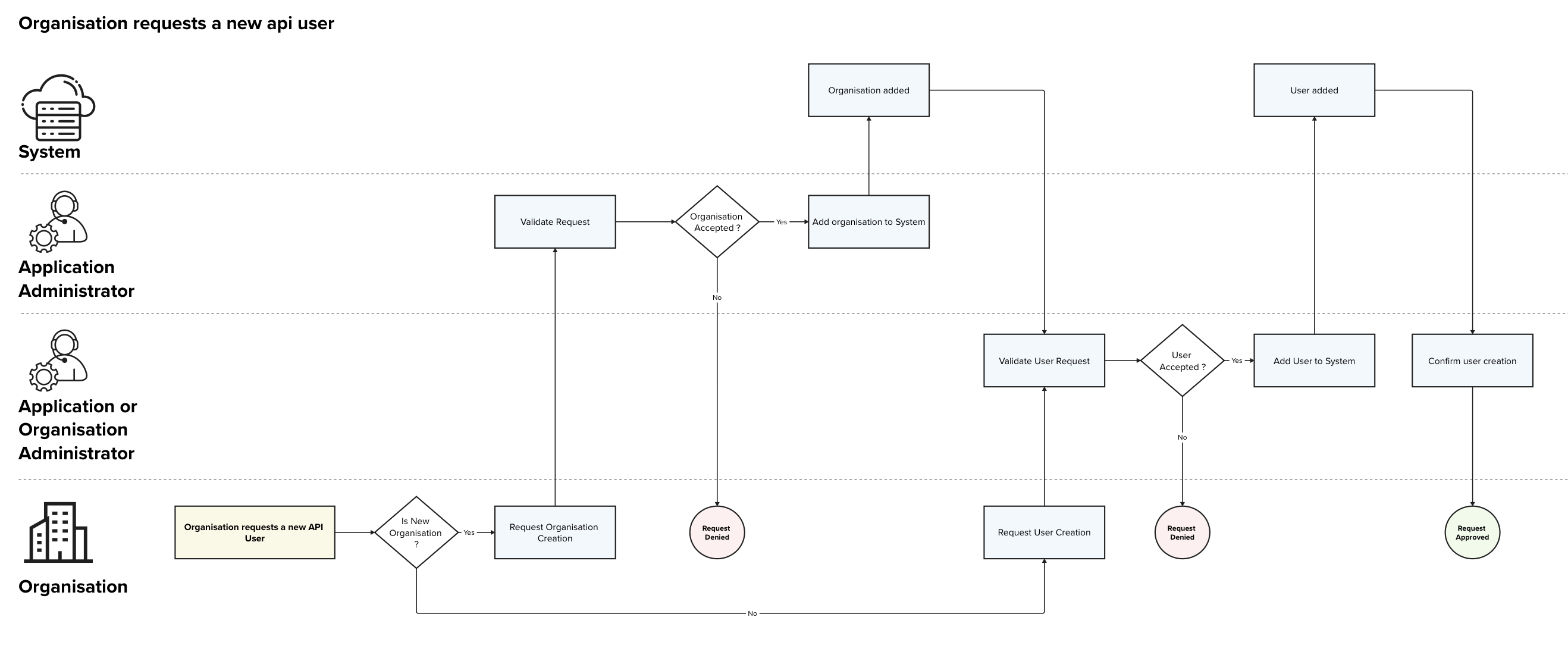
f an organisation requires a new user, two possible scenarios arise, either the organisation already exists in the system, or a new organisation needs to be created.
New organisation
For new organisations the request needs to be send to the Application Administrator (MyConnectivity) that is the only role that can create new organisations. The requests is then analysed and approved / rejected by the Application Administrator.
If the organisation is approved, it gets inserted in the system and then the application administrators can treat the API user request as any other user request.
New API user
New users can be requested to the Application Administrator or, if the organisation already exists in the system and the organisation has an Organisation Administrator, to an Organisation Administrator. The Administrator then analyses the request and can approve or reject it.
If the user is approved, it is inserted in the System and a Administrator confirms its creation to the requestor. The way the user will receive his credentials will depend on the Authentication Provider used and will not be described here.
User deletion process
Organisation Administrators as well as Application Administrators can mark users as deleted. Marking the users as deleted will make it impossible for that user to login. Furthermore the system will not allow any creation of new links to that user, effectively it is as if the user would not exist anymore.
The user itself does not get deleted and any potential private data will be deleted. The goal of keeping this data is to keep a trace of which user object performed which operations in the system and to be able to identify to which organisation it belonged.
The system will automatically mark users as inactive if they are not used for a period of time defined by MyConnectivity. Inactive users will be deleted after a given time, if they are not re-activated.
Inactive user deletion process
Users can be marked as inactive, if they will not be using the system for a while (e.g. suspended account or temporary deactivation). Inactive users cannot login an cannot perform any action on the system.
If an inactive user is not re-activated within a reasonable time interval X, the user will be automatically deleted. The exact value of X will be a parameter chosen by MyConnectivity, that can be adapted as needed.
Organisation deletion process
Organisation deletion follows the same principles as the user deletion process, except that the organisations can only be marked as deleted by Application Administrators.
When an organisation is marked as deleted, all users linked to the organisation are also marked as deleted.
Organisations must be explicitly deleted and are not automatically deleted when no users are assigned to it, this is important as an organisation can also be used in contexts others then document production (e.g. as a owners of equipments or contacts for a building)
7.2. Create missing address process
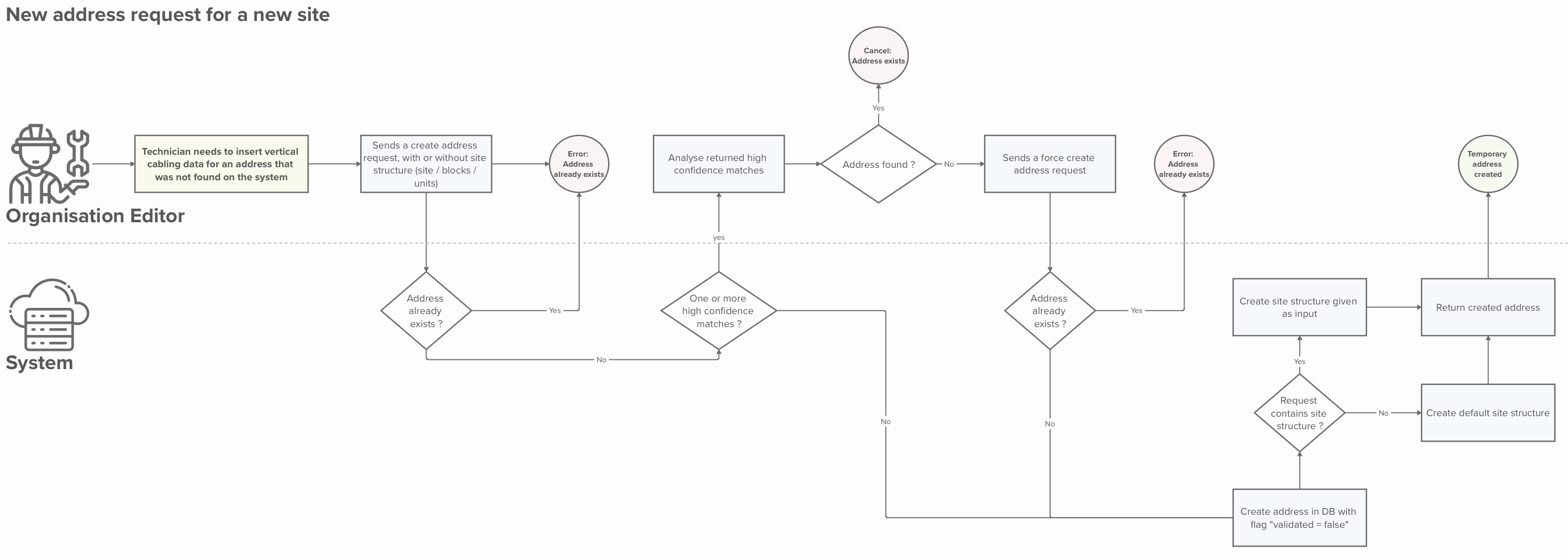
| Name | Create Missing Address Request |
|---|---|
| Purpose | Allow Editors to add missing addresses to the system, so that they are not blocked during the data ingestion processes. |
| Linked user stories | 4.28. Editor - Create temporary address |
| APIs used | POST /addresses |
| Scope | This process only handles the creation of the address in a temporary state. This state will allow the Editors to enter data into the vertical cabling database for that temporary address. The process of validating and approving the temporary addresses is out of the scope of this process. |
| Roles | Organisation Editor, System |
| Input | - address (mandatory) - site structure, including site → blocks → units (optional) |
| Output | - temporary address - the given site structure or the default one if not structure was provided |
Detailed Process description
Main process
| Step | Description | Actor(s) | Input(s) | Output(s) | Decision points |
|---|---|---|---|---|---|
| 1 | An Editor sends a “create address request”. | Editor | - Address (mandatory) - Site structure (optional) |
- | |
| 2 | The system checks if the address already exists | System | - Address (mandatory) - Site structure (optional) |
- yes / no | If the address does not exist: - the ingestion process continues (Step 3) If the address exists: - An error is returned (E.1. Address exists) |
| 3 | The system checks if their are high confidence matches (e.g. potential spelling mistakes in the street / locality) | System | - Address | - list of high confidence matches (if any) | If no high confidence matches: - the ingestion process continues (Step 4) If high confidence matches are found: - Matches are returned to the Editor for verification (secondary process: S.1. High confidence address verification) |
| 4 | The system creates the address in the database with a flag indicating that it is a temporary address that is not yet validated. | System | - Address (with flag validated=false) | - Newly created address | |
| 5 | The system checks if a site structure was sent with the “create address request”. | System | - Create address request | - yes / no | If a site structure is provided: - the provided structure is created. If no site structure is provided: - a default structure is created. |
| 6.a | The system creates the provided site structure | System | - Requested site structure | - Newly created site structure | |
| 6.b | The system creates the default site structure | System | - | - Newly created default site structure | |
| 7 | The system returns the created address and the site structure | System | - | - Newly created address and site structure | |
| 8 | The Editor gets the newly requested address | Editor | - | - Newly created address and site structure |
Secondary Processes
S.1. High confidence address verification
| Step | Description | Actor(s) | Input(s) | Output(s) | Decision points |
|---|---|---|---|---|---|
| 1 | System returns a list of high confidence address matches | System | - | - list of high confidence matches | |
| 2 | Editor verifies if the address is present in the list | Editor | - list of high confidence matches | - yes / no | If address not present: - the secondary process continues (S.1. Step 3) If address present: - the ingestion process is canceled (E.2. Address exists) |
| 3 | The Editor sends again a “create address request” but this time flags it as forced (force = true) | Editor | - Address (mandatory) - Site structure (optional) |
- | |
| 4 | The system checks if the address already exists | System | - Address (mandatory) - Site structure (optional) |
- yes / no | If the address does not exist: - the main process continues (Step 4) If the address exists: - An error is returned (E.1. Address exists) |
Error Processes
E.1. Address exists (System error)
| Step | Description | Actor(s) | Input(s) | Output(s) | Decision points |
|---|---|---|---|---|---|
| 1 | System returns an error indicating that the address already exists | System | - | Error: Address exists |
E.2. Address exists (Editor cancel)
| Step | Description | Actor(s) | Input(s) | Output(s) | Decision points |
|---|---|---|---|---|---|
| 1 | Editor finds the address in the high confidence matches returned by the system. The process is canceled. |
Editor | - | - |
Additional Information
Address matching processes
Exact match (link to algorithm or process)
High confidence match (link to algorithm or process)
Default site structure

If no site structure is sent with the “address creation request”, a default site structure will be created composed of a site, to which one block is linked. No units are created by default, as more information is needed to create the units (floor, identification).
Exceptions
[400 Bad Request] Invalid input:
If mandatory fields are missing or fields are invalid, the system returns an error message.
[409 Already Exists] Address already exists
If the Editor attempts to add an address that already exists, an error is returned.
[300 Similar exists] High confidence matches
If the Editor attempts to add an address for which the system detects high confidence matches and the force flag is set to false, the system return an error 300 and the list of high confidence matches.
[500 Internal Server Error] System Error
If the system fails to save changes due to an internal error, it displays an appropriate message and logs the error for further investigation.
7.3. Create missing address for existing site or block process
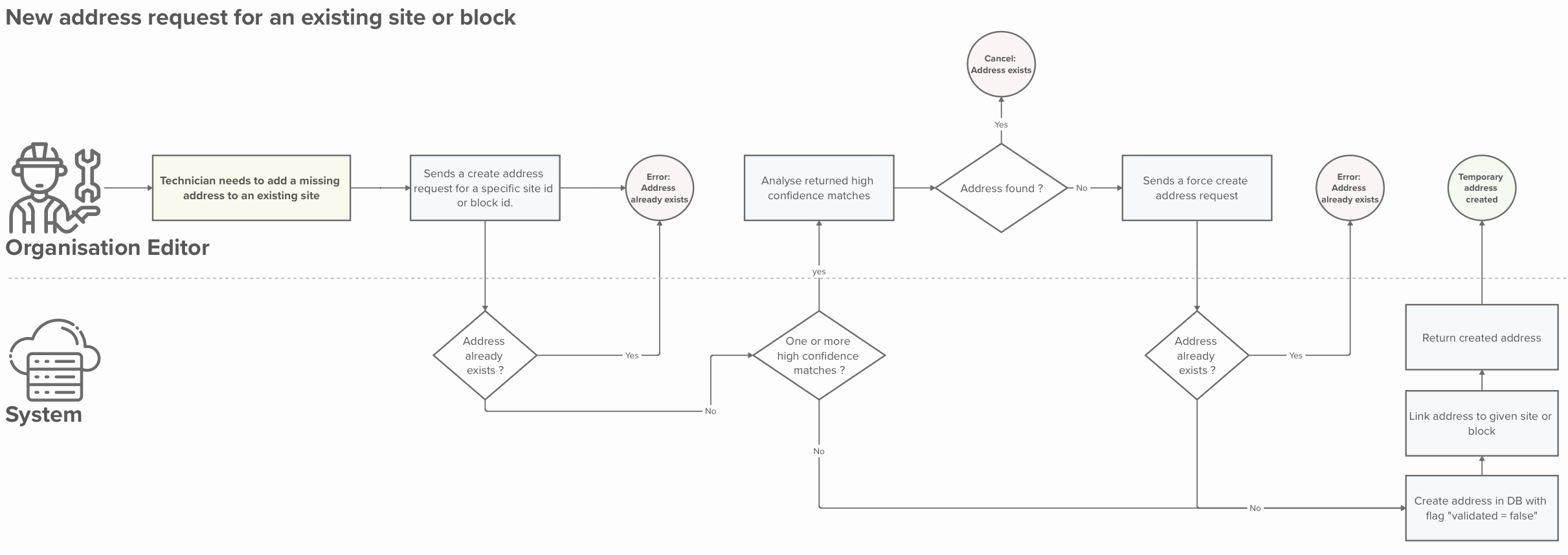
| Name | Create missing address for existing site or block process |
|---|---|
| Purpose | Allow Editors to add missing addresses for an existing site or block to the system, so that they are not blocked during the data ingestion processes. |
| Linked user stories |
4.29. Editor - Create an additional temporary address for an existing site 4.30. Editor - Create an additional temporary address for an existing block |
| APIs used | POST /sites/<site-id>/addresses POST /blocks/<site-id>/addresses |
| Scope | This process only handles the creation of the address in a temporary state and link it to an existing site or block. This state will allow the Editors to enter data into the vertical cabling database for that temporary address. The process of validating and approving the temporary addresses is out of the scope of this process. |
| Roles | Editor, System |
| Input | - site id or block id (mandatory) - address (mandatory) |
| Output | - temporary address linked to the given site or block - the site structure attached the address |
Detailed Process description
Main process
| Step | Description | Actor(s) | Input(s) | Output(s) | Decision points |
|---|---|---|---|---|---|
| 1 | An Editor sends a “create address request” for an existing site or block. | Editor | - Site id or Block id - Address (mandatory) |
- | |
| 2 | The system checks if the address already exists | System | - Site id - Address (mandatory) |
- yes / no |
If the address does not exist:
If the address exists:
|
| 3 | The system checks if their are high confidence matches (e.g. potential spelling mistakes in the street / locality) | System | - Address | - list of high confidence matches (if any) |
If no high confidence matches:
If high confidence matches are found:
|
| 4 | The system creates the address in the database with a flag indicating that it is a temporary address that is not yet validated. | System | - Address (with flag validated=false) | - Newly created address | |
| 5 | The system links the address to the given site or block | System | - Create address request | - Address linked to the given site or block | |
| 6 | The system returns the created address and the site structure | System | - | - Newly created address and site structure | |
| 7 | The Editor gets the newly requested address | Editor | - | - Newly created address and site structure |
Secondary Processes
S.1. High confidence address verification
| Step | Description | Actor(s) | Input(s) | Output(s) | Decision points |
|---|---|---|---|---|---|
| 1 | System returns a list of high confidence address matches | System | - | - list of high confidence matches | |
| 2 | Editor verifies if the address is present in the list | Editor | - list of high confidence matches | - yes / no |
If address not present:
If address present:
|
| 3 | The Editor sends again a “create address request” but this time flags it as forced (force = true) | Editor | - Address (mandatory) - Site structure (optional) |
- | |
| 4 | The system checks if the address already exists | System | - Address (mandatory) - Site structure (optional) |
- yes / no |
If the address does not exist:
If the address exists:
|
Error Processes
E.1. Address exists (System error)
| Step | Description | Actor(s) | Input(s) | Output(s) | Decision points |
|---|---|---|---|---|---|
| 1 | System returns an error indicating that the address already exists including the site it is attached to. | System | - | Error: Address exists |
E.2. Address exists (Editor cancel)
| Step | Description | Actor(s) | Input(s) | Output(s) | Decision points |
|---|---|---|---|---|---|
| 1 | Editor finds the address in the high confidence matches returned by the system including the site it is attached to. The process is canceled. |
Editor | - | - |
Additional Information
Address matching processes
Exact match (link to algorithm or process)
High confidence match (link to algorithm or process)
Exceptions
[400 Bad Request] Invalid input:
If mandatory fields are missing or fields are invalid, the system returns an error message.
[409 Already Exists] Address already exists
If the Editor attempts to add an address that already exists, an error is returned.
[300 Similar exists] High confidence matches
If the Editor attempts to add an address for which the system detects high confidence matches and the force flag is set to false, the system return an error 300 and the list of high confidence matches.
[500 Internal Server Error] System Error
If the system fails to save changes due to an internal error, it displays an appropriate message and logs the error for further investigation.
7.4. Address ingestion via the ETL process
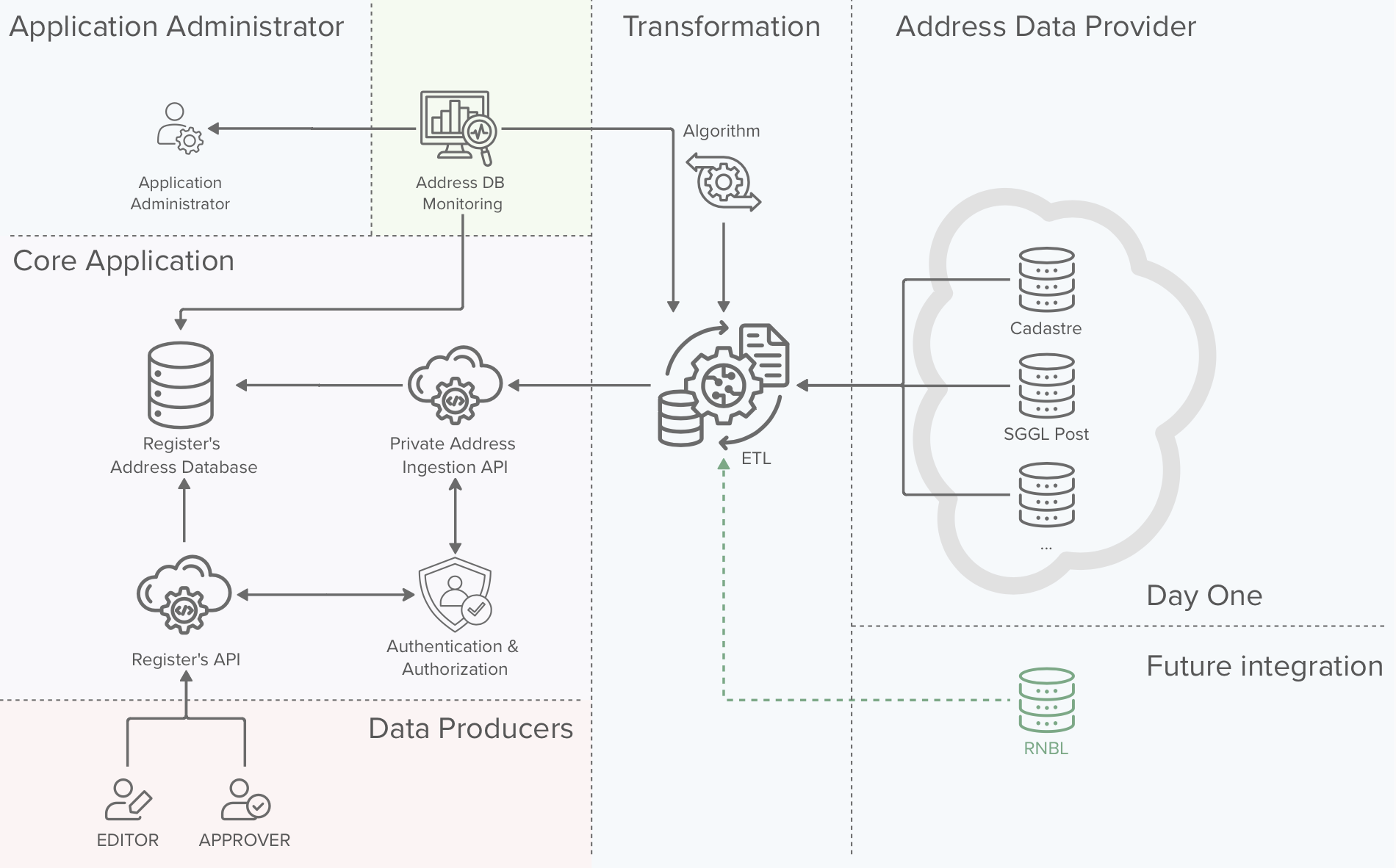
|
The background colors of the above image are to be interpreted as:
|
The ETL process that is responsible for ingesting data from one or multiple trusted external Address Data Providers, is a key element of the RNCV. The ETL is responsible for:
- Ingest new addresses present on the Address Data Providers.
- Correct existing addresses
- Validate addresses ingested by the Data producers
You will find below a high level representation of the ingestion process. The exact algorithms used by the ETL process are out of the scope of this project and therefore are abstracted as a black box in the process description
The ETL algorithm is out of scope of this project
ETL Process
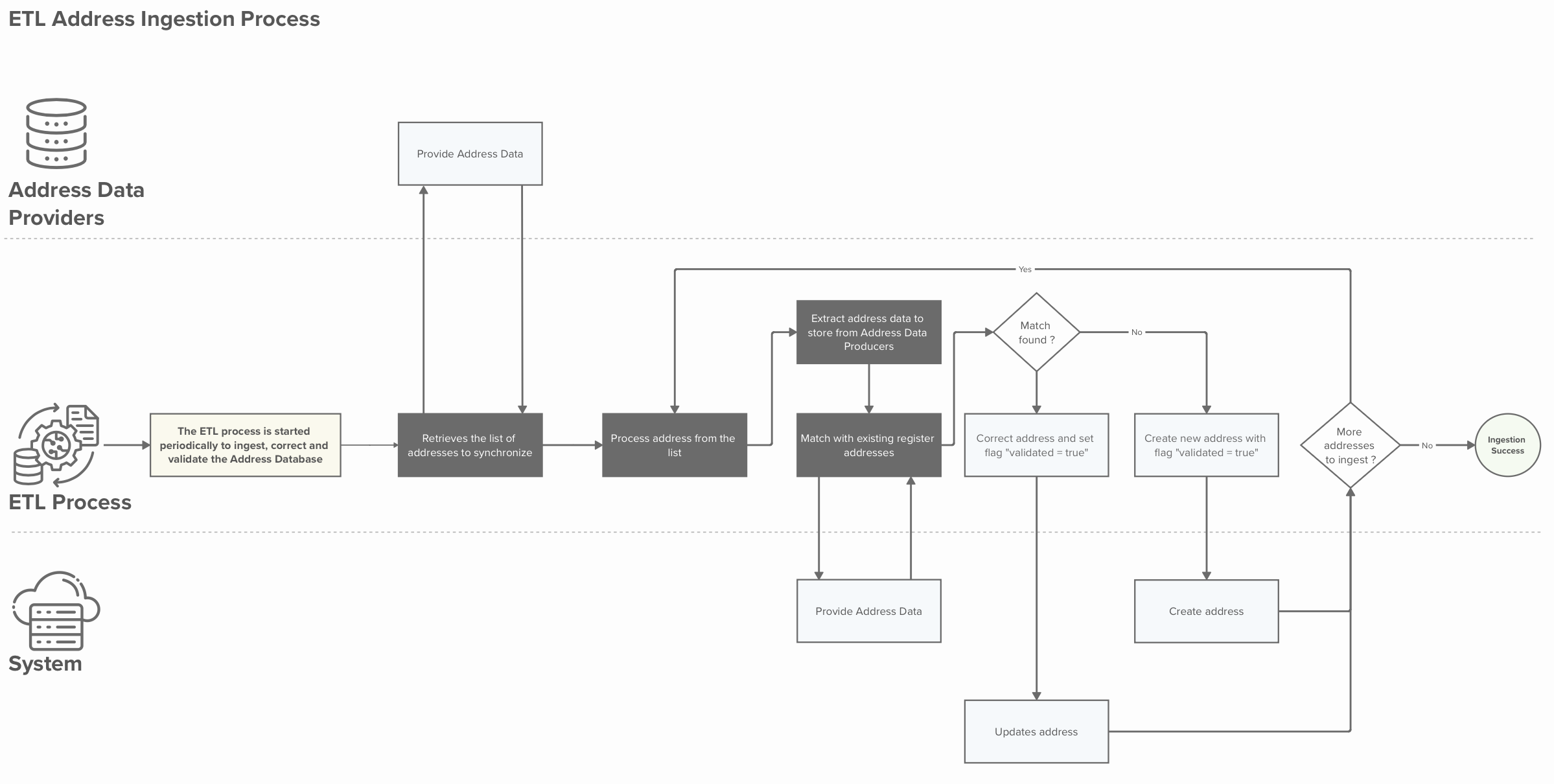
| Name | Address ingestion via the ETL process |
|---|---|
| Purpose | Ingest and validate address data to maintain the quality of the RNCV’s address database database to the highest standards |
| Linked user stories | |
| APIs used | GET /etl/addresses POST /etl/addresses GET /etl/addresses/<address-id> PUT /etl/addresses/<address-id> PATCH /etl/addresses/<address-id> |
| Scope | This process handles the ingestion of addresses into the RNCV’s address database. It also handles the correction and validation of existing address data. This exact algorithm used by the ETL process is out of scope of this process. |
| Roles | ETL, System |
| Input | - Addresses from the Address Data Providers - Algorithm for the address data consolidation |
| Output | - Consolidated and up to date RNCV address database |
Detailed Process description
Main process
| Step | Description | Actor(s) | Input(s) | Output(s) | Decision points |
|---|---|---|---|---|---|
| 1 | The ETL process is periodically triggered | ETL | - | - | |
| 2 | The ETL process retrieves the data to synchronise from the Address Data Providers | ETL | - | - addresses to synchronise | |
| 3 | The ETL process process one address from the addresses to synchronise (could be done in parallel) | ETL | - addresses to synchronise | - next address to synchronise | |
| 4 | The ETL process extracts the address information to be stored in the RNCV address database | ETL | - address to synchronise | - address information to be ingested | |
| 5 | The ETL process searches for address matches in the RNCV address database | ETL | - address information to be ingested | - address present in the RNCV address database if any | |
| 6 | The ETL process checks if the address is present in the RNCV address database | ETL | - address present in the RNCV address database if any | - yes / no | If the address is present: Go to step 7 Else: Go to secondary process S.1. |
| 7 | Correct address information and set the flag “validated = true” | ETL | - RNCV address | - Corrected RNCV address with flag “validated = true” | |
| 8 | System applies the address update | System | - Corrected RNCV address with flag “validated = true” | - Corrected RNCV address with flag “validated = true” | |
| 9 | The ETL process checks if more addresses need to be synchronised | ETL | - addresses that still need to be synchronised | - yes / no | If there are still addresses to be synchronised: Go to step 3 Else: Go to step 10 |
| 10 | The ETL process terminates successfully | ETL | - | - |
Secondary Processes
S.1. Address does not exist in the RNCV address database
| Step | Description | Actor(s) | Input(s) | Output(s) | Decision points |
|---|---|---|---|---|---|
| 1 | The ETL process creates a new Address with the flag “validated = true” | ETL | - address information to be ingested | - RNCV address to be created | |
| 2 | The system creates the given address | System | - RNCV address to be created | - RNCV address created | Go to Main process step 9 |
Additional Information
Error processing during the ETL process
If an error occurs during the ETL process (internal error, or error while using an external API), the system should log the error and process the next address. An error triggered during the processing of one address should never interrupting the ETL process for subsequent addresses, except if it is a system wide error, that would prevent all addresses from being processed.
7.5. Send update vertical cabling request process
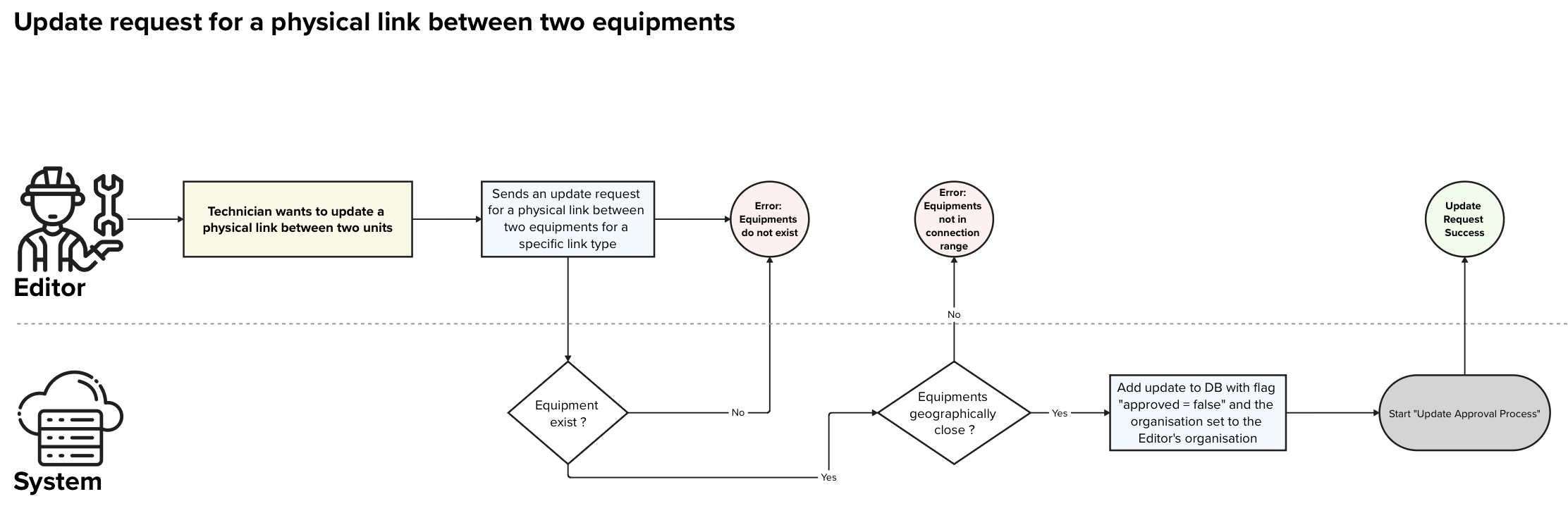
| Name | Send update vertical cabling request process |
|---|---|
| Purpose | Allow Editors to send an update request for a vertical cabling entry between two equipments |
| Linked user stories | |
| APIs used | POST /physical-links |
| Scope | This process only handles the creation of an update request for a vertical cabling entry between two existing equipments. The process of validating and approving the entry is handled in a dedicated process. |
| Roles | Organisation Editor, System |
| Input | - source equipment (mandatory) - destination equipment or destination unit (mandatory) - link type (mandatory) - additional metadata |
| Output | - confirmation that the update request has been transmitted |
Detailed Process description
Main Process
| Step | Description | Actor(s) | Input(s) | Output(s) | Decision points |
|---|---|---|---|---|---|
| 1 | An Editor sends a “update vertical cabling request” for two existing equipments and a specific link type. | Editor | - source equipment (mandatory) - destination equipment or destination unit (mandatory) - cable type (mandatory) - additional metadata |
- | |
| 2 | The System verifies that the two equipments exist | System | - yes / no | If the equipments / unit exist: - the process continues (Step 3) If the equipments / unit do not exist: - An error is returned (E.1. Equipments not found) |
|
| 3 | The System verifies if the equipments / unit are geographically close enough to be connected | System | - equipments / unit addresses | - yes / no | If the equipments / unit are close enough: - the process continues (Step 4) If the equipments / unit are not close enough: - An error is returned (E.2. Equipments out of reach) |
| 4 | The System stores the connection in the database, adds the flag “approved = false” and the organisation of the Editor | System | - update vertical cabling request | - connection stored with the flag “approved = false” and linked to the Editor’s organisation | |
| 5 | The System triggers the approval process for the created connection | System | - stored connection | - approval process is triggered | |
| 6 | The Editor gets a confirmation that the update was successfully submitted | Editor | - submission confirmation |
Error Processes
E.1. Equipments or unit not found
| Step | Description | Actor(s) | Input(s) | Output(s) | Decision points |
|---|---|---|---|---|---|
| 1 | System returns an error indicating that one or both equipment(s) or the unit do not exist | System | - | Error: Equipments or unit do not exist |
E.2. Equipments or unit out of reach
| Step | Description | Actor(s) | Input(s) | Output(s) | Decision points |
|---|---|---|---|---|---|
| 1 | System returns an error indicating that the two equipments or uni are not geographically close enough to be connected. | System | - | Error: Equipments or unit not in connection range |
Additional Information
Deleting a cable type in between two equipments or unit
Deleting a cable type between two instances follows the same process as above. In that case the user indicates in the update request that he wants to flag the connection as “deleted = true”.
Exceptions
[400 Bad Request] Invalid input:
If mandatory fields are missing or fields are invalid, the system returns an error message. This includes the case in which one or both equipment(s) do not exist.
[409 Conflict] Equipments or unit out of reach
If the Editor attempts to add connection between two equipments or unit that are geographically too far away to be connected, the system should return an error.
[500 Internal Server Error] System Error
If the system fails to save changes due to an internal error, it displays an appropriate message and logs the error for further investigation.
7.6. Approve update vertical cabling request
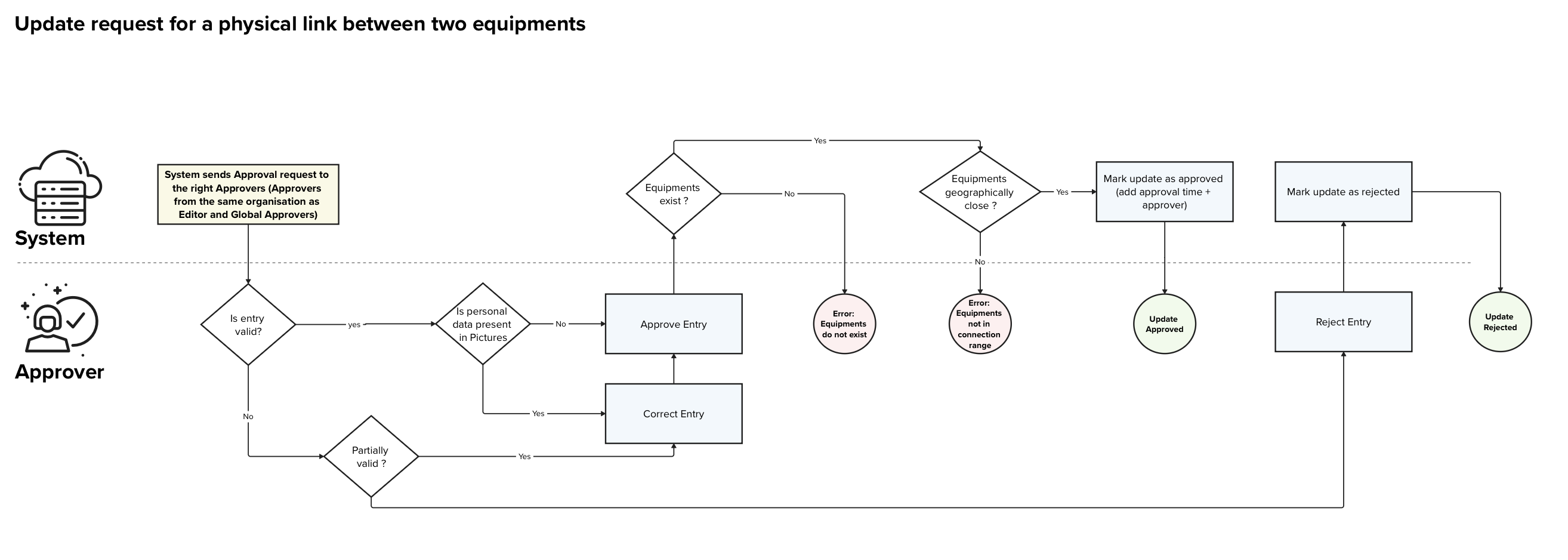
| Name | Approve update vertical cabling request |
|---|---|
| Purpose | Allow Approvers to validate an update request for a vertical cabling entry between two equipments |
| Linked user stories |
4.51. Approver - Approve or reject update vertical cabling request 4.56. Organisation Approver - Approve or reject update vertical cabling request for organisation |
| APIs used | PUT /physical-links/<physical-link-id>/approve PUT /physical-links/<physical-link-id>/reject PUT or PATCH /physical-links/<physical-link-id> |
| Scope | This process only handles the validation of an already created update vertical cabling request The process of creating the entry is handled in a dedicated process. |
| Roles | System, Approver / Global Approver |
| Input | - id of the physical link update to validate - optionally the information to amend: - source equipment (mandatory) - destination equipment or unit (mandatory) - cable type (mandatory) - additional metadata |
| Output | - confirmation that the update request has been approved/rejected |
Detailed Process description
Main Process
| Step | Description | Actor(s) | Input(s) | Output(s) | Decision points |
|---|---|---|---|---|---|
| 1 | The System sends out notifications to the Global approvers and organisation approvers, indicating that an approval a pending. | System | - Outside trigger (e.g. Editor sent a new update request) | - notification to the Global and organisation Approvers | |
| 2 | The Approver verifies if the entry is valid and up to the expected quality standards | Approver | - Update physical link request | - yes / no | If the entry is valid: - Go to step 4 Else: - Go to secondary process S.1 |
| 3 | The Approver verifies if pictures linked to the entry contain any private data | Approver | - Update physical link request | - yes / no | If the entry is valid: - Go to step 4 Else: - Go to secondary process S.1 |
| 4 | The Approver approves the entry | Approver | - Update physical link request | - update physical link request approval | |
| 5 | The System verifies if the equipments/unit for which a physical link approval is sent exist | System | - update physical link request to approve | - yes / no | If the equipments/unit exist: - Go to step 6 Else: - Go to error E.1 |
| 6 | The System verifies that the two equipments/unit are geographically close enough to be connected | System | - update physical link request to approve | - yes / no | If the equipments/unit are close enough: - Go to step 7 Else: - Go to error E.2 |
| 7 | The System marks the update as approved and adds the approval date as well as the approver | System | - update physical link request to approve | - Approved update request | |
| 8 | The Approver gets notified that the approval was successfully done | Approver | - update request approval confirmation | - |
Secondary Processes
S.1. Submitted update physical link request needs adaptations
| Step | Description | Actor(s) | Input(s) | Output(s) | Decision points |
|---|---|---|---|---|---|
| 1 | The Approver verifies if the update physical link request is partially valid and can be corrected | Approver | - update physical link request | - yes / no | If the request can be corrected by the approver: Go to step 2 Else: Go to secondary process S.2. |
| 2 | The Approver corrects the submitted update request | Approver | - update physical link request | - corrected update physical link request | Go back to main process Step 4 |
S.1. Submitted update is rejected
| Step | Description | Actor(s) | Input(s) | Output(s) | Decision points |
|---|---|---|---|---|---|
| 1 | The Approver rejects the entry | Approver | - update physical link request | - update physical link request rejection | |
| 2 | The System marks the request as rejected and adds the date as well as the approver to the rejected update request | System | - update physical link request rejection | - rejected update physical link request | |
| 3 | The Approver gets a confirmation that the update request has been rejected | Approver | - update physical link request rejection confirmation |
Error Processes
E.1. Equipments / unit not found
| Step | Description | Actor(s) | Input(s) | Output(s) | Decision points |
|---|---|---|---|---|---|
| 1 | System returns an error indicating that one or both equipment(s) / unit do not exist | System | - | Error: equipments / unit do not exist |
E.2. Equipments / unit out of reach
| Step | Description | Actor(s) | Input(s) | Output(s) | Decision points |
|---|---|---|---|---|---|
| 1 | System returns an error indicating that the two equipments / unit are not geographically close enough to be connected. | System | - | Error: equipments / unit not in physical link range |
Additional Information
Exceptions
[400 Bad Request] Invalid input:
If mandatory fields are missing or fields are invalid, the system returns an error message. This includes the case in which one or both equipment(s) / unit do not exist.
[409 Conflict] Equipments / unit out of reach
If the Editor attempts to add physical link between two equipments / unit that are geographically too far away to be connected, the system should return an error.
[500 Internal Server Error] System Error
If the system fails to save changes due to an internal error, it displays an appropriate message and logs the error for further investigation.
7.7. Approve delete site request
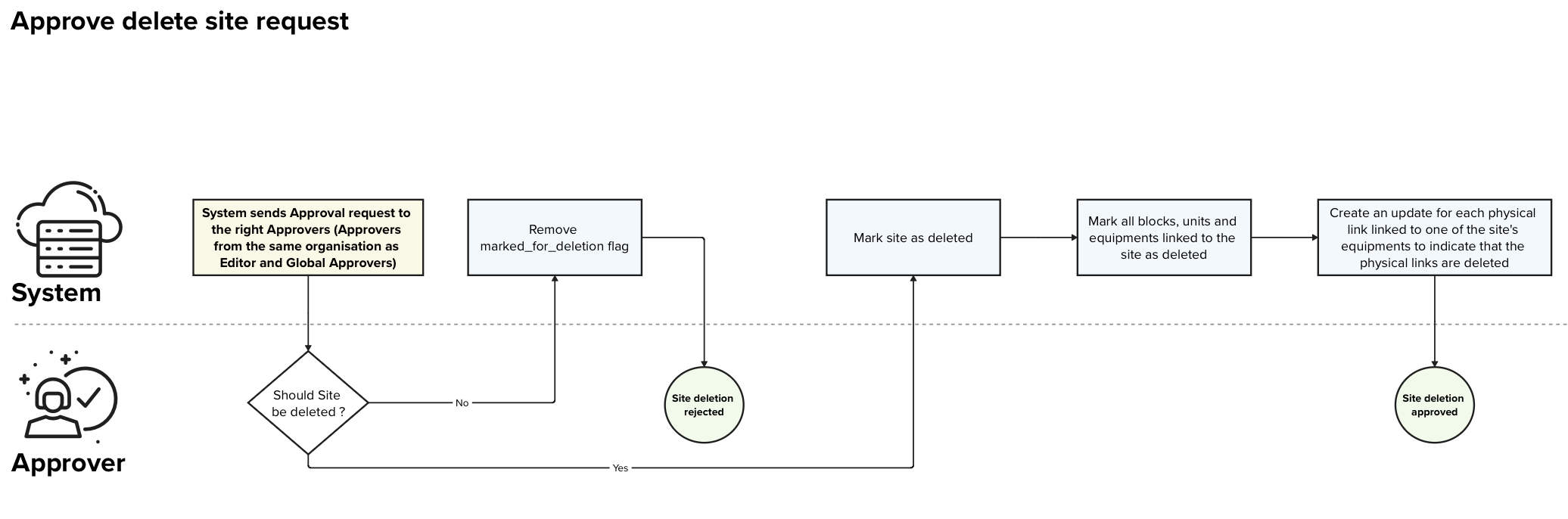
| Name | Approve delete site request |
|---|---|
| Purpose | Allow Approver to validate a site delete request |
| Linked user stories |
4.47. Approver - Approve deleted site request 4.52. Organisation Approver - Approve deleted site request for organisation |
| APIs used | PUT /sites/<site-id>/approve PUT /sites/<site-id>/reject PUT or PATCH /sites/<site-id> |
| Scope | This process only handles the validation of an already created site deletion request |
| Roles | System, Approver / Global Approver |
| Input | - id of the site that is marked for deletion - optionally the information to amend |
| Output | - confirmation that the update request has been approved/rejected |
Detailed Process description
Main Process
| Step | Description | Actor(s) | Input(s) | Output(s) | Decision points |
|---|---|---|---|---|---|
| 1 | The System sends out notifications to the Global approvers and organisation approvers, indicating that an approval a pending. | System | - Outside trigger (e.g. Editor sent a delete request) | - notification to the Global and organisation Approvers | |
| 2 | The Approver verifies if the site can be deleted | Approver | - Site deletion request | - yes / no | If the site can be deleted: Go to step 3 Else: Go to secondary process S.1 |
| 3 | The System marks the site with the flag “is_deleted = true” and adds the information on the date of validation and the user that validated the request | System | - site with flag “marked_for_deletion = true” | - site with flag “is_deleted = true” - approver set to the user that triggered the approval - approval date set to the current date |
|
| 4 | The System sets all the objects linked to the site with the flag “is_deleted = true” (blocks, units, equipments). | System | - site | - all linked objects marked with the flag “is_deleted = true” | |
| 5 | The System creates validated update requests with the flag “is_deleted = true” for each active physical link that are connected to at least one unit of the site. | System | - site | - new validated physical links with the flag “is_deleted = true” for each active physical link that links at least one unit of the deleted site | |
| 6 | The Approver gets a confirmation that the approval has been applied | Approver | - confirmation of the validation |
Secondary Processes
S.1. Delete site request rejected
| Step | Description | Actor(s) | Input(s) | Output(s) | Decision points |
|---|---|---|---|---|---|
| 1 | The System removes the mark_for_deletion tag from the site entry | System | - site marked for deletion | - site with the flag “mark_for_deletion = false” | |
| 2 | The Approver gets a confirmation that the deletion rejection has been applied | Approver | - deletion request rejection confirmation |
Exceptions
[400 Bad Request] Invalid input:
If mandatory fields are missing or invalid, the system returns an error message. If some addresses do not exist in the system, this is also considered as a bad request.
[404 Not Found] Site not found
Error returned by the system if the site is not found.
[409 Conflict] Site not marked for deletion
Error returned by the system if the site being validated is not marked for deletion.
[500 Internal Server Error] System Error
If the system fails to save changes due to an internal error, it displays an appropriate message and logs the error for further investigation.
7.8. Approve delete block request

| Name | Approve delete block request |
|---|---|
| Purpose | Allow Approver to validate a block delete request |
| Linked user stories |
4.48. Approver - Approve deleted block request 4.53. Organisation Approver - Approve deleted block request for organisation |
| APIs used | PUT /blocks/<block-id>/approve PUT /blocks/<block-id>/reject PUT or PATCH /blocks/<block-id> |
| Scope | This process only handles the validation of an already created block deletion request |
| Roles | System, Approver / Global Approver |
| Input | - id of the block that is marked for deletion - optionally the information to amend |
| Output | - confirmation that the update request has been approved/rejected |
Detailed Process description
Main Process
| Step | Description | Actor(s) | Input(s) | Output(s) | Decision points |
|---|---|---|---|---|---|
| 1 | The System sends out notifications to the Global approvers and organisation approvers, indicating that an approval a pending. | System | - Outside trigger (e.g. Editor sent a delete request) | - notification to the Global and organisation Approvers | |
| 2 | The Approver verifies if the block can be deleted | Approver | - Block deletion request | - yes / no | If the site can be deleted: Go to step 3 Else: Go to secondary process S.1 |
| 3 | The System verifies if the site has other blocks than the one being deleted | System | - Block to be deleted | - yes / no | If the site has more blocks: Go to step 4 Else: Go to E.1 |
| 4 | The System marks the block with the flag “is_deleted = true” and adds the information on the date of validation and the user that validated the request | System | - block with flag “marked_for_deletion = true” | - block with flag “is_deleted = true” - approver set to the user that triggered the approval - approval date set to the current date |
|
| 4 | The System sets all the objects linked to the block with the flag “is_deleted = true” (units, equipments). | System | - block | - all linked objects marked with the flag “is_deleted = true” | |
| 5 | The System creates validated update requests with the flag “is_deleted = true” for each active physical link that are connected to at least one unit of the block. | System | - block | - new validated physical links with the flag “is_deleted = true” for each active physical link that links at least one unit of the deleted block | |
| 6 | The Approver gets a confirmation that the approval has been applied | Approver | - confirmation of the validation |
Secondary Processes
S.1. Delete block request rejected
| Step | Description | Actor(s) | Input(s) | Output(s) | Decision points |
|---|---|---|---|---|---|
| 1 | The System removes the mark_for_deletion tag from the block entry | System | - block marked for deletion | - block with the flag “mark_for_deletion = false” | |
| 2 | The Approver gets a confirmation that the deletion rejection has been applied | Approver | - deletion request rejection confirmation |
Error Processes
E.1. Last block can’t be deleted
| Step | Description | Actor(s) | Input(s) | Output(s) | Decision points |
|---|---|---|---|---|---|
| 1 | The Approver gets an error indicating that the last block of a site cannot be deleted | System | - Error: last block can’t be deleted |
Exceptions
[400 Bad Request] Invalid input:
If mandatory fields are missing or invalid, the system returns an error message. If some addresses do not exist in the system, this is also considered as a bad request.
[404 Not Found] Block not found
Error returned by the system if the block is not found.
[409 Conflict] Block not marked for deletion
Error returned by the system if the block being validated is not marked for deletion.
[500 Internal Server Error] System Error
If the system fails to save changes due to an internal error, it displays an appropriate message and logs the error for further investigation.
7.9. Approve delete unit request

| Name | Approve delete unit request |
|---|---|
| Purpose | Allow Approver to validate a unit delete request |
| Linked user stories |
4.49. Approver - Approve deleted unit request 4.54. Organisation Approver - Approve deleted unit request for organisation |
| APIs used | PUT /units/<unit-id>/approve PUT /units/<unit-id>/reject PUT or PATCH /units/<unit-id> |
| Scope | This process only handles the validation of an already created unit deletion request |
| Roles | System, Approver / Global Approver |
| Input | - id of the unit that is marked for deletion - optionally the information to amend |
| Output | - confirmation that the update request has been approved/rejected |
Detailed Process description
Main Process
| Step | Description | Actor(s) | Input(s) | Output(s) | Decision points |
|---|---|---|---|---|---|
| 1 | The System sends out notifications to the Global approvers and organisation approvers, indicating that an approval a pending. | System | - Outside trigger (e.g. Editor sent a delete request) | - notification to the Global and organisation Approvers | |
| 2 | The Approver verifies if the unit can be deleted | Approver | - unit deletion request | - yes / no | If the unit can be deleted: Go to step 3 Else: Go to secondary process S.1 |
| 3 | The System marks the unit with the flag “is_deleted = true” and adds the information on the date of validation and the user that validated the request | System | - unit with flag “marked_for_deletion = true” | - unit with flag “is_deleted = true” - approver set to the user that triggered the approval - approval date set to the current date |
|
| 4 | The System sets all the quipments linked to the site with the flag “is_deleted = true”. | System | - unit | - all linked equipments marked with the flag “is_deleted = true” | |
| 5 | The System creates validated update requests with the flag “is_deleted = true” for each active physical link that are linked to the deleted equipments | System | - unit | - new validated physical links with the flag “is_deleted = true” for each active physical link that is linked to the deleted equipments | |
| 6 | The Approver gets a confirmation that the approval has been applied | Approver | - confirmation of the validation |
Secondary Processes
S.1. Delete unit request rejected
| Step | Description | Actor(s) | Input(s) | Output(s) | Decision points |
|---|---|---|---|---|---|
| 1 | The System removes the mark_for_deletion tag from the unit entry | System | - unit marked for deletion | - unit with the flag “mark_for_deletion = false” | |
| 2 | The Approver gets a confirmation that the deletion rejection has been applied | Approver | - deletion request rejection confirmation |
Exceptions
[400 Bad Request] Invalid input:
If mandatory fields are missing or invalid, the system returns an error message. If some addresses do not exist in the system, this is also considered as a bad request.
[404 Not Found] Unit not found
Error returned by the system if the unit is not found.
[409 Conflict] Unit not marked for deletion
Error returned by the system if the unit being validated is not marked for deletion.
[500 Internal Server Error] System Error
If the system fails to save changes due to an internal error, it displays an appropriate message and logs the error for further investigation.
7.10. Approve delete equipment request
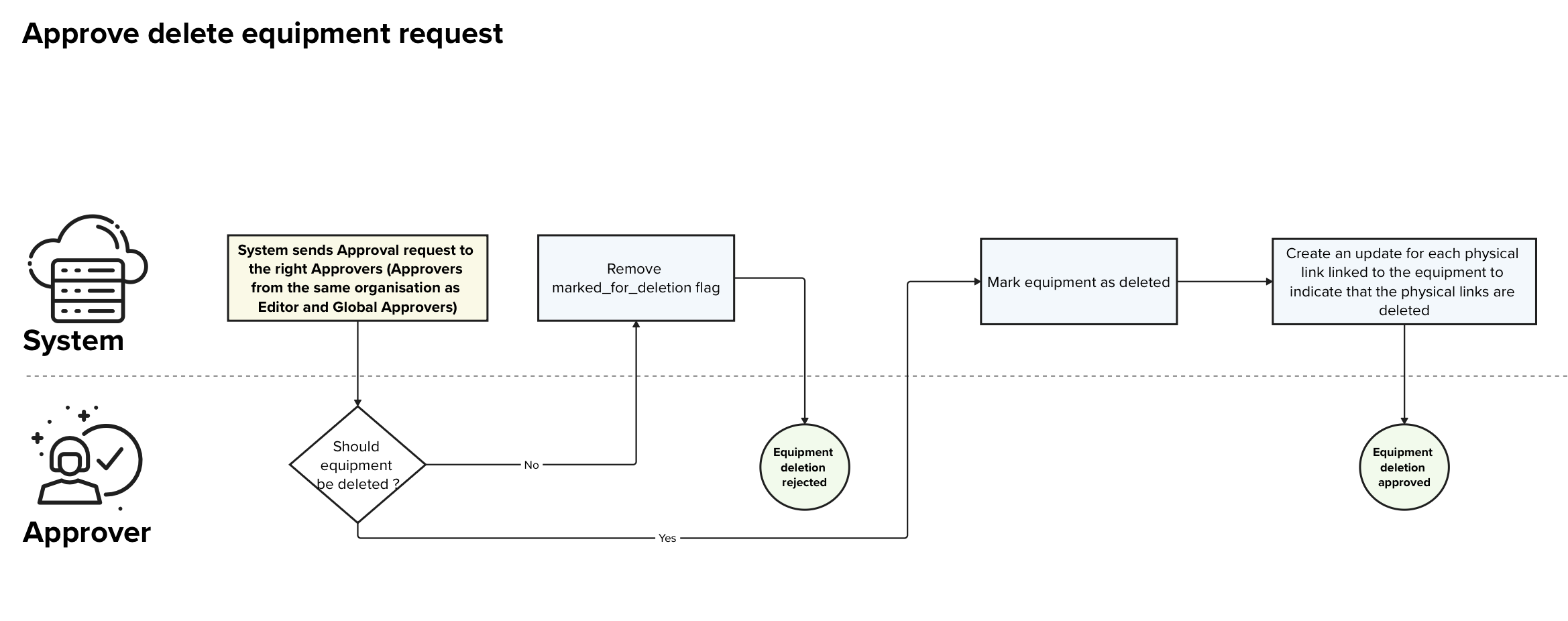
| Name | Approve delete equipment request |
|---|---|
| Purpose | Allow Approver to validate an equipment delete request |
| Linked user stories |
4.42. Editor - Delete an equipment 4.50. Approver - Approve deleted equipment request 4.55. Organisation Approver - Approve delete equipment request for organisation |
| APIs used | PUT /equipments/<equipment-id>/approve PUT /equipments/<equipment-id>/reject PUT or PATCH /equipments/<equipment-id> |
| Scope | This process only handles the validation of an already created equipment deletion request |
| Roles | System, Approver / Global Approver |
| Input | - id of the unit that is marked for deletion - optionally the information to amend |
| Output | - confirmation that the update request has been approved/rejected |
Detailed Process description
Main Process
| Step | Description | Actor(s) | Input(s) | Output(s) | Decision points |
|---|---|---|---|---|---|
| 1 | The System sends out notifications to the Global approvers and organisation approvers, indicating that an approval a pending. | System | - Outside trigger (e.g. Editor sent a delete request) | - notification to the Global and organisation Approvers | |
| 2 | The Approver verifies if the equipment can be deleted | Approver | - equipment deletion request | - yes / no | If the equipment can be deleted: Go to step 3 Else: Go to secondary process S.1 |
| 3 | The System marks the equipment with the flag “is_deleted = true” and adds the information on the date of validation and the user that validated the request | System | - equipment with flag “marked_for_deletion = true” | - equipment with flag “is_deleted = true” - approver set to the user that triggered the approval - approval date set to the current date |
|
| 4 | The System creates validated update requests with the flag “is_deleted = true” for each active physical link that are linked to the deleted equipments | System | - unit | - new validated physical links with the flag “is_deleted = true” for each active physical link that is linked to the deleted equipments | |
| 5 | The Approver gets a confirmation that the approval has been applied | Approver | - confirmation of the validation |
Secondary Processes
S.1. Delete equipment request rejected
| Step | Description | Actor(s) | Input(s) | Output(s) | Decision points |
|---|---|---|---|---|---|
| 1 | The System removes the mark_for_deletion tag from the equipment entry | System | - equipment marked for deletion | - equipment with the flag “mark_for_deletion = false” | |
| 2 | The Approver gets a confirmation that the deletion rejection has been applied | Approver | - deletion request rejection confirmation |
Exceptions
[400 Bad Request] Invalid input:
If mandatory fields are missing or invalid, the system returns an error message.
[404 Not Found] Equipment not found
Error returned by the system if the given equipment does not exist.
[500 Internal Server Error] System Error
If the system fails to save changes due to an internal error, it displays an appropriate message and logs the error for further investigation.
8. Data architecture
In this section we will present the data architecture chosen for the Vertical Cabling data. The introduction will be kept very high-level and the detailed fields of each entity will be presented in the Data Structure section below.
Our main objectives and guidelines are:
- be able to model the most complex use cases of vertical cabling infrastructures in multi-dwelling units
- keep the smallest possible set of data to perform that task.
- not store any privacy relevant data (e.g. personal data) (if possible)
- limit the number of unstructured text fields to a minimum
- keep a history of the evolution of the vertical cabling situation
8.1. Vertical Cabling Data Architecture
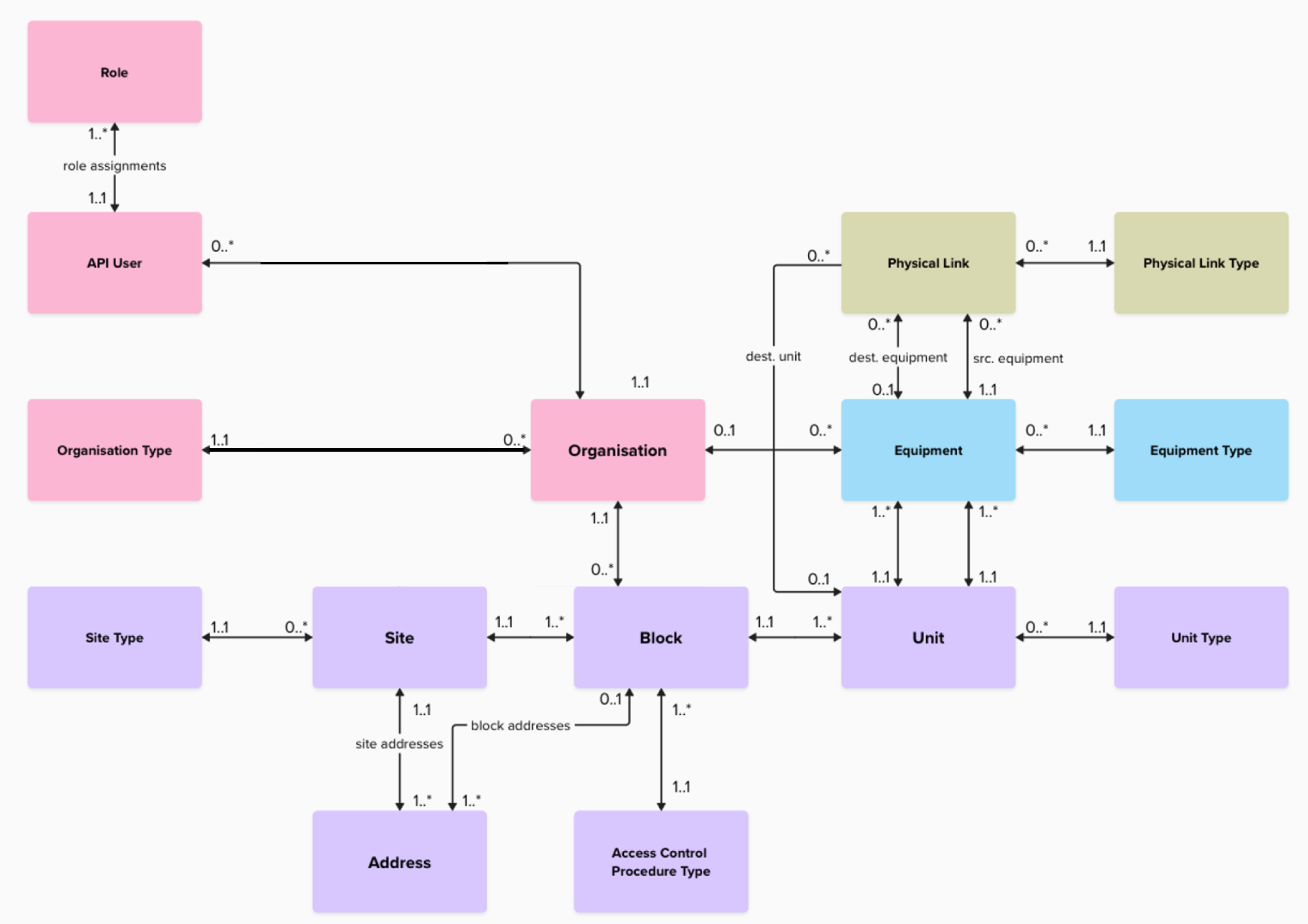
|
The background colors of the above image are to be interpreted as:
|
Definitions
In the diagram you will find two things:
- boxes: that represent entities in the database. The entities will have the same name as the boxes but in snake case
- edges that link two boxes: the named edges represent junction tables
You will find below a description of each entity that is part of the data architecture:
| Entity | Description |
|---|---|
| Address |
An address that is available in the system. Addresses have two possible sources:
|
| Site Type |
A site type denotes the specificity of the site with respect to the type of habitation:
|
| Unit Type |
A unit type describes the purpose of the unit:
|
| Access Control Procedure Type |
The access control procedure type, indicates how the access to the building is provided:
|
| Site | A Site is building or group of blocks. Depending on the size and complexity of the Site, it can have multiple addresses attached to it. |
| Block | A Block is a part or entirety of a Site to which multiple units can be attached to. |
| Unit | A Unit, is either an apartment / office / or any other subdivision of a Block (e.g. technical room, elevator, parking, common room). |
| Equipment | An equipment can be a specific NTP, a floor distributor, a wall socket, a cabinet, or any other equipment on which a physical link can be terminated. |
| Equipment Type | An equipment type (NTP, floor distributor, wall socket, cabinet, …) is specific type of equipment that can be installed at the customer premises and on which a physical link can be terminated. |
| Physical Link | A physical link represents the physical link in between two equipments or an equipment and a unit. The physical link only indicates the presence or absence of a given Link Type, it does not indicate the quantity of cables connecting both units. |
| Physical Link Type | The Physical Link Type can be any type of physical link that can be used to connect two equipments together to deliver telecommunication services |
| Organisation Type |
A type of Organisation:
|
| Organisation |
An Organisation, represents a legal entity. This organisation can be:
|
| Role |
The different roles as defined in this document
|
| API User | A user of the system |
Below you will also find the description of the junction tables:
| Entity | Description |
|---|---|
| role assignments | A junction table that will keep track of the roles assigned to each user |
| site addresses | A junction table that will contain the link between the sites and their addresses |
| block addresses | A junction table that will contain the link between the blocks and their addresses |
8.2. Pictures
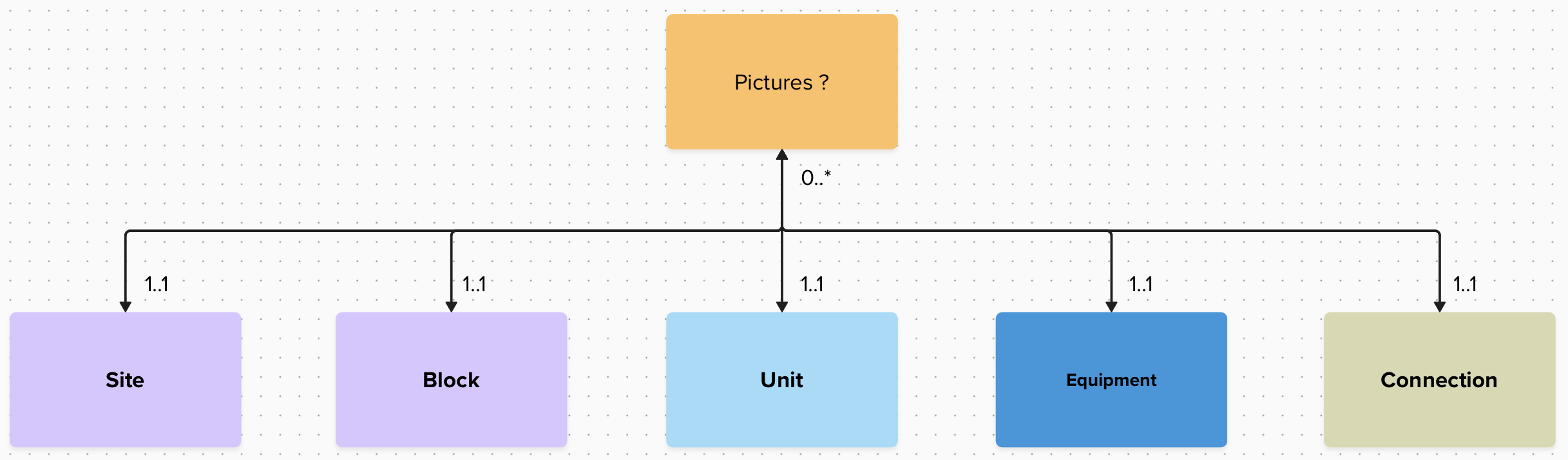
On top of the above vertical cabling data, pictures can also be attached to the sites / blocks / …
8.3. Data Structure and data dictionary
You will find below an excel file that defines and justifies each field stored in the RNCV:
9. API Proposal
Introduction
You will find below a link to the latest version of the swagger file that contains all entities manipulated by the system and the API calls associated with them. The swagger includes the roles that have access to each API call.
Production Swagger:
https://prod.rncv.lu/backend/api/v1/swagger-ui/
Staging Swagger:
https://staging.rncv.lu/backend/api/v1/swagger-ui/
How to test the API
The RNCV API allows you to interact withthe backend services of the registry. This guide explains how to access the API, authenticate, and send test requests. The screenshots below illustrate each step.
Accessing the API Documentation
Open the Swagger (OpenAPI) documentation corresponding to the environment you want to test (staging or production). This interface enables you to explore all available endpoints and test them interactively once you are authenticated.
Please be aware that the API keys are environment dependent.
Authentication
To use the API interactively in Swagger, you need an authentication token provided by MyConnectivity. You will find below the steps needed to configure the authentication on Swagger-UI.
- Click the “Authorize” button at the bottom right of the Swagger page.

- In the pop-up window, enter your authentication token in the following format: Token <your_token>.
- Click “Authorize” to confirm.

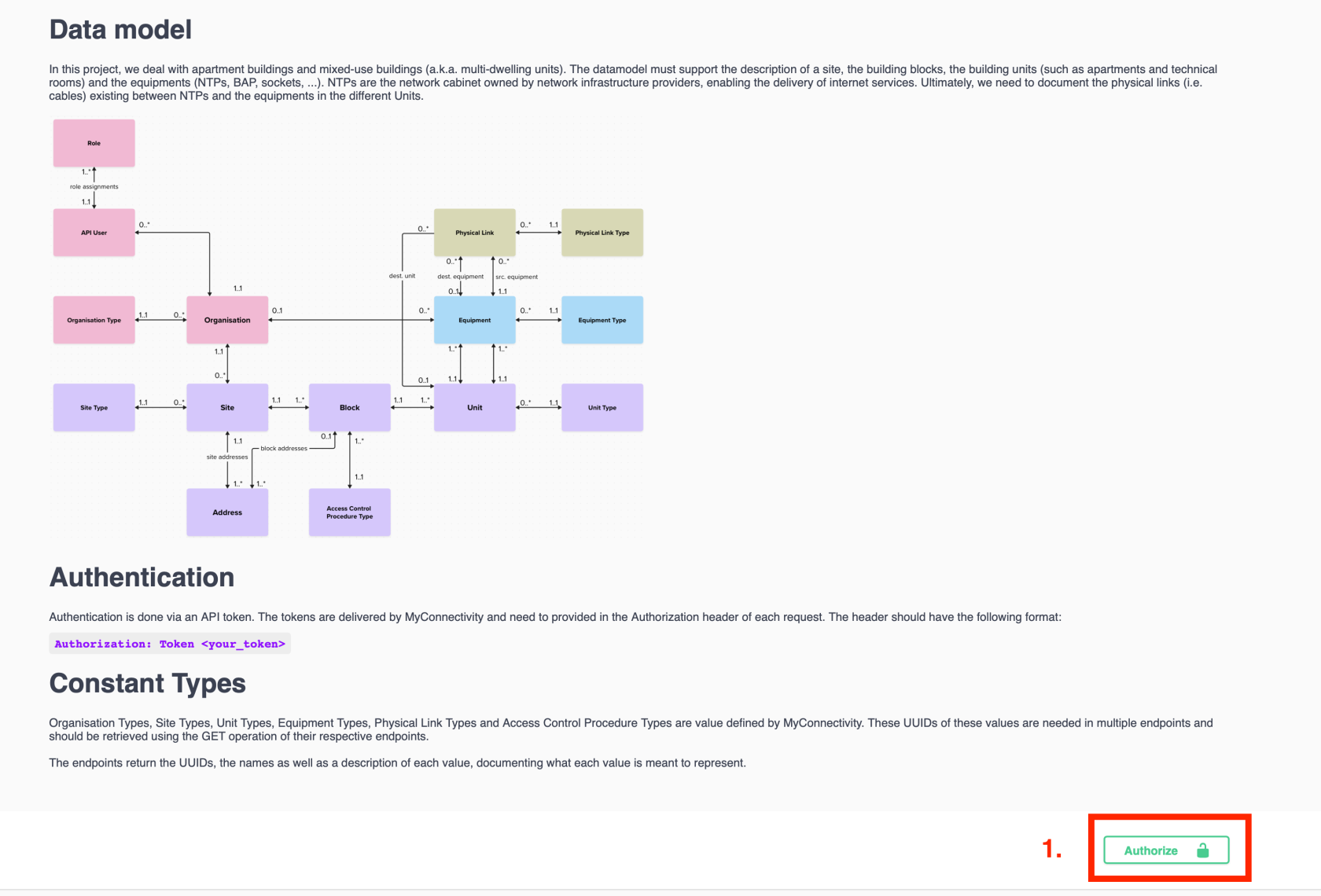
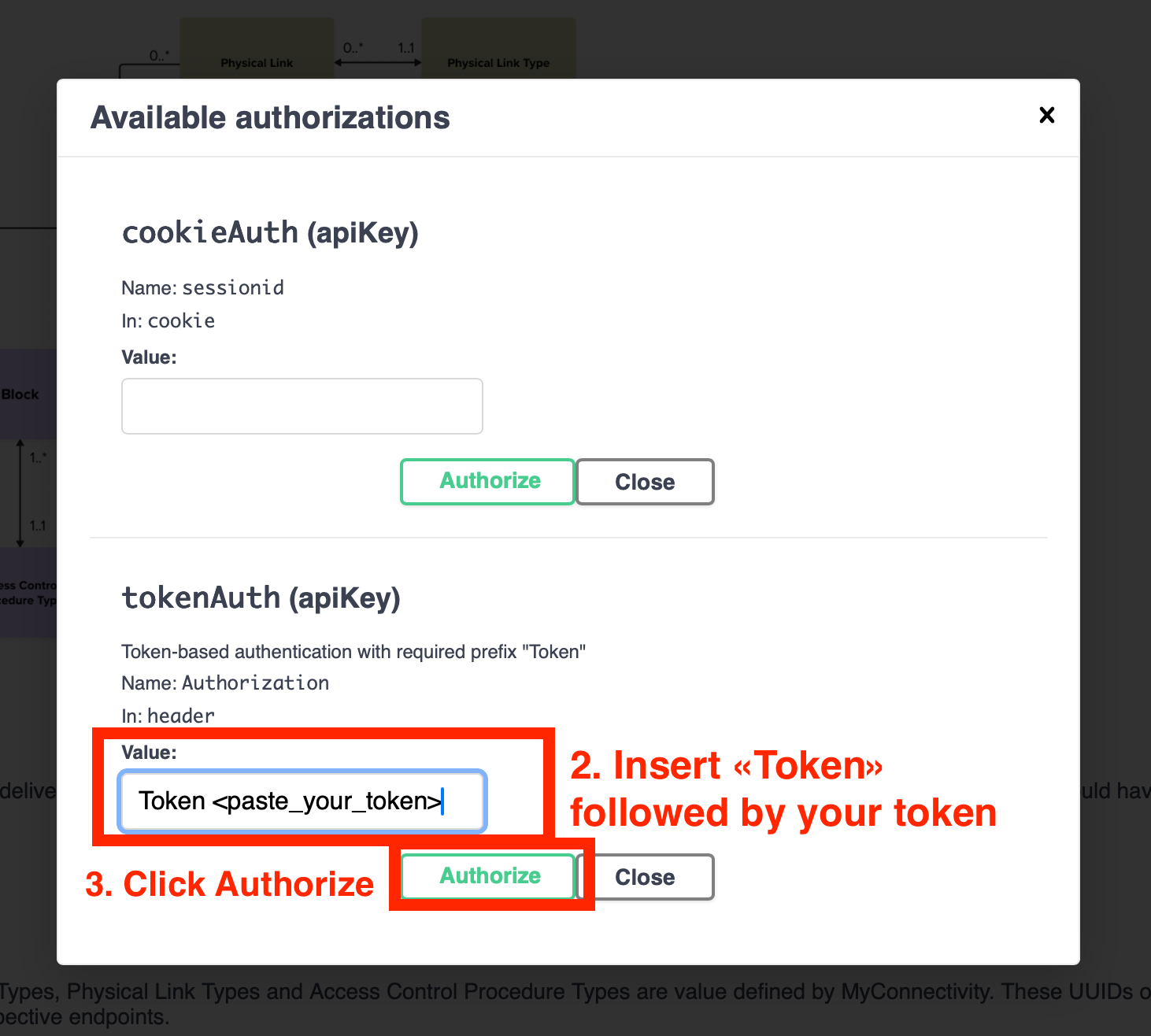
Sending a Request
- Choose the API endpoint you wish to test from the documentation list.
- Click “Try it out” to enable editing of the request parameters.

-
Optionally set filters (e.g., includeInactive, search).
- Click “Execute” to send the request.

- Review the server’s response (status code, JSON body, and headers).

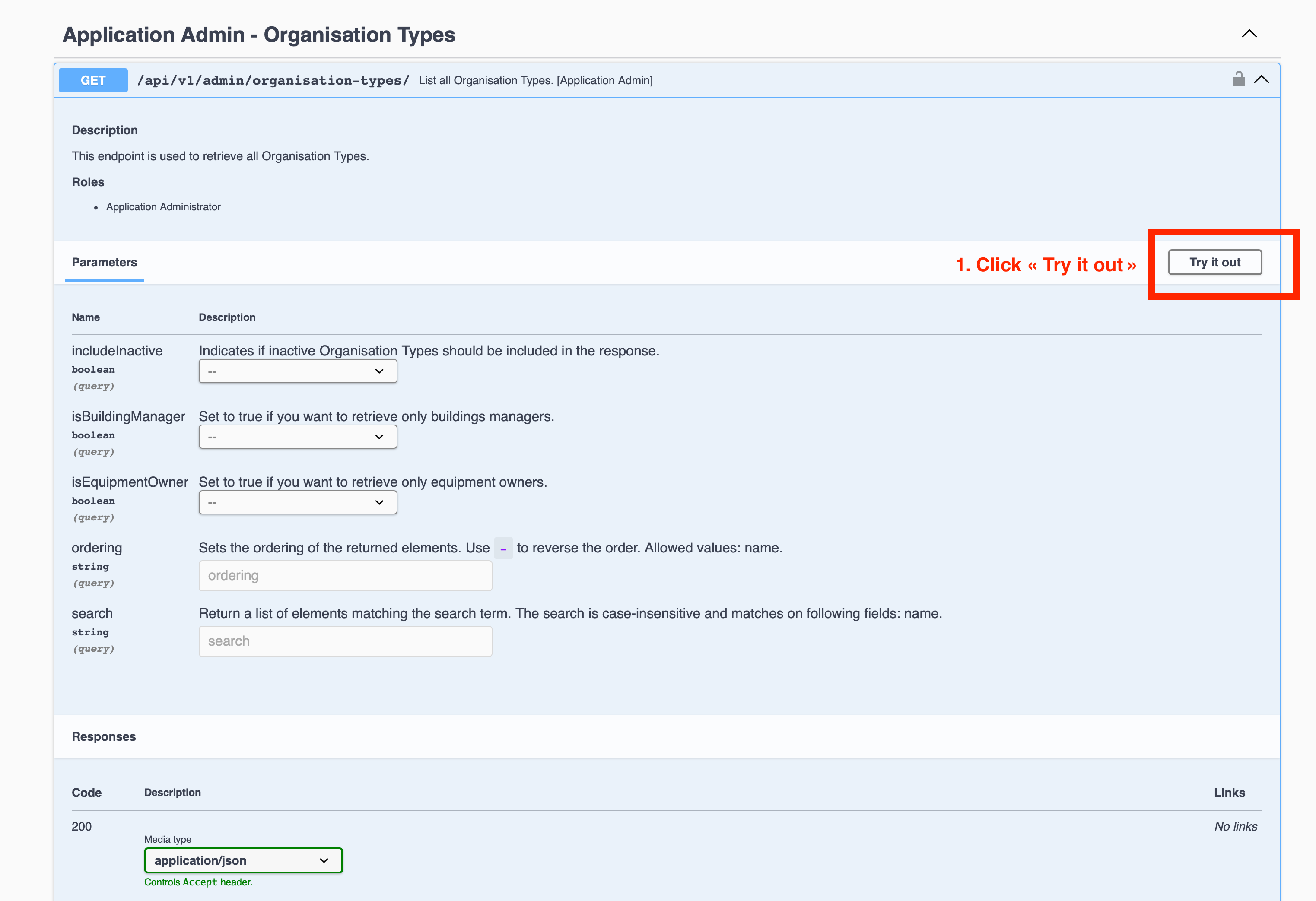
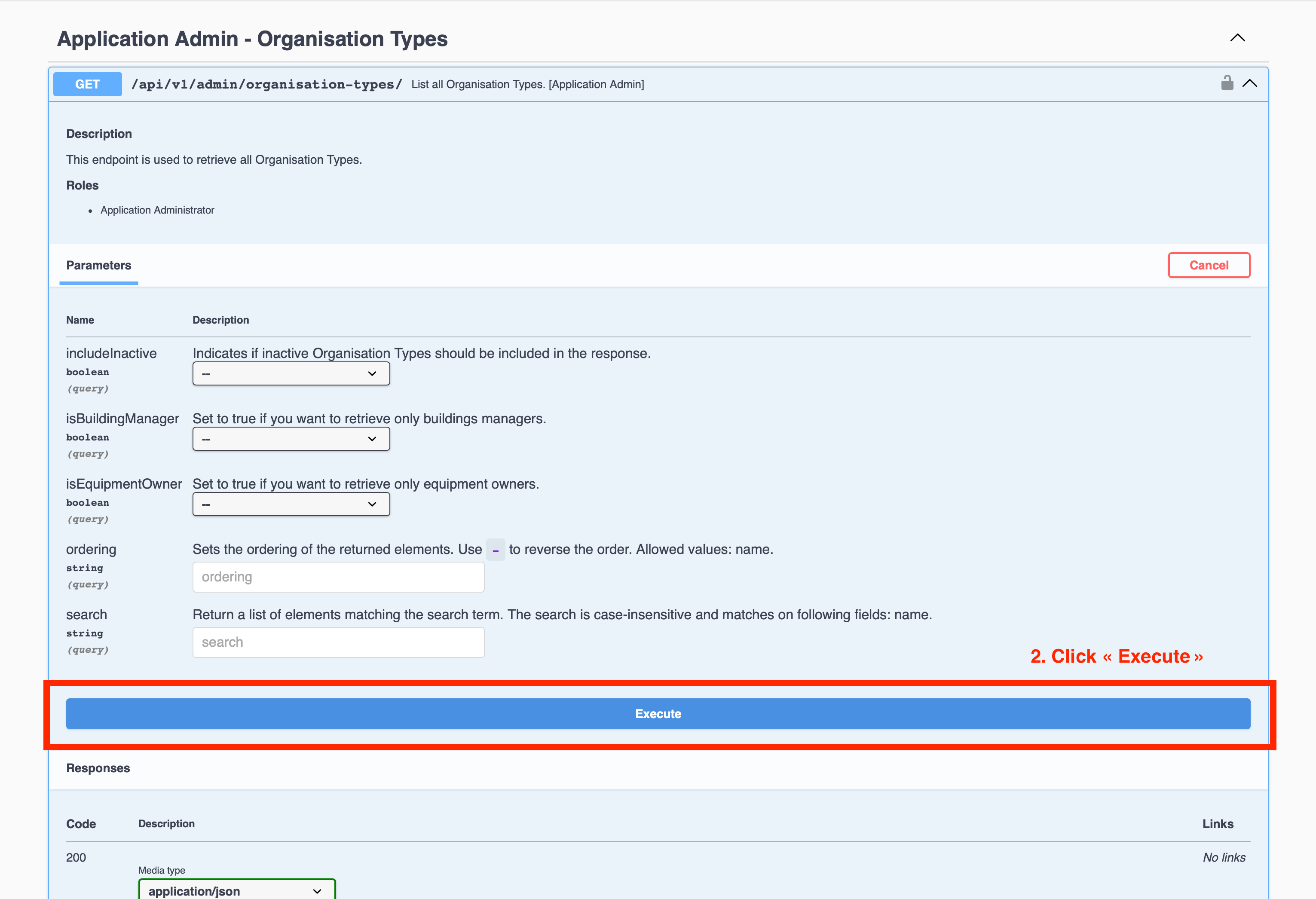
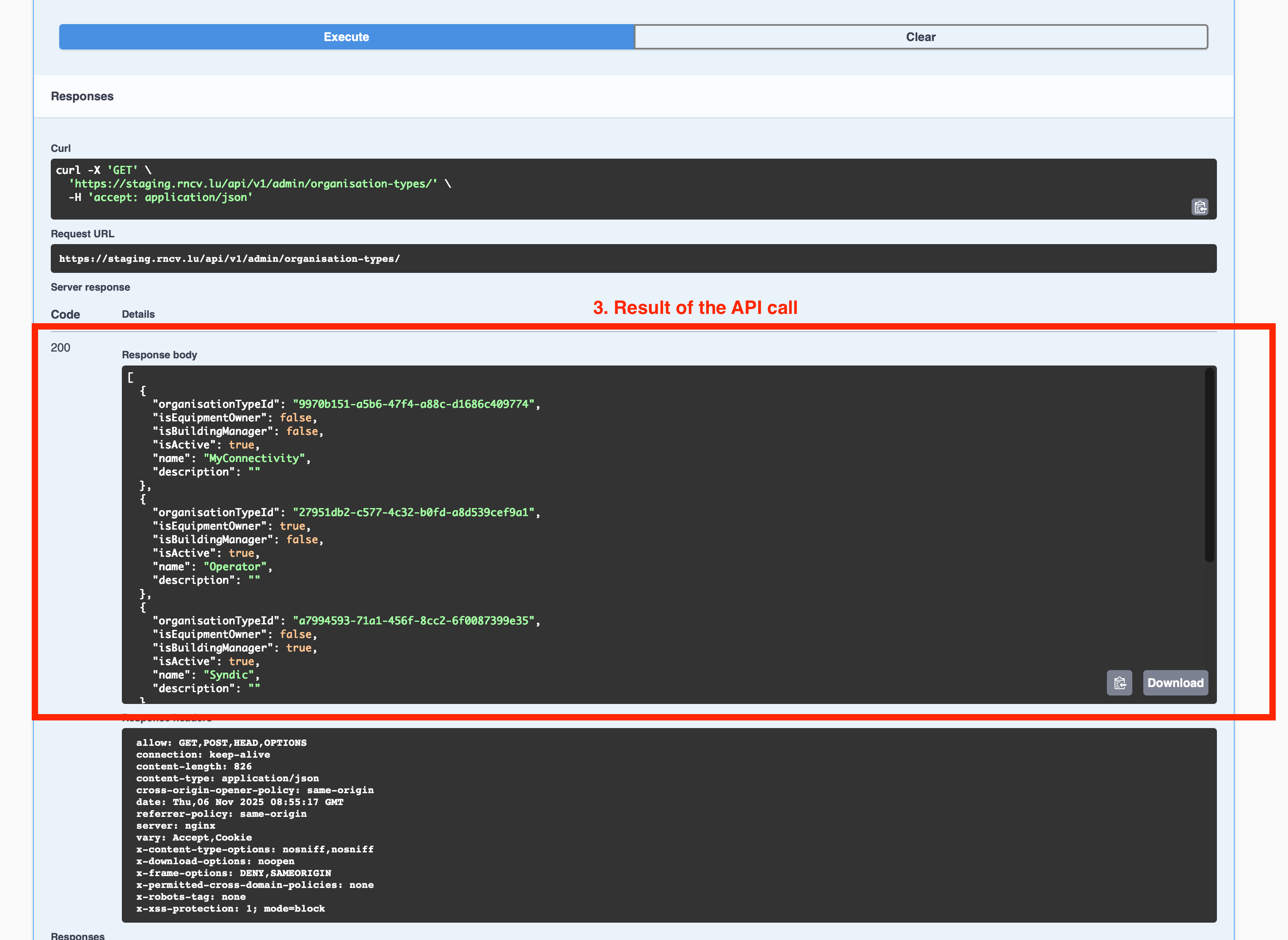
Troubleshooting
Notes
- API access may be restricted to specific IP ranges
- The staging environment is intended for testing and may differ slightly from production
- Never share your token publicly